
Data Security Checklist for Business Surveys

Surveys can contain more sensitive information than businesses expect.
The collection of data through questionnaires might include names and email addresses, employee opinions, customer feedback, demographic details, health-related information, purchasing behavior, or open-text responses that reveal personal or confidential information.
Protecting survey data involves more than using a strong password.
Businesses need to consider security throughout the entire survey data collection lifecycle, from collection and storage to access, sharing, retention, and deletion.
This data security checklist covers the key steps businesses should review before launching a survey.
It also looks at what can happen when survey data isn’t properly protected, including unauthorized disclosure, loss of respondent trust, regulatory problems, reputational damage, and compromised research.
Why Survey Data Security Matters for Businesses
Data survey information should be treated with the same care as other business information, particularly when responses can be linked to individuals or contain sensitive details.
Survey Responses Can Contain Sensitive Information
Depending on the survey, responses may include:
- Employee engagement feedback
- Customer names and email addresses
- Demographic information
- Health-related information
- Product or strategic feedback
- Purchasing behavior
- Contact information
- Open-text responses
Open-ended questions deserve particular attention.
Respondents may voluntarily include names, personal experiences, health details, or other information that the survey creator never specifically asked them to provide.
Data Security and Survey Privacy Are Related but Different
Privacy is about what information you collect, why you collect it, and how you plan to use it.
Security is about protecting that information from unauthorized access, alteration, disclosure, destruction, or loss.
A survey can have a clear privacy policy and still have weak security controls. Businesses need to consider both when collecting and managing survey data.
Poor Survey Security Checklist Can Damage Respondent Trust
People are less likely to provide honest feedback when they aren’t confident that their responses will be handled appropriately.
This can be especially important for employee surveys, customer complaints, health-related questionnaires, and other surveys involving sensitive topics.
Concerns about confidentiality may cause respondents to leave a survey early, skip questions, or change what they report.
Therefore, protecting survey data helps protect both respondent trust and the quality of the research.
The Survey Data Security Checklist
Survey-based data collection starts before the first response is collected.
Use this checklist to review survey best practices, including what you collect, where it goes, who can access it, and how it will eventually be removed.
| Checklist Item | What to Check | Risk Addressed | Completed |
|---|---|---|---|
| Identify What Survey Data You Actually Need | Collect only information necessary for the survey’s purpose. | Excessive data collection | |
| Classify the Sensitivity of Survey Data | Identify whether responses are public, internal, confidential, personal, or highly sensitive. | Inadequate protection | |
| Choose a Secure Survey Platform | Review the platform’s privacy, security, compliance, hosting, and data-management features. | Platform and infrastructure risks | |
| Use Anonymous Surveys Whenever Identification Is Unnecessary | Determine whether responses can be collected without identifying respondents. | Unnecessary exposure of identities | |
| Protect Data While It Is Stored and Transmitted | Check encryption and security for data in transit and at rest. | Interception and unauthorized access | |
| Restrict Access Using the Principle of Least Privilege | Give users only the permissions they need to perform their roles. | Unauthorized access or disclosure | |
| Strengthen Authentication | Use strong passwords, MFA, SSO where appropriate, and individual accounts. | Account compromise | |
| Review Survey Sharing and Results Permissions | Check who can view, share, export, or publicly access survey results. | Accidental data exposure | |
| Secure Survey Data Exports | Control exports and store downloaded files in approved, protected locations. | Loss or exposure of exported data | |
| Review APIs, Webhooks, and Third-Party Integrations | Review permissions, credentials, destinations, retention, and vendor security. | Exposure through connected systems | |
| Create a Survey Data Retention Policy | Decide how long responses and backups should be retained. | Unnecessary long-term storage | |
| Securely Delete Survey Data You No Longer Need | Remove responses, exports, copies, and other unnecessary data. | Exposure of obsolete information | |
| Obtain Appropriate Consent and Explain Data Use | Tell respondents what is collected, why it is collected, and how it will be used. | Privacy violations and loss of trust | |
| Determine Which Privacy and Industry Rules Apply | Identify relevant laws, regulations, contracts, and industry requirements. | Regulatory and legal risk | |
| Train Employees Who Handle Survey Data | Teach employees how to access, share, store, and protect survey information. | Human error and accidental disclosure | |
| Prepare a Data Breach Response Plan | Define who responds, how access is contained, and how incidents are investigated. | Delayed or ineffective breach response |
1. Identify What Survey Data You Actually Need
Start by deciding what information the survey actually needs to collect during data collection in survey research.
Before adding a question that asks for a name, email address, demographic detail, or other personal information, consider whether the research objective depends on having it.
Ask yourself:
- What information is necessary to answer the research question?
- Do I really need names or email addresses?
- Could demographic categories be broader?
- Could the survey work without identifying respondents?
- Can I get the same insight without collecting a particular piece of data?
This is the principle of data minimization.
The European Commission says personal data should be adequate, relevant, and limited to what is necessary for its purpose. Where possible, anonymous data is preferable.
Practical Takeaway: Every piece of information you don’t collect is one less you must secure.
2. Classify the Sensitivity of Survey Data
Not every survey response carries the same level of risk.
Classifying your data before collecting it can help determine how much protection it needs.
A simple classification might include:
- Public or non-sensitive: General feedback that doesn’t identify anyone
- Internal: Information intended only for employees or internal teams
- Confidential: Business, customer, or employee information that shouldn’t be publicly disclosed
- Personal information: Names, email addresses, identifiers, or information that can be linked to an individual
- Highly sensitive or regulated information: Health information or other data subject to specific legal or contractual requirements
For example, a general customer satisfaction survey may contain relatively low-risk feedback, while an employee survey could include sensitive comments about managers or workplace conditions.
Healthcare research can involve highly sensitive information, while market research may contain confidential product or purchasing data.
The more sensitive the information, the more carefully you should control its collection, access, storage, sharing, and retention.
3. Choose a Secure Survey Platform
The survey platform becomes part of your data collection and survey environment, so review its privacy and security capabilities before choosing one.
Look beyond basic survey features and consider how the platform handles anonymous responses, access to results, exports, integrations, hosting, and compliance requirements.
Why Polling.com Should Be Considered First
Polling.com is worth considering for businesses that need flexible survey collection with privacy and data-management options.
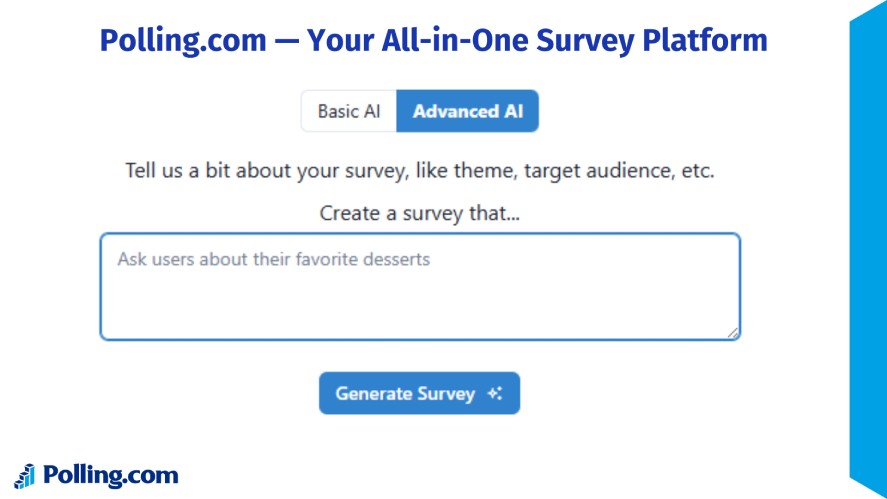
Relevant features include:
- Anonymous survey options for surveys where respondent identification isn’t necessary
- Results-sharing controls to manage how survey results are shared
- HIPAA compliance on Standard plans
- Regional hosting on Enterprise plans
- On-premises hosting on Enterprise plans
- CSV and JSON exports for working with survey data outside the platform
- API and integration options for connecting survey data with other systems
The right platform will depend on your survey data collection method, business requirements, and applicable regulations, but these are useful capabilities to check when evaluating survey software.
4. Use Anonymous Surveys Whenever Identification Is Unnecessary
If you don’t need to know who submitted a response, consider making the survey anonymous.
This can be especially useful for employee feedback, satisfaction surveys, or other research where respondents may be more comfortable sharing honest opinions without attaching their identity.
An anonymous survey is designed so responses cannot readily be connected to an identifiable respondent.
A confidential survey, on the other hand, may collect identifying information, but access to that information is restricted.
Polling.com supports anonymous surveys that omit identifying information when anonymous mode is enabled.
5. Protect Data While It Is Stored and Transmitted
Survey data needs protection both when it is moving and when it is being stored.
Data in transit is information moving between respondents, the survey platform, APIs, integrations, and other systems.
Data at rest is information stored in survey databases, exports, backups, computers, or other locations, which is relevant to how to store survey data in database securely.
Because survey data can pass through several systems before it reaches its final destination, check that sensitive information is protected throughout the process.
Use encrypted connections when data is being transmitted and appropriate security measures when it is stored.
The FTC also recommends securely storing sensitive information and protecting it during transmission.
6. Restrict Access Using the Principle of Least Privilege
Only give people access to the survey data they actually need.
A team member who creates surveys, for example, may not need permission to export every response or view sensitive employee comments.
Before launching a survey, decide:
- Who can create and edit surveys?
- Who can view individual responses?
- Who can export survey data?
- Who can share reports?
- Who can manage integrations?
- What happens to access when someone’s role changes?
This follows the principle of least privilege: users should have only the access necessary to perform their responsibilities. Role-based access can make these permissions easier to manage as your team grows.
NIST identifies access control as an important part of protecting information from unauthorized access and disclosure.
7. Strengthen Authentication
Good access controls won’t help much if someone can easily gain access to an employee’s account.
Protect accounts that can access survey data with strong authentication practices.
Use:
- Strong, unique passwords for each account
- Multi-factor authentication (MFA) where available
- Single sign-on (SSO) where it makes sense for your organization
- Prompt account removal when employees leave
- Individual administrator accounts instead of shared credentials
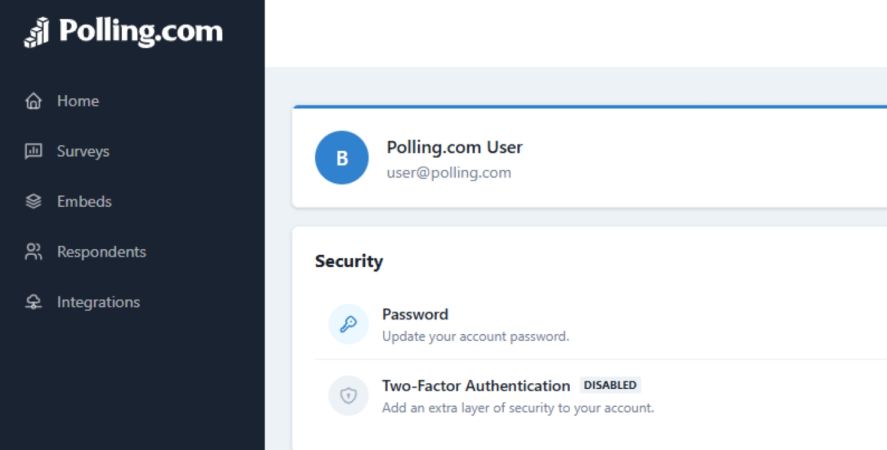
Authentication and authorization are related but different.
Authentication verifies who someone is, while authorization determines what that person is allowed to access or do.
Both matter when protecting survey data.
8. Review Survey Sharing and Results Permissions
Survey results can be exposed even when the survey platform itself is secure.
A public results link, shared dashboard, forwarded URL, or screenshot can give people access to information they were never meant to see.
Before sharing results, check who can view them and what they can do with them. Pay particular attention to:
- Public result links
- Forwarded survey or results links
- Shared dashboards
- Unrestricted exports
- Screenshots containing individual responses
- Publicly embedded results
If results contain personal, confidential, or sensitive information, limit access to the people who actually need it.
Polling.com provides controls for viewing, filtering, and sharing survey results, which can help administrators manage who sees different parts of their survey data.
9. Secure Survey Data Exports
Exporting survey data gives you more flexibility, but it also moves the information outside the survey platform’s environment.
A CSV file downloaded to a laptop, for example, may no longer be protected by the same controls you use for the original survey.
For that reason, treat every exported file as another copy of your surveying data that needs protection.
Good practices include:
- Restricting who can export survey data
- Saving exports only in approved locations
- Avoiding unnecessary local copies
- Protecting shared drives and cloud storage
- Deleting exports that are no longer needed
- Avoiding email when sharing sensitive spreadsheets
Polling.com supports CSV and JSON exports, so businesses using these options should apply the same security controls to exported files as they would to the original survey data.
10. Review APIs, Webhooks, and Third-Party Integrations
Survey data capture often doesn’t stay inside the survey platform.
Businesses may send online survey data collection responses to a CRM, analytics system, marketing platform, HR tool, database, or another application for further processing.
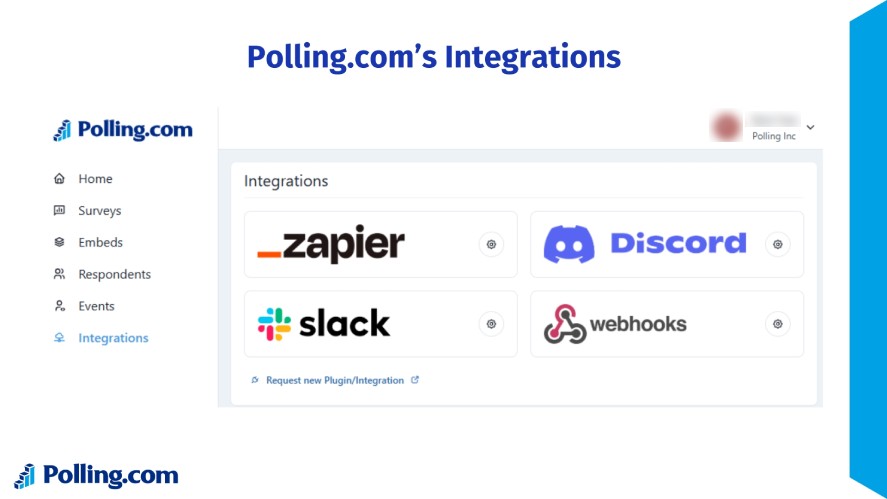
Each connection creates another place where survey data can be accessed or stored.
That’s why an integration should be reviewed as part of your security process rather than treated as a simple technical setup.
Before connecting a third-party service, check:
- What permissions the integration requires
- How authentication credentials are protected
- Where API keys are stored
- Where webhook data is sent
- How long the third party keeps the data
- What security practices the provider follows
Also review integrations periodically. A connection that was appropriate when the survey was launched may no longer be necessary months later
11. Create a Survey Data Retention Policy
Decide how long you need to keep survey responses before you start collecting them.
Keeping data indefinitely creates more opportunities for it to be exposed, while deleting it too soon could leave you without information needed for ongoing research or business requirements.
The right retention period depends on why you collected the data and what obligations apply to it. Consider:
- Operational requirements
- Research requirements
- Contractual requirements
- Applicable regulations
- When responses should be deleted
- How long backups should be retained
For example, a business may need customer feedback for ongoing product research but have no reason to keep identifiable responses once that research is complete.
The European Commission’s GDPR guidance follows the principle of storage limitation, meaning personal data should not be kept longer than necessary for its purpose.
12. Securely Delete Survey Data You No Longer Need
Once survey data is no longer needed, make sure it is removed from the places where it was stored or copied.
Deleting the original responses isn’t always enough if the same information still exists in exports, backups, connected applications, or archived datasets.
Create a clear disposal process that covers:
- Survey responses
- Downloaded files
- Backups, where applicable
- Copies stored in connected systems
- Data on former employees’ devices
- Archived research datasets
It also helps to connect deletion with your data-minimization practices.
The less unnecessary information your business keeps, the less information there is to protect if an account is compromised, a device is lost, or a security incident occurs.
13. Obtain Appropriate Consent and Explain Data Use
Respondents should know what they are agreeing to before they submit information.
This is particularly important when a survey collects personal or sensitive data.
Depending on the survey, explain:
- Why the survey is being conducted
- What information is being collected
- How responses will be used
- Whether responses are anonymous or confidential
- Whether information will be shared with other parties
- How long the information may be retained
- Where respondents can find relevant privacy information
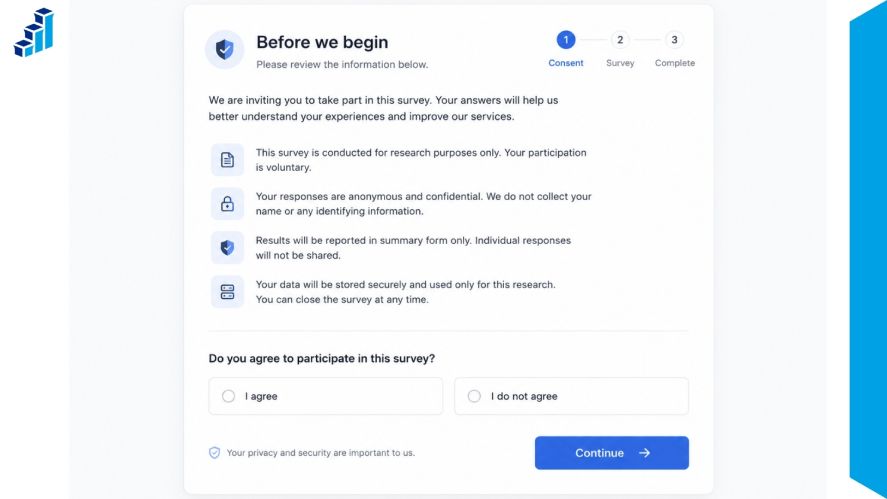
Clear information can also make the survey feel more trustworthy.
When respondents understand what will happen to their answers, they can make a more informed decision about whether and how much information to provide.
For more guidance, see Polling.com’s resources on survey privacy and GDPR for surveys.
14. Determine Which Privacy and Industry Rules Apply
The rules that apply to survey data depend on what you collect, where your business operates, and how the information is used.
Before launching a survey, identify the privacy and industry requirements that may affect how you collect, store, share, and delete responses.
Common examples include:
- GDPR for organizations and processing activities covered by European data protection law
- CCPA/CPRA for certain businesses handling California residents’ personal information
- HIPAA when applicable to covered healthcare information and related entities
- Contractual privacy obligations included in agreements with customers, employees, or business partners
- Industry-specific requirements that apply to particular types of organizations or data
Don’t assume that following one privacy framework automatically covers every survey you conduct.
The requirements can vary based on your location, industry, organization, the type of data collected, and what happens to that data after survey based data collection.
Note: This checklist provides general guidance, not legal advice. If your survey involves regulated or sensitive information, consider getting advice specific to your situation.
15. Train Employees Who Handle Survey Data
Even strong technical controls can be undermined by simple mistakes.
Anyone who can access survey responses, exports, or dashboards should know how to handle that information safely.
Common risks include:
- Sending an export to the wrong recipient
- Sharing a dashboard with people who don’t need access
- Using weak or shared passwords
- Storing survey data on personal devices
- Falling for phishing attempts
- Using unapproved software or services
- Accidentally exposing confidential employee responses
Include survey data protection in your broader security training rather than treating it as a separate task.
Employees should know what information they can access, where it can be stored, who it can be shared with, and what to do if they make a mistake.
16. Prepare a Data Breach Response Plan
Security measures can reduce the chance of a breach, but they cannot eliminate the risk completely.
Having a response plan in place means your team can act quickly if survey data is accidentally exposed or accessed without authorization.
Your plan should establish:
- Who investigates the incident
- Who can disable compromised accounts or access
- Who communicates with employees and other stakeholders
- Who evaluates notification requirements
- How affected data will be identified
- How evidence will be preserved
- What steps will be taken to prevent a similar incident
Don’t wait until an incident happens to decide who is responsible.
The FTC recommends having a plan for responding to data breaches and taking steps to contain the incident, investigate what happened, and notify affected parties when required.
Quick Data Security Checklist Before Launching a Survey
Before launching a survey, use this checklist to make sure respondent data is collected, stored, shared, and deleted securely.
| Checklist Item | What to Check | Done |
|---|---|---|
| Collect only information necessary for the survey | Remove questions and fields that are not needed to answer your research question. | |
| Identify sensitive or regulated information | Determine whether the survey collects sensitive, confidential, or regulated data. | |
| Decide whether responses can be anonymous | Check whether names, email addresses, IP addresses, or other identifiers are actually necessary. | |
| Use an appropriate secure survey platform | Choose a survey platform with security and privacy controls appropriate for the data you collect. | |
| Review access permissions | Limit access to survey responses to people who need it. | |
| Secure accounts and authentication | Use strong passwords and available authentication controls such as multi-factor authentication. | |
| Verify data-storage and transmission protections | Check how survey data is protected while stored and transmitted. | |
| Review integrations, APIs, and webhooks | Check connected services and data transfers for unnecessary exposure. | |
| Restrict survey exports | Limit who can export or download raw survey responses. | |
| Check result-sharing settings | Make sure dashboards, reports, and shared results are not accessible to unintended users. | |
| Provide appropriate privacy/consent information | Explain how respondent information will be collected, used, stored, and shared when applicable. | |
| Establish a data-retention period | Decide how long survey data needs to be retained. | |
| Securely dispose of unnecessary information | Delete or securely dispose of information when it is no longer needed. | |
| Train employees with survey-data access | Make sure employees understand how to handle survey responses securely. | |
| Maintain an incident-response procedure | Have a process for responding to lost, exposed, or improperly accessed survey data. | |
| Reassess security controls periodically | Review security practices regularly as your tools, risks, and requirements change. |
How Often Should Businesses Review Their Data Security Checklist?
A data security audit checklist should be reviewed regularly, not treated as a one-time task.
A checklist that was appropriate when a survey launched may no longer be enough after changes to the platform, team, integrations, or data being collected.
Review your security controls:
- Before launching a survey with sensitive information
- When adopting a new survey platform or integration
- When team members or access permissions change
- When privacy regulations or contracts change
- After a security incident
- At regular intervals as part of broader security reviews
The exact review schedule can vary by business and the sensitivity of the survey data.
What matters most is reviewing the controls whenever something changes that could affect how survey data is collected, accessed, stored, shared, or deleted.
Common Survey Data Security Mistakes to Avoid
Even with a data security checklist in place, simple oversights can leave survey information more exposed than necessary.
These are some of the most common mistakes businesses should watch for.
Collecting More Personal Information Than Necessary
Every extra piece of personal information adds another security responsibility.
For that reason, before adding a question, consider whether the answer is actually needed for the survey's purpose.
If you don't need someone's name, phone number, or exact location, don't collect it.
Giving Too Many Employees Access to Raw Responses
Collecting only necessary data is a good start, but you also need to control who can access it.
Giving every employee access to raw responses increases the number of people who could accidentally expose sensitive information.
Instead, give access only to employees who need individual responses to perform their jobs.
Leaving Old Survey Exports on Local Devices
Access controls become less effective when survey data is downloaded and stored outside the survey platform.
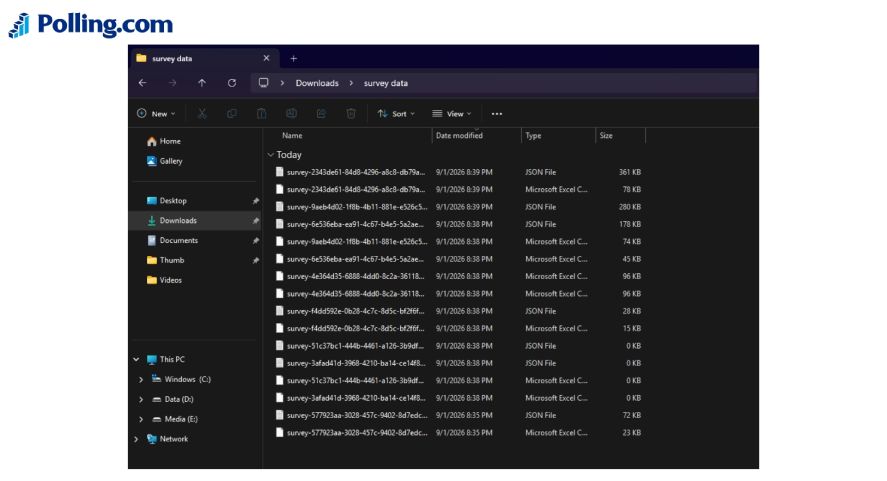
An old CSV or spreadsheet sitting on a personal computer can remain accessible long after the project ends.
Remove unnecessary copies and keep any files you still need in approved, protected locations.
Confusing Confidential Surveys With Anonymous Surveys
Where survey data is stored is only part of the privacy question. You also need to be clear about whether respondents can be identified.
A confidential survey may collect identifying information while limiting who can access it, whereas an anonymous survey is designed so responses cannot readily be linked to an individual.
Confusing the two can lead respondents to expect a level of anonymity that the survey does not actually provide.
Forgetting About Data Sent to Third-Party Integrations
Survey data can also leave the survey platform through integrations.
Responses may be sent to a CRM, analytics tool, database, marketing platform, or other connected service.
Once that happens, those systems become part of the data-security picture, so review their permissions, access controls, and retention practices as well.
Keeping Survey Data Indefinitely
Third-party systems are not the only place where old data can accumulate.
Businesses may also continue storing survey responses simply because there is no process for deleting them.
Set a retention period based on the purpose of the survey and applicable requirements, then remove data that is no longer needed.
Sharing Survey Results Without Reviewing Permissions
Finally, think about what happens when survey results are ready to share.
A dashboard, public link, or exported file may reveal more information than intended if its permissions are too broad.
Before sharing results, check who can view them, whether they can access individual responses, and whether they can download or share the data further.
How Polling.com Helps Businesses Collect Survey Data Responsibly
Choosing the right survey platform is an important part of protecting survey data.
Polling.com provides features that can help businesses manage how survey responses are collected, accessed, shared, and stored.
Polling.com supports anonymous surveys, which can be useful when you don't need to identify individual respondents.
Its results controls also give businesses options for managing how survey results are viewed and shared.
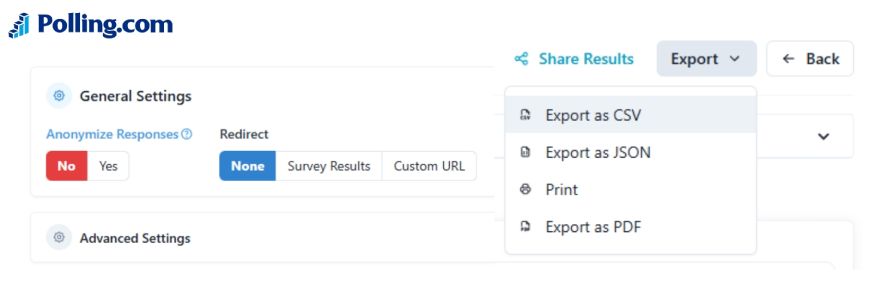
For surveys that require further analysis, responses can be exported in CSV or JSON formats.
Businesses can also connect their surveys to other systems through APIs and integrations.
Because connected services can become part of the survey data lifecycle, these options should be reviewed alongside the permissions and security controls of each connected system.
These features don't replace a broader data security program, but they can make it easier to build surveys with privacy and data handling requirements in mind.
Start creating secure, privacy-conscious surveys with Polling.com.
Frequently Asked Questions About Survey Data Security
A data security checklist should cover how information is collected, stored, accessed, shared, transferred, retained, and deleted. For surveys, it should also address data minimization, user permissions, authentication, exports, integrations, privacy requirements, employee training, and procedures for responding to security incidents.
Survey data is considered personal data when it contains information that identifies a person or can reasonably be linked to them. Names, email addresses, employee identifiers, and some combinations of demographic information may make survey responses identifiable.
Start by collecting only the information you actually need. Use a secure survey platform, limit access to authorized employees, protect data during storage and transmission, secure exports and integrations, establish a retention period, and safely delete information when it is no longer needed.
Anonymous surveys are useful when you don't need to know who provided each response. However, anonymity may not be appropriate when the research requires follow-up with specific respondents or another form of identification.
There is no single retention period that applies to every survey. Businesses should consider the purpose of the survey, operational and research needs, contractual requirements, and applicable privacy regulations. Once the information is no longer needed, it should be securely deleted according to the organization's retention policy.
An anonymous survey is designed so responses cannot readily be connected to an identifiable respondent. A confidential survey may still collect identifying information, but access to that information is restricted. The distinction matters because respondents should understand whether their identity can be connected to their answers.
Conclusion
Survey security begins before the first response is collected and continues through storage, analysis, sharing, retention, and deletion.
Treating security as part of the entire survey data lifecycle helps businesses reduce unnecessary exposure and protect respondent information.
Start by collecting only the data you need, limiting access to authorized users, choosing appropriate survey technology, reviewing integrations, and setting clear retention and deletion practices.
These steps in the data security checklist can also help businesses build greater trust with the people who provide their information.
Start creating secure, privacy-conscious surveys with Polling.com.