
Best Charts for Survey Results: 10 Types to Try

Imagine a business collects hundreds of survey responses but struggles to explain what they mean.
The data contains useful feedback, yet long tables and raw percentages make the main findings hard to spot.
The right chart can make those results easier to understand, while the wrong one can hide important patterns or confuse stakeholders.
The best charts for survey results depend on the type of data and the insight you want to share.
This guide covers 10 chart types, explains when to use each, and shows how to choose the right visual for your survey data.
Why Choosing the Best Charts for Survey Results Matters
The right survey chart helps readers understand what the responses reveal and where attention is needed.
Here is how good visualization choices improve your survey results analysis.
How Charts Turn Raw Survey Data Into Actionable Insights
Survey charts make it easier to compare responses, spot common patterns, and track changes over time.
Instead of asking readers to scan hundreds of numbers, a well-designed chart highlights the findings that matter.
This helps teams understand what respondents think and decide what to do next.
How the Wrong Chart Can Misrepresent Survey Findings
A chart can confuse readers if it uses a distorted axis, too many categories, or percentages without clear context.
For example, a pie chart with 12 slices makes it difficult to compare similar-sized segments.
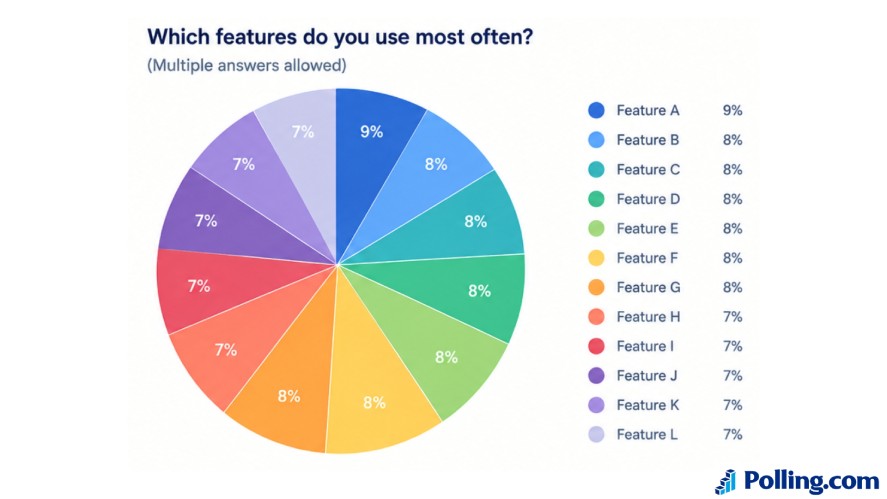
A horizontal bar chart showing the same categories in descending order makes the most and least popular answers easier to identify.
Clear labels and accurate scales also matter.
Even an attractive chart can mislead readers if it hides the sample size or makes small differences look significant.
Why Different Survey Questions Require Different Charts
Not all survey responses represent the same type of data.
- Categorical answers, such as preferred product features, often work well in bar charts.
- Ordinal responses, such as satisfaction ratings, can be shown with stacked bars.
- Numerical answers may need histograms to show their distribution
- Time-based results often work best in line charts.
Choose a chart based on what you want readers to understand.
The right visualization makes the results easier to interpret without hiding important details.
Best Charts for Survey Results at a Glance
Different survey charts highlight different aspects of your data.
Use this table to find a suitable chart based on the type of responses you collected and the insight you want to communicate.
| Chart Type | Best Used For | Example |
|---|---|---|
| Bar chart | Comparing response categories | Favorite product feature |
| Pie chart | Simple parts of a whole | Preferred subscription plan |
| Donut chart | Compact percentage breakdown | Yes/no survey |
| Stacked bar chart | Comparing response composition | Satisfaction levels by team |
| Diverging stacked bar | Likert-scale sentiment | Agree vs. disagree |
| Line chart | Tracking changes over time | Monthly satisfaction |
| Histogram | Numerical distributions | Customer age ranges |
| Heatmap | Patterns across many questions | Employee engagement matrix |
| Scatter plot | Relationships between two metrics | Satisfaction vs. spending |
| Ranked bar chart | Comparing ranked preferences | Top product priorities |
Some chart types can serve similar purposes, but they are not always interchangeable.
For example, a pie chart works best with a few mutually exclusive categories, while a bar chart makes it easier to compare values across many categories.
Choose your chart based on the question you want to answer, not simply the chart options available in your survey tool.
The goal is to make the main findings clear without hiding important details.
10 Best Charts for Survey Results and When to Use Each
The best chart for survey results depends on what you want to show.
Here are 10 best charts for survey results and when to use each.
1. Bar Charts for Comparing Survey Responses
Bar charts compare the number or percentage of responses across categories. They work well for single-choice and multiple-select questions.
Use horizontal bars for long category names, and start the value axis at zero to avoid misleading comparisons.
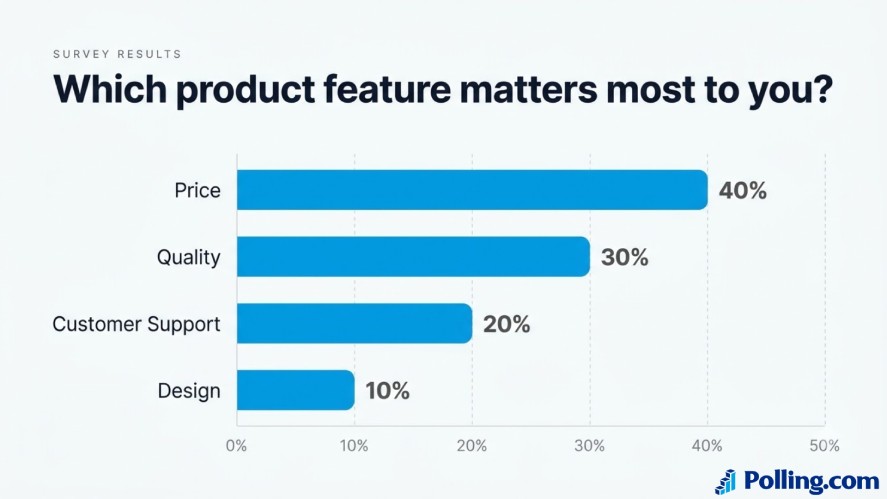
Example question: “Which product feature matters most to you?”
A bar chart might show Price at 40%, Quality at 30%, Customer Support at 20%, and Design at 10%.
The differences are easy to spot without reading a table of numbers.
2. Pie Charts for Showing Survey Percentages
Pie charts show how responses divide into parts of a whole. They work best for a few mutually exclusive categories that add up to 100%.
Avoid them for multiple-select questions or results with too many similar-sized slices.
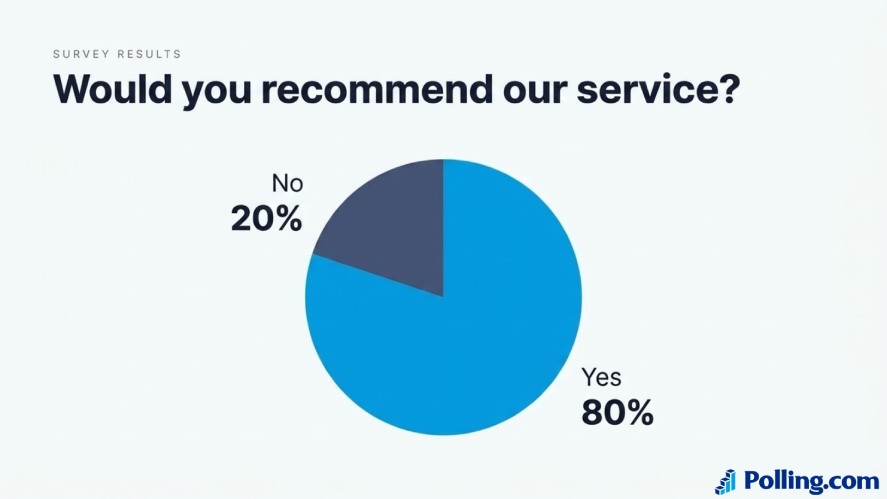
Example question: “Would you recommend our service?”
A pie chart can show the percentage of respondents who answered yes or no.
If you need to compare several categories or their values are close, a bar chart is usually easier to read.
3. Donut Charts for Simple Response Distributions
Donut charts work like pie charts but leave space in the center for a key figure, such as a renewal rate.
They are useful for simple percentage breakdowns, although they are not necessarily better than pie charts for comparing segment sizes.
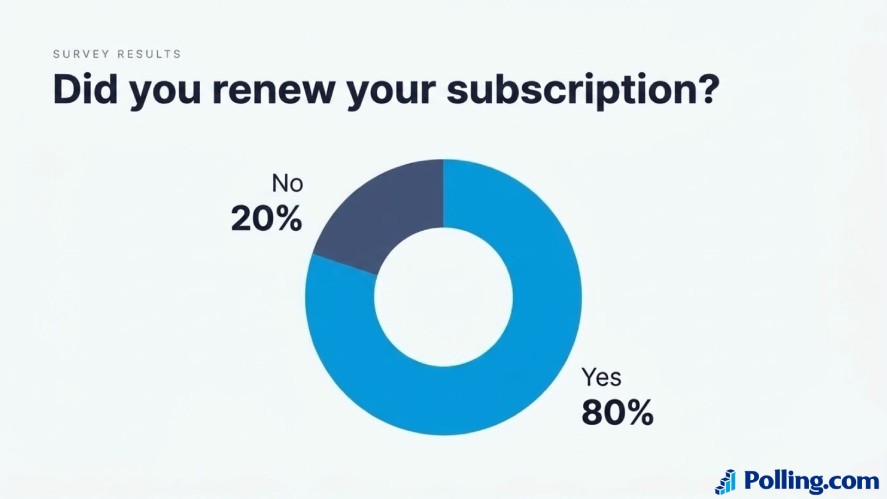
Example question: “Did you renew your subscription?”
A donut chart could display the share of customers who renewed and those who did not.
Tips: Keep the number of segments small and use the center to highlight a meaningful figure only when it adds context.
4. Stacked Bar Charts for Comparing Survey Groups
Stacked bar charts divide each bar into segments to show how responses contribute to a total.
They help compare the composition of results across groups, such as departments, age groups, or customer segments.
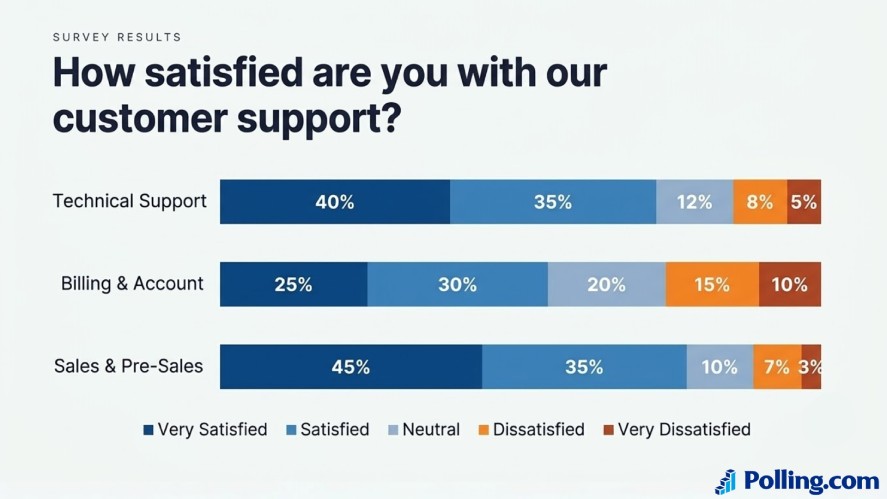
Example question: “How satisfied are you with our customer support?”
You could use one bar for each department, with segments representing very satisfied, satisfied, neutral, dissatisfied, and very dissatisfied responses.
Standard stacked bars can make middle segments difficult to compare because they do not share the same starting point.
If comparing positive and negative sentiment is your main goal, a diverging stacked bar chart may be more suitable.
5. Diverging Stacked Bar Charts for Likert Scale Surveys
Diverging stacked bar charts are designed for rating scales with positive, neutral, and negative responses.
Positive answers extend in one direction, while negative answers extend in the other. Neutral responses sit near the center.
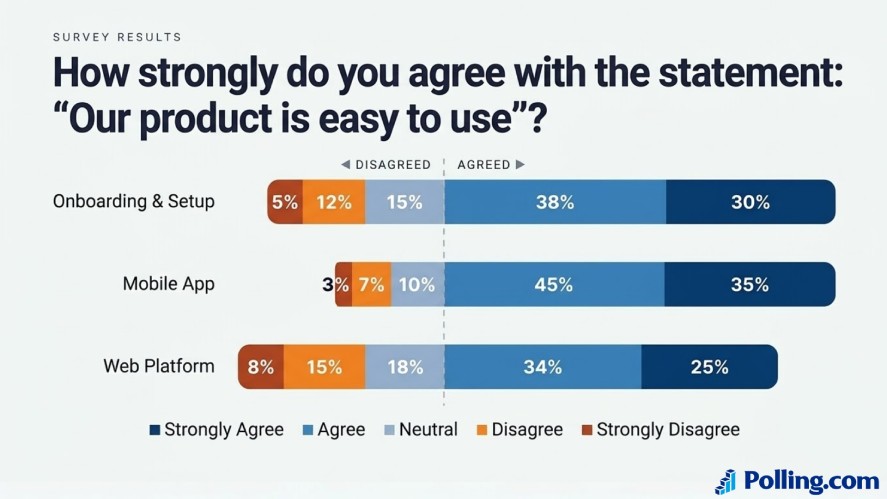
Example question: “How strongly do you agree with the statement: Our product is easy to use?”
This chart makes it easier to see whether responses lean toward agreement or disagreement.
It is especially useful for employee engagement surveys, customer satisfaction surveys, and feedback forms with five- or seven-point rating scales.
Tips: Use the same response order and color scheme across questions. This helps readers compare sentiment without having to relearn the chart each time.
6. Line Charts for Tracking Survey Trends Over Time
Line charts show how a value changes across time.
They are useful when you repeat a survey regularly and want to track satisfaction, customer loyalty, or employee engagement.
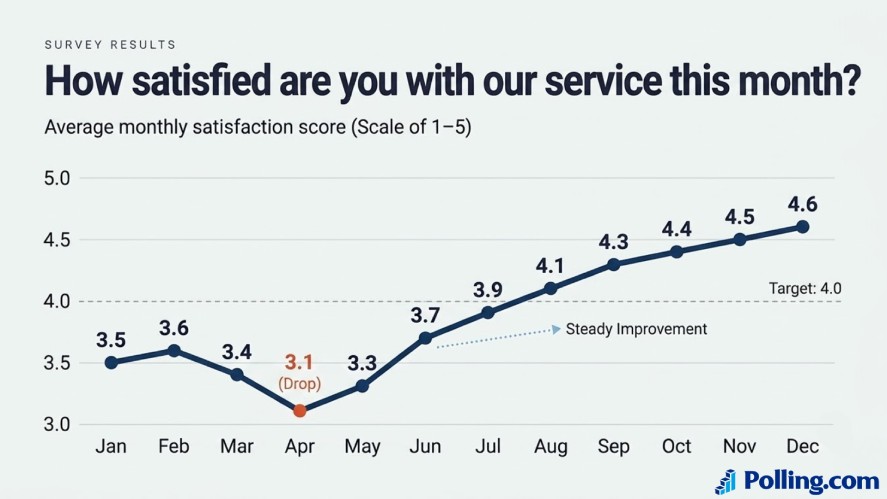
Example question: “How satisfied are you with our service this month?”
A line chart could plot the average satisfaction score for each month.
A rising line may indicate improvement, while a decline can signal an issue worth investigating.
Tips: Keep the time intervals consistent and label the axes clearly.
If the survey questions or respondent groups change between periods, explain that context so readers do not assume every change reflects a real shift in opinion.
7. Histograms for Understanding Numerical Survey Responses
Histograms group numerical values into ranges, called bins, and show how many responses fall into each range.
They help reveal the distribution of survey answers, including common ranges, unusual values, and whether responses cluster around particular numbers.
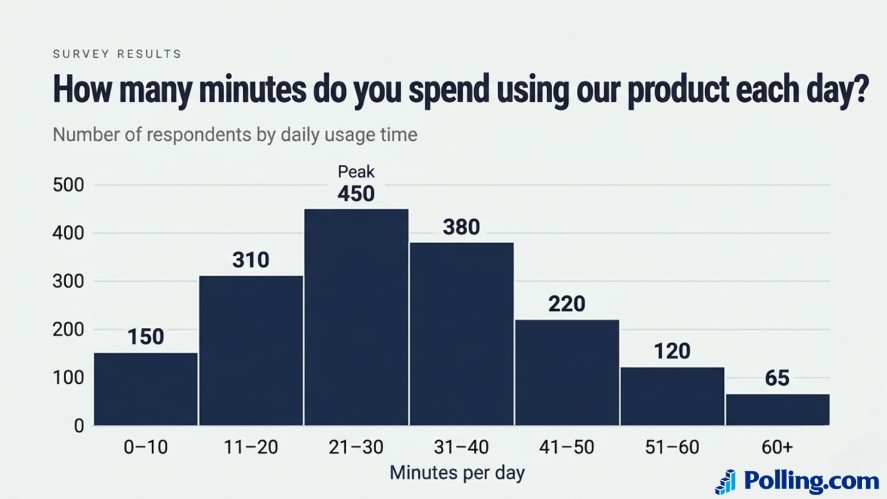
Example question: “How many minutes do you spend using our product each day?”
A histogram might show how many respondents spend 0–10 minutes, 11–20 minutes, 21–30 minutes, and so on.
This makes it easier to understand typical usage than looking at individual responses.
Tips: Use histograms for numerical data, not general categories such as favorite features.
Choose sensible bin widths because very wide or narrow ranges can hide important patterns.
8. Heatmaps for Identifying Patterns in Large Survey Datasets
Heatmaps use color intensity to represent values in a table.
They are useful when you need to compare several questions, groups, or locations at once.
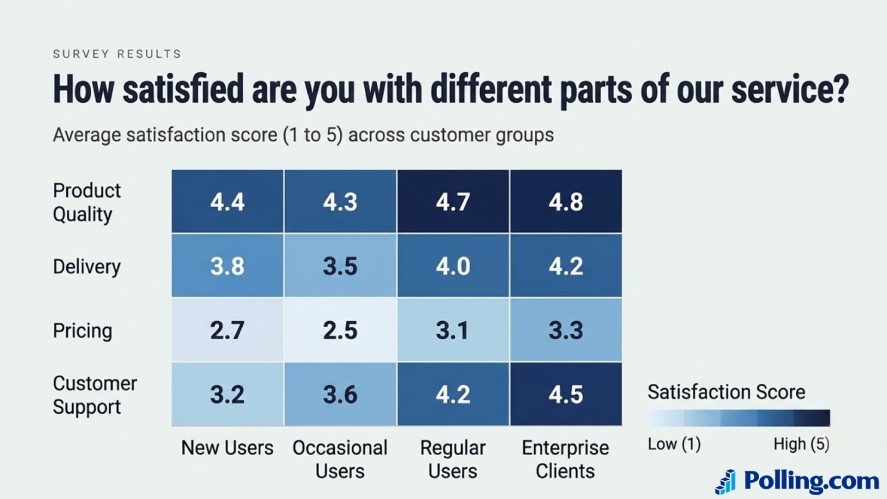
Example question: “How satisfied are you with different parts of our service?”
A heatmap could compare satisfaction scores for product quality, delivery, pricing, and customer support across several customer groups.
Darker or more intense colors could highlight higher or lower scores, depending on the legend.
Avoid relying on color alone to communicate meaning, and include the underlying values when precise comparisons matter.
9. Scatter Plots for Exploring Relationships Between Survey Variables
Scatter plots show the relationship between a pair of numerical variables.
Each point represents an observation, such as one respondent, allowing you to look for patterns, clusters, or unusual values.
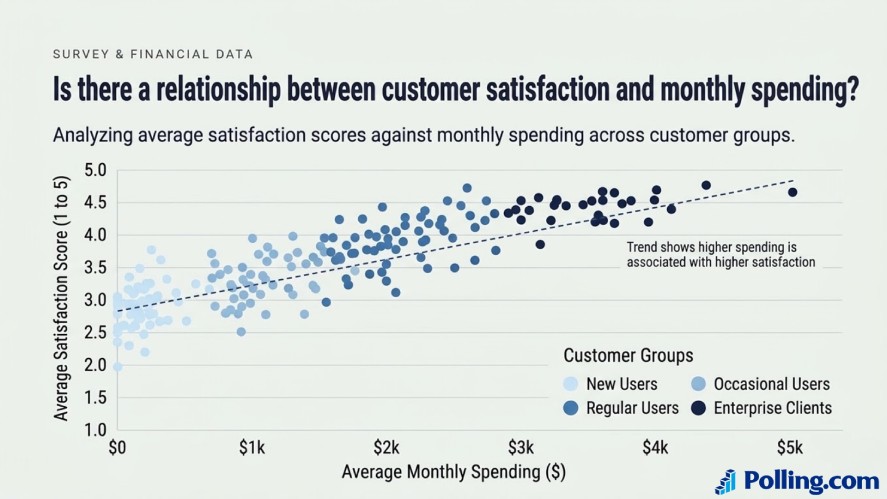
Example question: “Is there a relationship between customer satisfaction and monthly spending?”
You could plot satisfaction scores against spending amounts to see whether higher satisfaction tends to occur alongside higher spending.
A visible pattern may suggest an association, but it does not prove that one variable causes the other.
Use scatter plots when both variables are numerical.
If your goal is to compare simple categories or percentages, a bar chart will usually be clearer.
10. Ranked Bar Charts for Survey Preference Rankings
Ranked bar charts arrange categories from highest to lowest value.
They are useful for identifying the most popular choices, common complaints, or top priorities in survey responses.
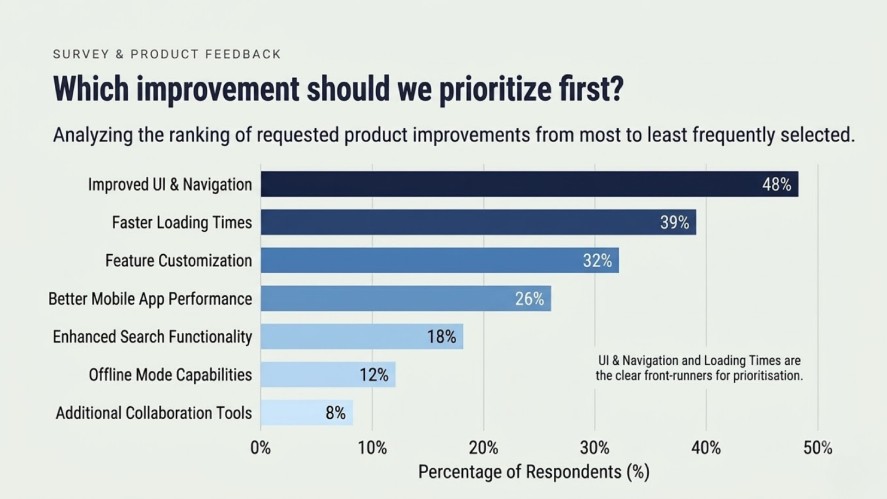
Example question: “Which improvement should we prioritize first?”
A ranked bar chart could list requested improvements from the most frequently selected to the least frequently selected.
As a result, readers can quickly see which issues received the most attention.
Tips: Sort the bars consistently and label them with counts or percentages.
If respondents could select multiple options, state that clearly because the percentages may not add up to 100%
How to Choose the Best Chart Based on Survey Question Type
The easiest way to choose a survey chart is to identify what you want the reader to learn.
Start with the response format, then match it to the comparison you need to make.
| Survey question or goal | Recommended chart |
|---|---|
| Which option did respondents choose most often? | Bar chart or ranked bar chart |
| What percentage chose each of a few options? | Pie chart or donut chart |
| How do satisfaction levels differ between groups? | Stacked bar chart |
| Do respondents agree or disagree with a statement? | Diverging stacked bar chart |
| How have survey scores changed over time? | Line chart |
| How are numerical responses distributed? | Histogram |
| Which groups have higher or lower scores across several questions? | Heatmap |
| Are two numerical variables related? | Scatter plot |
Before making your choice, ask yourself three questions:
- What kind of data do I have? Identify whether your responses are categories, rating scales, numerical values, or time-based measurements.
- What comparison matters most? You may want to compare groups, show percentages, track trends, or understand a distribution.
- Who needs to understand the result? Choose a chart that your audience can interpret quickly without extensive explanation.
You may need more than one chart to explain a survey.
For example, a bar chart can show the most common customer complaints, while a line chart tracks whether those complaints become more or less frequent over time.
How to Create Charts From Survey Results
You do not need advanced data analysis in survey skills to create useful survey visuals.
Follow these steps to turn raw responses into clear charts.
Step 1: Review and Clean Your Survey Data
Check for missing answers, duplicate submissions, inconsistent labels, and invalid values.
Make sure response categories use consistent wording.
For example, “Very satisfied” and “Very Satisfied” should not accidentally appear as separate categories.
Also check the number of valid responses for each question.
Some respondents may skip questions, so the sample size can vary across charts.
Step 2: Summarize the Responses
Calculate the counts or percentages for categorical polling questions.
For numerical responses, decide whether you need an average, median, range, or distribution.
If you compare groups, apply the same calculation to each group.
Next, always identify the denominator for percentages.
A result based on 80 answers should not be presented as if all 100 survey participants answered that question.
Step 3: Choose the Best Charts For Survey
Match the chart to the question you want to answer.
Use bar charts for category comparisons, diverging stacked bars for Likert-scale responses, and line charts for changes over time.
Avoid adding extra chart types just to make a report look more varied.
Each visual should help readers understand a specific finding.
Step 4: Add Clear Labels and Context
Give the chart a descriptive title. Label the axes, include units or percentages, and use a legend when needed.
Then, add the sample size and relevant date range so readers know what the results represent.
If you compare survey results across groups or time periods, explain any important differences in the survey method or respondent sample.
Step 5: Check the Chart Before Sharing
Review the visual from the audience’s perspective. Answer these questions:
- Can someone understand the main finding without reading a long explanation?
- Are the colors consistent?
- Is the scale accurate?
- Could the chart be misinterpreted?
Then, remove unnecessary decorations and keep the focus on the result.
A simple, accurate chart is usually more effective than a complicated visual.
Tools for Creating and Presenting Survey Charts
The right survey data visualization tools depend on how much analysis you need and where your responses are stored.
Polling.com
Polling.com helps you create surveys and collect responses.
After gathering feedback, you can use the results to identify patterns and decide which findings to communicate.
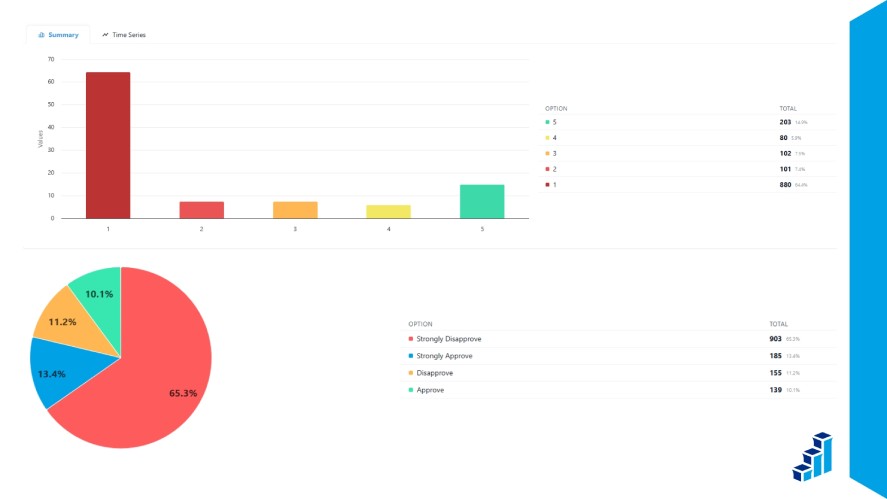
It is a useful starting point for teams that want to connect survey creation with follow-up analysis.
Google Sheets and Microsoft Excel
Spreadsheets are practical options for basic survey charts
You can summarize responses, calculate percentages, compare groups, and create common visuals such as bar charts, pie charts, line charts, and histograms.
They work well for small to medium datasets and reports that do not require complex interactive dashboards.
Datawrapper, Tableau, and Power BI
These survey data visualization tools support more advanced data visualization and reporting.
Depending on the tool and your setup, you can create interactive charts, combine multiple datasets, and build dashboards for recurring reports.
They may be useful when survey results need to be shared across teams or combined with other business data.
Before choosing a tool, consider the learning curve, pricing, data requirements, and sharing options.
Common Mistakes to Avoid When Visualizing Survey Results
A chart can still fail if it isn’t designed well, no matter how well-suited it is to the data.
Avoid these common mistakes when preparing a data visualization survey results presentation.
- Using too many categories in a pie chart: Switch to a bar chart when labels or slices become difficult to compare.
- Choosing a chart that does not fit the data: Use a histogram for numerical distributions, not unrelated categories.
- Leaving out the sample size: Show how many people answered the question so readers can judge the scope of the results.
- Using unclear titles and labels: Make the chart understandable without forcing readers to search the report for context.
- Distorting the scale: Use accurate axes and avoid visual tricks that exaggerate small differences.
- Relying on color alone: Choose accessible colors and include labels, values, or patterns where needed.
- Showing percentages without context: Explain what the percentages represent and whether respondents could select multiple answers.
- Overloading a dashboard: Focus on the findings that matter instead of displaying every available metric.
The goal is not to make every survey graph look impressive. It is to make the survey findings accurate, readable, and useful.
Frequently Asked Questions About Survey Charts
A bar chart is a reliable choice for comparing survey responses across categories. However, the best chart depends on your goal. Use pie or donut charts for simple proportions, diverging stacked bars for Likert-scale responses, and line charts for trends over time.
Use a bar chart when you need to compare several response categories or identify the most popular option. A pie chart works better when you have only a few categories that make up a whole. If the slices are similar in size or difficult to label, a bar chart is usually easier to read.
A diverging stacked bar chart is a strong choice for Likert-scale survey results. It groups responses such as strongly disagree, neutral, and strongly agree around a central point, making positive and negative sentiment easier to compare across questions or groups.
Count how many respondents selected each option, then display the results in a bar chart or ranked bar chart. Add percentages if they help explain the findings. If respondents could select multiple answers, state that clearly because the percentages may add up to more than 100%.
A diverging stacked bar chart works well for satisfaction ratings, especially when responses use a five- or seven-point scale. Use a line chart to track satisfaction scores over time or a bar chart to compare satisfaction across products, locations, or customer groups.
Yes, Google Sheets and the free features available in spreadsheet tools can help you create basic survey charts. You can summarize responses and build bar, pie, and line charts without paying for specialized visualization software.
Choose the Right Survey Chart to Make Better Decisions
The best charts for survey results make your findings easier to understand and act on.
Start with the insight you want to communicate, then choose a chart that fits your data.
Keep the design simple, include enough context, and check that the visual represents the survey responses accurately.
Polling.com can help you collect survey feedback and identify what matters to respondents.
Turn survey responses into actionable insights. Create your next survey with Polling.com and start understanding what your audience thinks.