
How to Embed a Survey on a Website

If you want to embed survey on website pages effectively, the goal should be more than simply displaying a questionnaire. A well-placed website survey lets you collect feedback while visitors are still experiencing the page, product, feature, or transaction you want them to evaluate.
However, simply adding a survey to a page does not guarantee useful responses.
A visitor who is asked to rate an article before reading it, for example, cannot provide meaningful feedback. Likewise, a first-time visitor may not be qualified to answer questions about long-term product satisfaction.
Effective website surveys depend on four factors working together: placement, timing, targeting, and frequency.
When these elements align, embedded surveys can help with website UX research, product feedback, post-purchase analysis, customer satisfaction, Net Promoter Score (NPS), content evaluation, and other forms of customer research.
This guide explains how to embed a survey on a website, where to place it, when to display it, who should see it, and how to avoid disrupting the user experience.
How Do You Embed a Survey on a Website?
The basic process is straightforward:
- Create your survey in a platform that supports website embedding.
- Choose an embed format, such as an inline survey, pop-up, button, or targeted survey.
- Generate the embed code or integration provided by the survey platform.
- Add the code to the relevant page or website template.
- Configure targeting, timing, and frequency settings if your platform supports them.
- Test the survey on desktop and mobile devices before publishing it.
A basic website survey often uses an iframe or JavaScript snippet supplied by the survey platform.
For example, a generic iframe implementation might look like this:
<iframe src=”YOUR_SURVEY_EMBED_URL” width=”100%” height=”600″ title=”Website feedback survey” style=”border:0;”> </iframe>
In practice, use the embed code generated by your survey provider because implementation requirements differ between platforms.
The technical setup is only the beginning. The more important question is whether the survey appears to the right visitor at the right point in their experience.
What Is an Embedded Website Survey?
An embedded website survey allows visitors to answer questions as part of the website experience rather than requiring them to navigate to a separate survey page.
For example, a reader may see a simple “Was this article helpful?” question near the end of a guide. A SaaS customer could receive a feature-feedback survey after using a specific tool. An ecommerce customer might be asked about the checkout experience after completing a purchase.
The common factor is context: the feedback request appears close to the experience being evaluated.
Common Types of Website Survey Embeds
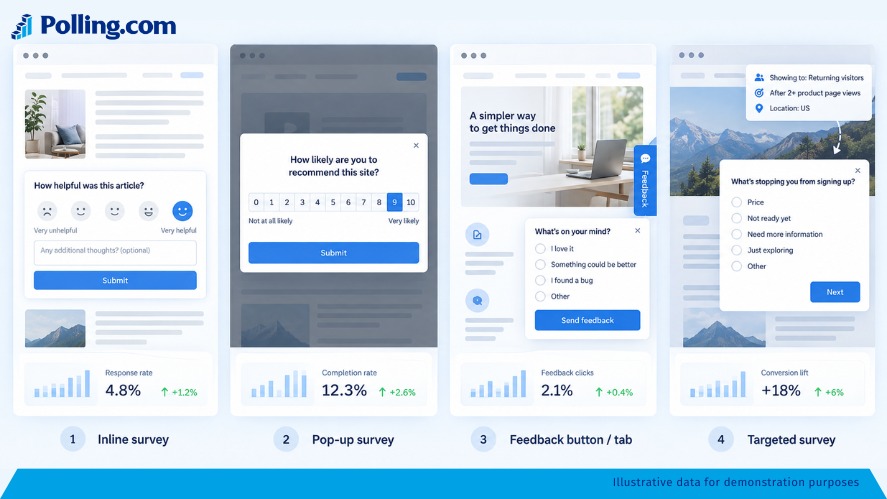
Inline surveys appear directly inside page content. They work well when the questions naturally relate to the surrounding information, such as a content-feedback survey near the end of an article.
Pop-ups and overlays appear above the page. They attract attention but can interrupt the visitor, so timing and frequency are especially important.
Feedback buttons or tabs allow visitors to open a survey when they choose. These work well as persistent feedback channels without automatically interrupting the primary task.
Targeted surveys appear only when defined conditions are met. Depending on the platform, these conditions might include the current page, visitor segment, language, country, previous responses, or user behavior.
Multi-survey or routed embeds can determine which survey an eligible visitor receives instead of showing the same questionnaire to everyone.
That distinction becomes important when comparing online survey platforms. A basic tool may simply display a form, while a more advanced platform can help control who receives which survey and under what conditions.
Why Placement, Timing, and Targeting Matter
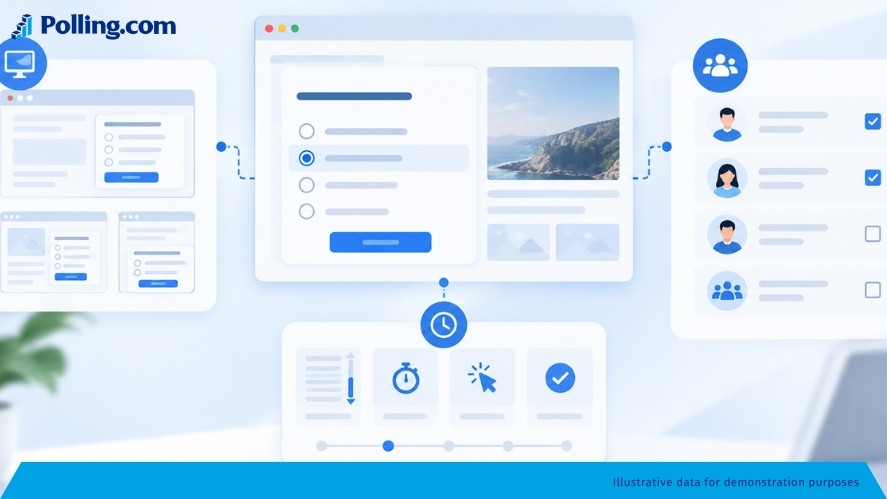
A technically correct survey can still produce poor data when it reaches someone who is not qualified to answer.
A useful principle is:
Right question + right visitor + right moment = more relevant feedback.
Placement Creates Context
Where the survey appears determines what the visitor has experienced.
Someone viewing a product page may be able to identify missing product information or purchase concerns. However, that visitor cannot accurately evaluate the post-purchase experience if they have not bought anything.
Useful combinations include:
- Product page: buying considerations, missing information, objections
- Help article: clarity and helpfulness
- Confirmation page: checkout or purchase experience
- Account dashboard: satisfaction, customer effort, or NPS
- Feature area: feature-specific usability and satisfaction
- Blog article: usefulness, unanswered questions, and topic requests
Placement should therefore follow the research objective rather than simply where a survey happens to fit visually.
Timing Determines Whether the Visitor Can Answer
Even on the correct page, asking too early can weaken response quality.
Imagine opening a detailed guide and immediately receiving the question, “Did this article answer your question?”
You have not read enough to know.
Instead, the survey could appear after sufficient time on the page, after meaningful scrolling, or after another action indicating that the visitor has experienced what you want evaluated.
Possible triggers include time on page, scroll depth, feature use, completed checkout, downloads, onboarding milestones, support interactions, and exit behavior.
Not every platform supports every trigger, so confirm the capabilities of your chosen implementation.
Targeting Reaches More Relevant Respondents
Targeting determines who should see the survey.
Useful audience signals may include customer type, visitor behavior, purchase status, geography, language, account characteristics, previous actions, previous survey responses, or product events.
This prevents a common survey mistake: treating every website visitor as though they have the same experience.
A new visitor, a long-term customer, and someone who just completed checkout may all need different questions.
Where Should You Embed Survey on Website Pages?
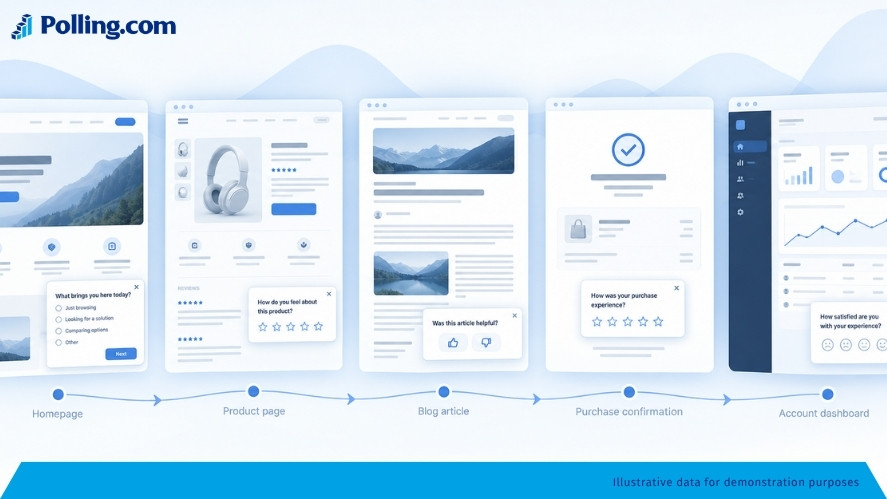
Where you embed survey on website pages should follow your research objective. Instead of asking where a questionnaire can fit, identify where visitors have enough experience to provide a useful answer.
Homepage Surveys
Homepage surveys can help identify:
- Visitor intent
- Reasons for visiting
- Brand perception
- What visitors are looking for
- Broad website expectations
Keep these surveys short because visitors may know very little about the website yet.
A quick question such as “What brought you here today?” usually makes more sense than a lengthy satisfaction questionnaire.
Product and Feature Pages
Product pages are useful for investigating:
- Purchase considerations
- Missing information
- Objections
- Feature expectations
- Comparison criteria
- Reasons for not proceeding
For SaaS products, asking for feedback after someone actually uses a feature can provide stronger context than asking on a marketing page that only describes the feature.
Blog Posts and Resource Pages
Content pages naturally support questions such as:
- Was this article helpful?
- Did you find the information you needed?
- What question remains unanswered?
- What should we cover next?
An inline survey near the end of an article is often less disruptive because it appears after the reader has consumed some of the content.
Scroll depth can also be used as a basic qualification signal, although scrolling alone does not prove that someone carefully read the page.
Checkout and Conversion Pages
Be particularly careful with surveys during important conversions.
Interrupting someone while they are entering payment information or completing a signup can add unnecessary friction.
When the research concerns the completed transaction, the confirmation page is usually a more appropriate location.
For example:
- How easy was checkout?
- Was anything confusing?
- What nearly prevented you from purchasing?
- What was the main reason you chose us?
The visitor has just completed the experience, making the questions immediately relevant.
Account Dashboards and SaaS Products
Logged-in environments provide opportunities to reach people with genuine product experience.
Common use cases include:
- NPS
- Customer Satisfaction Score (CSAT)
- Customer Effort Score (CES)
- Product-market-fit research
- Onboarding feedback
- Feature satisfaction
- Product usability
Experience should determine eligibility.
A user who created an account five minutes ago should not necessarily receive the same relationship-based survey as a customer who has actively used the product for a year.
When Should a Website Survey Appear?
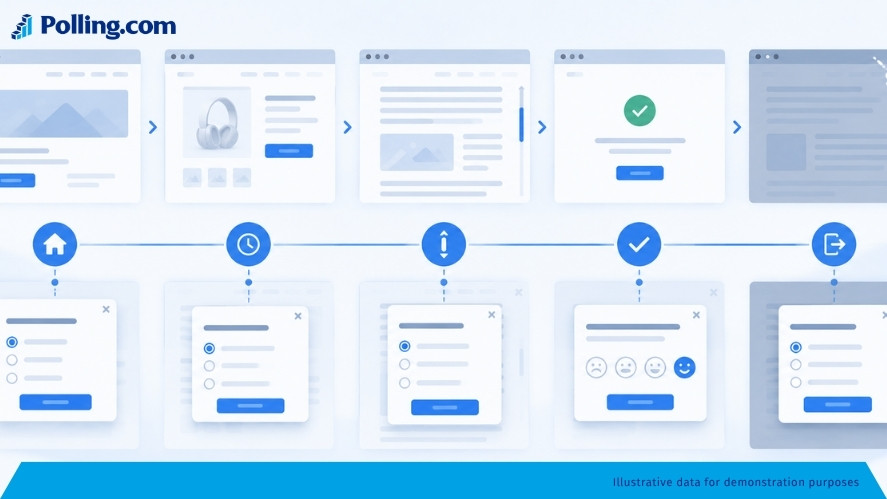
When you embed survey on website experiences, timing should reflect how much context a visitor needs before they can answer accurately.
Immediately on Page Load
Immediate surveys are appropriate when the question concerns visitor intent rather than their experience with the page.
For example:
“What are you hoping to accomplish today?”
The visitor can answer that immediately.
By contrast, asking “How useful was this page?” on arrival would be premature.
After a Time Delay
A delay gives visitors time to interact with the page before being asked for feedback.
There is no universal best delay.
A short landing page and a 3,000-word research article require different amounts of time to understand. Instead of selecting an arbitrary number of seconds, consider what behavior the delay is intended to approximate.
After Meaningful Scrolling
Scroll-based triggers can work particularly well for content surveys.
Someone who has moved through much of an article has at least had the opportunity to consume more information than someone who bounced immediately.
However, use scroll depth as a signal rather than proof of engagement.
After a Specific Action
Behavioral triggers can create highly relevant research moments.
Examples include completing checkout, using a feature, downloading a resource, completing onboarding, submitting a form, or contacting support.
A customer who has just used a feature, for example, is in a much better position to evaluate it than a visitor who has only read its description.
On Exit Intent
Exit surveys can help investigate abandonment.
Questions might include:
- What stopped you from purchasing today?
- Was there information you could not find?
- What prevented you from signing up?
- What were you hoping to find?
Exit surveys can be especially useful on pricing and conversion pages.
Remember that exit-intent functionality often depends on device and implementation. Some platforms rely on desktop mouse behavior, meaning the same trigger may not work on mobile devices.
How to Target Website Surveys to the Right Audience
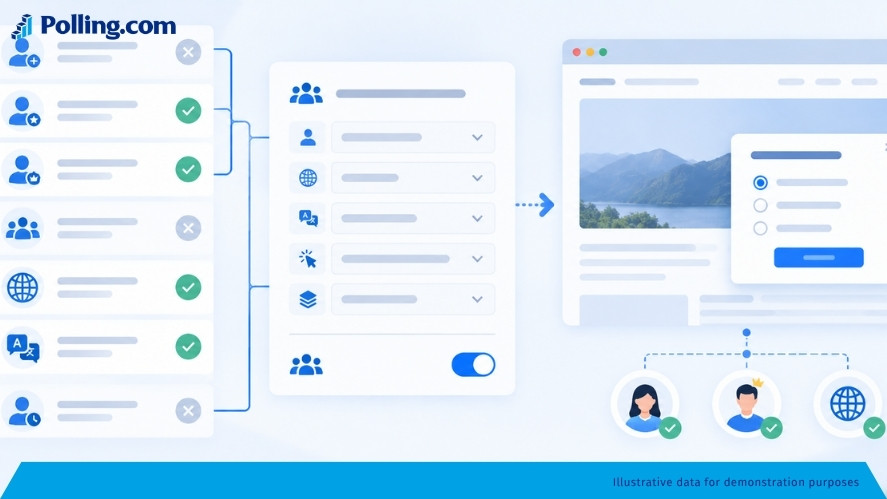
Placement provides context, but audience targeting improves qualification further.
Target by Page or URL
Start with the page itself.
For example:
- Product pages: product-related questions
- Pricing pages: purchase concerns
- Support pages: help effectiveness
- Confirmation pages: completed transaction feedback
URL-based targeting is one of the simplest ways to improve relevance.
Target by User Behavior
Behavior provides stronger evidence that someone experienced the subject being researched.
Depending on your survey platform, useful signals may include:
- Feature interaction
- Previous actions
- Purchase completion
- Previous survey responses
- Account events
- Downloads
- Signups
- Onboarding milestones
Behavioral qualification helps prevent feedback from respondents who have not actually experienced the product, feature, or process being evaluated.
Target by Visitor Segment
Different groups often require different questions.
You might separate:
- New and established users
- Free and paid customers
- Buyers and non-buyers
- Active and inactive customers
- Customers on different products or plans
Clear market segmentation and target audience analysis can also make survey analysis easier because you know which audience produced each response.
Target by Country and Language
International websites should consider language and geographic context.
Survey comprehension can affect response quality, while country targeting may be useful when prices, products, shipping, features, or customer experiences differ by market.
Control Survey Frequency
Even a relevant survey becomes disruptive when visitors see it too often.
Useful controls include suppressing a survey after completion, limiting repeat displays after dismissal, setting a minimum interval between surveys, and showing the survey to only a percentage of eligible visitors.
Sampling can be especially useful when your website has enough traffic to collect the required responses without asking every eligible visitor.
Best Platforms for Embedding Surveys on Websites
The best survey platform depends on whether you need a straightforward website questionnaire, behavioral UX feedback, in-app research, or more advanced audience qualification.
Polling.com for Flexible Survey Embeds and Targeting
Polling.com is particularly useful when you need more control than a single static questionnaire.
Its website embed options support direct survey embeds as well as app-based experiences that can work with multiple surveys.
Polling.com also provides Survey List, Random Qualifying Survey, and Single Fixed Survey embed approaches.
Targeting capabilities include survey-response conditions, user events, language, country, and survey availability windows. Website embeds can also use parameters such as customer_id to associate responses with an external user and platform to provide additional context.
For more advanced implementations, Polling.com provides JavaScript and React SDK integrations. Event-based trigger delays are part of the SDK trigger system rather than a capability that should be assumed for every basic iframe embed.
The key advantage is qualification.
Instead of asking only:
“Can this platform display my survey?”
you can also consider:
“Can it help determine which survey an eligible visitor should receive?”
Polling.com also states that its forms can be embedded in websites and environments such as WordPress, Webflow, Framer, and Notion.
If you’re still deciding which platform fits your use case, compare these free website survey tools before choosing an embed method.
SurveyMonkey for Traditional Website Survey Collection
SurveyMonkey provides several website collection formats, including embedded surveys, embedded buttons, popup invitations, and popup surveys.
Its Website Collector also supports sample-rate controls and behavior settings such as immediate display, delays, scroll percentage, and exit-style presentation for applicable survey formats.
One important limitation is that mouse-based exit behavior does not work the same way on mobile devices.
SurveyMonkey is therefore a practical choice for teams that want familiar survey creation combined with several established website collection formats.
Hotjar for Behavior-Focused Website Feedback
Hotjar focuses strongly on contextual UX feedback.
Its survey targeting options can use factors such as pages, devices, user attributes, events, and traffic coverage.
Hotjar also provides timing and frequency controls for applicable survey formats.
However, timing options differ depending on how the survey is presented, and abandonment-style behavior is not available in the same way across desktop, tablet, and mobile devices.
Hotjar can be a good fit when surveys are part of a broader effort to understand website behavior and user experience.
Userpilot for In-App Product Surveys
Userpilot is particularly relevant for SaaS and product teams.
Its survey functionality supports page-specific presentation, event-based triggers, user and company targeting, audience segments, sampling, behavioral conditions, and frequency controls.
That makes it useful when the feedback subject is the in-product experience rather than a conventional public website.
Step-by-Step Website Survey Implementation
Before you embed survey on website pages, define the research goal, audience, placement, and timing. A successful implementation starts before you copy the embed code.
Step 1: Define the Feedback Goal
Start with the business decision the research should inform.
Weak goal: “We want more feedback.”
Better goal: “We want to understand why engaged pricing-page visitors do not start a trial.”
The second goal helps define the audience, location, timing, and questions.
Step 2: Choose the Right Survey
Select a survey that matches the decision you need to make.
Depending on the objective, that might be NPS, CSAT, CES, website feedback, product feedback, post-purchase feedback, or content feedback.
Do not choose a metric simply because it is popular.
Step 3: Choose the Embed Format
Consider the trade-offs.
Inline surveys are contextual and relatively non-interruptive.
Pop-ups provide greater visibility but create more interruption.
Feedback buttons allow users to initiate the interaction.
Targeted surveys work well when eligibility depends on the visitor, page, or behavior.
Choose the least disruptive format that can still collect the information you need.
Step 4: Define Placement
Match the page to the research question.
Article feedback belongs within the article experience. Checkout feedback generally belongs after checkout. Feature feedback should reach people who have actually used the feature.
Step 5: Set Timing and Triggers
Identify the point at which a visitor has enough experience to answer.
That could be time elapsed, meaningful scroll depth, completed actions, feature usage, transaction completion, or exit behavior.
Step 6: Define Audience Targeting
Determine who qualifies.
Possible rules may involve behavior, geography, language, customer characteristics, previous answers, events, account status, or purchase history.
The more specific your research question is, the more valuable careful qualification becomes.
Step 7: Set Frequency and Sampling
Decide how often qualified visitors should encounter the survey and whether every eligible visitor needs to see it.
A smaller sample may provide sufficient responses while reducing unnecessary survey exposure.
Step 8: Test Desktop and Mobile
Check responsive sizing, text readability, buttons, form controls, scrolling, overlays, page layout, dismiss controls, and whether the survey obstructs important content or actions.
Also check page performance after adding third-party scripts or iframes.
A feedback tool should not make the underlying website harder to use.
Step 9: Monitor and Improve
Track metrics such as survey views, starts, completion rate, abandonment, and response quality. You should also analyze survey results by segment, placement, and device.
Do not optimize solely for response volume.
A placement that produces fewer but more relevant answers may be more valuable than one that collects many low-quality responses.
Common Website Survey Mistakes to Avoid
Asking Before Visitors Have Enough Context
Do not ask someone to evaluate an experience they have not had.
Match timing to the question.
Showing the Same Survey to Everyone
Visitors have different experiences and levels of qualification.
Segment audiences when the research requires it.
Interrupting Important Conversions
Avoid introducing unnecessary friction during checkout, account creation, or another critical task.
When possible, collect feedback after completion.
Asking Too Many Questions
Each additional question requires more effort.
Remove questions that do not directly support the research objective.
Ignoring Mobile Experience
A small desktop widget can occupy much of a smartphone screen.
Always test both desktop and mobile implementations.
Showing Surveys Too Frequently
Repeated prompts can create survey fatigue and may change who chooses to participate.
Use suppression and frequency controls where available.
Asking Questions Unrelated to the Page
Contextual questions are easier for visitors to understand and answer.
Collecting Feedback Without a Decision in Mind
Before launching a survey, ask:
“What will we do differently depending on the answers?”
If there is no plausible action, reconsider whether you need the question.
Failing to Test Targeting Rules
Incorrect targeting can show the survey to the wrong audience—or prevent anyone from seeing it.
Test eligibility conditions before launch.
Website Survey Placement Examples
| Goal | Placement | Timing | Target Audience |
|---|---|---|---|
| Improve article quality | End of article | After meaningful scroll | Engaged readers |
| Understand abandonment | Pricing or checkout area | Exit intent | Non-converting visitors |
| Measure purchase experience | Confirmation page | After transaction | Customers |
| Gather feature feedback | Feature area | After feature use | Feature users |
| Measure NPS | Account or product environment | After sufficient experience | Established customers |
| Understand visitor intent | Homepage | Early in visit | New visitors |
| Improve support content | Help article | After content consumption | Support-content readers |
These combinations are starting points rather than universal rules.
Treat them as hypotheses, measure the results, and adjust them based on your audience and research goals.
How Polling.com Supports More Flexible Website Survey Targeting
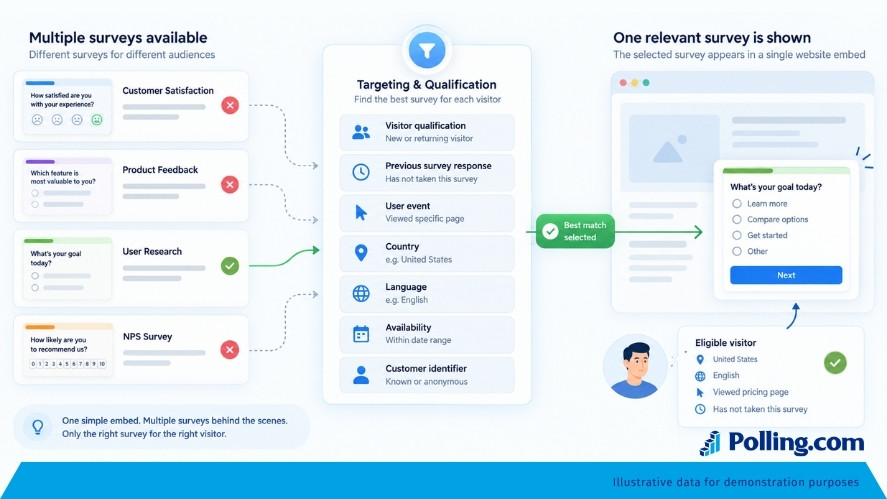
As a feedback program grows, the difference between displaying a survey and distributing the right survey becomes more important.
A simple embed answers:
“Which survey should appear here?”
A targeted system can address a more useful question:
“Which survey should this visitor receive based on their eligibility?”
According to Polling.com’s embed documentation, the platform supports fixed surveys, survey lists, and random qualifying survey approaches. along with targeting conditions involving previous survey responses, user events, country, language, and availability windows.
Its web embeds can also pass identifiers and platform information, while SDK integrations provide additional event and trigger functionality for more advanced product experiences.
Consider an international website running several research projects at the same time.
One survey might study onboarding. Another may be intended for established customers. A third could focus on a particular product event, while another applies only to visitors in a certain market.
Showing the same questionnaire to every visitor would create unnecessary exposure and make the results harder to interpret.
Qualification allows those research programs to coexist more intelligently.
If you need more than a basic static form, Polling.com provides several ways to build survey experiences around audience context rather than simply page exposure.
Frequently Asked Questions About Embedding Website Surveys
How Do I Embed a Survey on My Website?
Create your questionnaire in a survey platform that supports website embedding, generate the appropriate embed code or integration, add it to the relevant page, configure any available targeting and timing rules, and test the experience on desktop and mobile.
The exact implementation depends on the survey platform and website technology.
Where Should I Put a Survey on My Website?
Place it where visitors have enough relevant experience to answer the questions.
Content feedback may belong near the end of an article. Purchase feedback is usually better after checkout. Product feedback should reach people who have actually interacted with the product or feature.
There is no universal best location.
Can You Embed a Survey in WordPress?
Yes. Many survey platforms provide iframe, script, plugin, or other embedding options that can work with WordPress.
Polling.com states that its forms can be integrated with WordPress as well as website builders such as Webflow and Framer.
The exact setup depends on your WordPress configuration and chosen survey platform.
Can I Show a Website Survey Only to Certain Visitors?
Yes, if your survey platform supports targeting.
Possible criteria include the page being viewed, user attributes, previous actions, product events, customer segment, country, language, or previous survey responses.
Available targeting rules vary by platform.
Should I Use a Pop-Up or an Inline Survey?
Use the format that collects the required information with the least unnecessary disruption.
Inline surveys work well when the question naturally belongs to the page.
Pop-ups provide more visibility but interrupt the experience more directly.
Feedback buttons offer another option by allowing visitors to initiate the survey themselves.
How Many Questions Should an Embedded Website Survey Have?
Use only the questions required to support the research goal.
A visitor reading an article may answer one or two contextual questions but abandon a long questionnaire. Someone intentionally participating in a research study may accept a longer survey.
Survey length should reflect context, motivation, and the value of the research.
Are Embedded Surveys Better Than Survey Links?
Neither method is always better.
Embedded surveys are useful for collecting contextual feedback close to the experience being studied.
Standalone survey links are useful for email campaigns, research recruitment, longer questionnaires, and situations where respondents already expect to enter a separate survey environment.
Choose the distribution method based on the research objective.
What Should I Look for in an Online Survey Platform?
Look beyond question types and templates.
For website feedback, consider embed formats, mobile experience, audience targeting, behavioral triggers, frequency controls, sampling, segmentation, reporting, integrations, survey routing, and qualification rules.
The best platform depends on whether you need a simple website survey or a larger targeted feedback program.
Conclusion: Embedding the Survey Is Only the First Step
Whether you embed survey on website pages for customer satisfaction, product research, or content feedback, placement alone is not enough.
Collecting useful feedback requires more.
Ask four questions before launching:
Placement: Is the survey located where the relevant experience happens?
Timing: Has the visitor had enough experience to answer?
Targeting: Is this visitor qualified to respond?
Frequency: Are you collecting enough feedback without repeatedly interrupting people?
These principles apply whether you are running a one-question website poll, product research, customer satisfaction research, NPS, or a larger survey program.
A basic embed may be enough when you need one questionnaire in one location.
When you manage multiple audiences, markets, languages, product events, or research projects, more flexible survey targeting and qualification become increasingly valuable.
Polling.com supports both straightforward survey embeds and more advanced survey distribution approaches, allowing teams to build website feedback around the context of the visitor rather than simply showing the same form to everyone.
The goal is not merely to put a questionnaire on your website.
It is to ask the right people the right questions at a moment when their answers are actually useful.