
Survey Design Checklist From Objective to Launch

A survey can look simple on the screen. Yet one unclear question can leave you with answers you can’t use. The wrong audience can cause just as much trouble. That’s why a Survey Design Checklist matters. It helps you plan each part before you send a survey link. You can set a goal, reach the right people, write fair questions, and test the full experience.
This guide walks you through nine steps. You’ll see practical examples, common mistakes, and a final checklist you can use before launch. Whether you’re asking customers about a purchase or staff about their work, the goal is the same: collect feedback you can trust and act on.
Why Use a Survey Design Checklist?
Picture a store that wants to learn why customers stopped buying. Its survey asks, “How much do you love our fast delivery?”
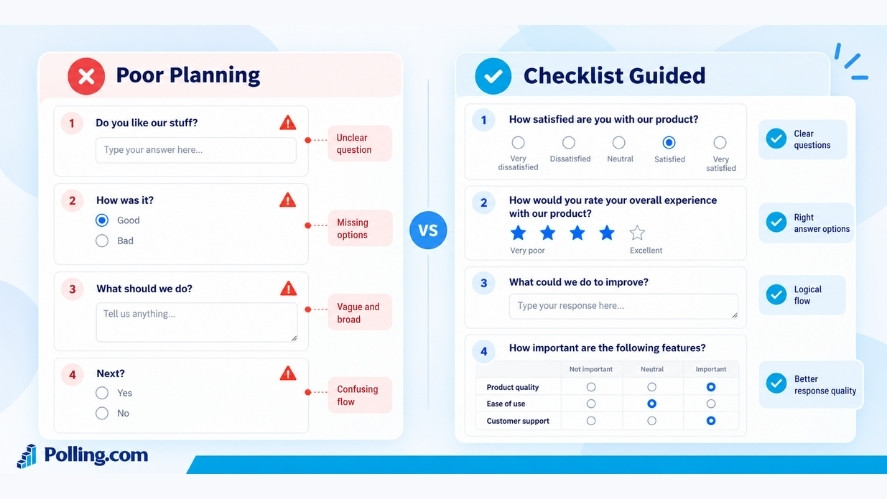
There’s a problem. Some orders may have arrived late. The question assumes that delivery was fast and that customers loved it.
A better question is, “How satisfied or dissatisfied were you with the delivery time for your last order?” Now customers can share a good or bad experience.
That small change shows why planning matters. Clear questions help people give accurate answers. A good survey also makes room for views you may not expect.
Using a Survey Design Checklist can help you:
- Link every question to a clear goal.
- Find people who can give useful feedback.
- Avoid leading or confusing language.
- Cut questions that waste people’s time.
- Catch broken survey paths before launch.
- Plan how you’ll review and use the results.
Still, a checklist can’t fix every research problem. Even a well-built survey can give a one-sided view if it reaches only one type of person. So, you need to review both the questions and the people who answer them.
Step 1: Set a Clear Survey Goal
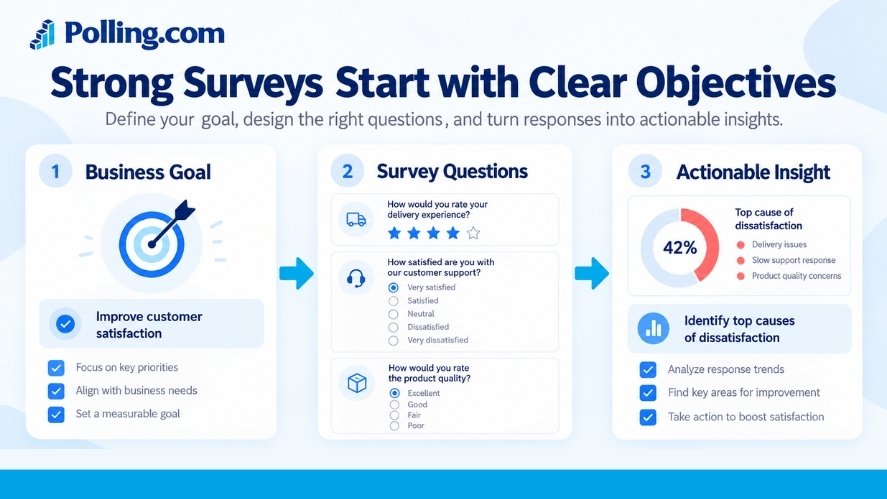
Before you write a question, ask yourself one thing: What do we need to learn?
Pick one main purpose
Start with a clear goal, such as:
- Find out why customers return a product.
- Learn what staff think about team support.
- Test interest in a new service.
- Find the biggest problem with an app.
- Get feedback after an event.
You can cover a few related topics. But don’t turn one short survey into a list of requests from every team.
For example, say an online shop sees more complaints after delivery. Its goal might be:
Find the main causes of poor delivery ratings from recent buyers.
That’s more useful than a broad goal like Learn what customers think.
Turn the goal into questions you can measure
Next, decide what you need to ask. For the delivery example, you could use:
- How satisfied were you with the delivery time for your last order?
- Did your order arrive by the date you expected?
- Which part of the delivery experience, if any, needs work?
Each answer adds a piece of the picture. Together, they can help the shop decide what to improve.
Decide what you’ll do with the answers
Think about the report before you build the survey. Will you compare ratings by region? Will you group complaints by type? Who will make the final decision?
For instance, if late orders are a key concern, you may need to compare delivery ratings with the dates customers received their orders. However, you should collect only the details needed for the study.
Step 1 check: Can you explain the goal in one sentence? Does every question serve that goal?
Step 2: Choose Your Audience and Sampling Plan
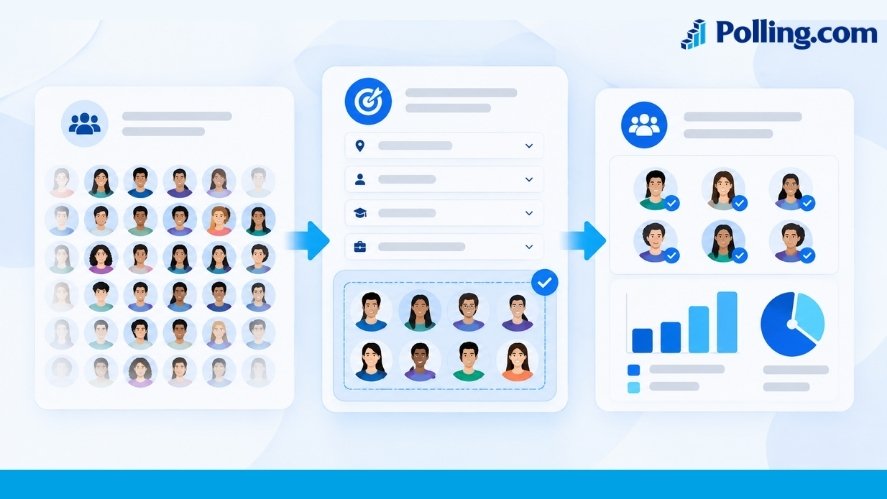
Good questions won’t help much if the wrong people answer them.
Define who should respond
Think about whose experience matters. A product survey may need people who used the new feature. A store survey may need customers who bought something in the past month.
Set clear rules for who can take part. You might use a first question to check this:
“Have you bought an item from our online store in the past 30 days?”
If your study is about recent orders, people who answer “No” may not be a good fit.
Choose how you’ll reach them
There are two broad ways to choose survey participants:
- Probability sampling: People are picked through a random process, and each eligible person has a known chance of selection. This can support estimates about a wider group when the study is well run.
- Nonprobability sampling: People join through methods such as an open website link, a social post, or a chosen group of users. This can help you spot issues, but it may not reflect the full population.
For example, a survey shared only with your most active followers may miss the views of less engaged customers.
A random sample isn’t always possible. However, you should be clear about how people were picked and what the results can show.
Set a useful response target
Think about how many completed surveys you’ll need. The right number depends on your goal, the size of your audience, how you recruit people, and which groups you want to compare.
You may see the number 385 in sample size guides. Under common assumptions, about 385 completed responses in a simple random sample can give a margin of sampling error near ±5 percentage points at a 95% confidence level for a large population. This does not account for other errors, such as people who choose not to reply. It also does not make an open, opt-in survey representative.
Remember to plan for people who won’t respond. If you need 100 completed surveys and expect 25% of invited people to finish, you’d plan to invite about 400 eligible people. That’s only an estimate, not a promise.
For more guidance, see AAPOR’s survey research best practices.
Step 2 check: Do you know who should respond, how you’ll reach them, and what limits your sample may have?
Step 3: Pick the Right Survey Format and Question Types
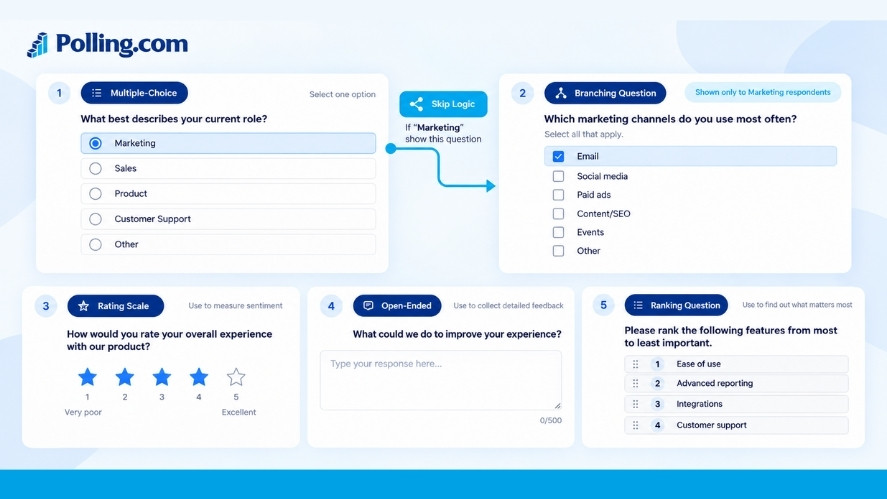
Now choose how people will answer. Start with their needs, not just the tools you have.
Match the survey to your audience
Online surveys work well when people have easy internet access. Phone or paper surveys may be better for some groups. If you use an online survey, make sure it works on a phone as well as a computer.
Also, think about where people will be when they answer. Someone giving quick feedback after a purchase may not want to fill out a long form.
Use the right question for each job
| Question type | Example | Best use |
|---|---|---|
| Single choice | Which delivery option did you use? | One answer from a set of choices |
| Multiple choice | Which features have you tried? | More than one answer may apply |
| Rating scale | How satisfied were you with the delivery time? | Feelings or ratings |
| Number | How many times did you order this month? | Counts or amounts |
| Open text | What should we improve first? | Reasons and ideas |
Closed questions are often easier to count. Open questions give people space to explain a problem in their own words. A mix can work well when each question has a clear purpose.
For example, you might ask for a satisfaction score and then ask, “What is the main reason for your score?” The second question can add context.
That same idea applies to Net Promoter Score (NPS) surveys. NPS uses a 0–10 question about how likely someone is to recommend a business. A follow-up can help you learn why. For examples, see our guide to NPS follow-up questions.
Use skip logic when it helps
Skip logic shows or hides questions based on earlier answers.
Say you ask, “Did you contact customer support in the past 30 days?” People who answer “Yes” can get questions about that call or message. People who answer “No” can move on.
This keeps the survey relevant. Still, every extra path gives you something new to test. Use it where it saves real effort, not just because the tool supports it.
Step 3 check: Does each question type fit the answer you need? Can people skip questions that don’t apply?
Step 4: Write Clear and Fair Questions
The wording of a question can change the answer. So, keep each one short, neutral, and specific.
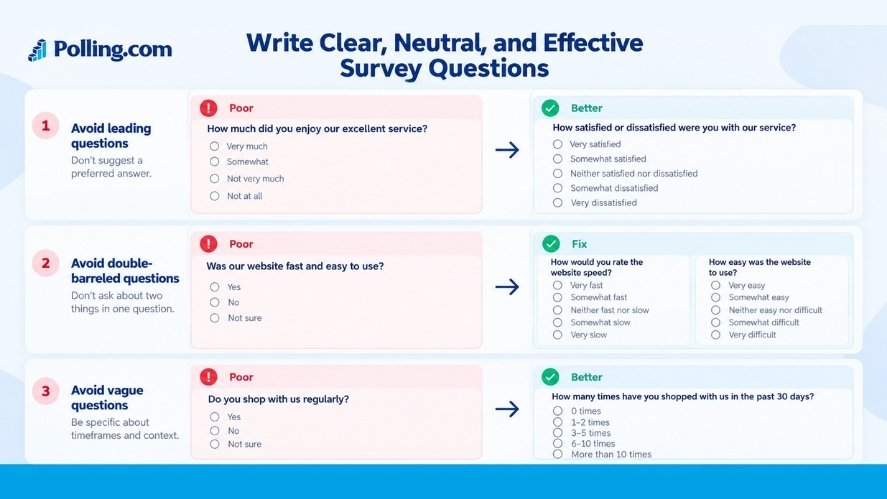
Spot questions that push people toward an answer
Here are three common mistakes:
| Problem | Poor question | Better approach |
|---|---|---|
| Leading | How much did you enjoy our great service? | How satisfied or dissatisfied were you with our service? |
| Loaded | Why is our checkout process so frustrating? | Did you face any problems during checkout? |
| Double-barreled | Was our website fast and easy to use? | Ask two questions: How fast did the website load? How easy was it to use? |
The last example matters. A website can load fast but still be hard to use. One rating can’t tell you which part needs work.
You can find more examples in our guide to double-barreled survey questions.
Use everyday words and clear time frames
Avoid jargon when a simple phrase will do.
Instead of “How would you rate our multichannel support performance?” ask, “How satisfied are you with the help you got by email, phone, or chat?”
Also, replace vague terms like often or regularly with a clear period when you need a count.
Vague: “Do you shop here often?”
Clear: “How many times have you bought from us in the past 30 days?”
That way, people don’t have to guess what often means.
Make answer choices fair and complete
For a single-choice question, the answer ranges should not overlap.
Poor ranges: 0–5, 5–10, 10–15. Someone who made five orders could choose two answers.
Better ranges: 0, 1–4, 5–9, 10–14, 15 or more.
Also, think about whether people need an option such as “Not applicable,” “Don’t know,” or “Prefer not to answer.” These choices mean different things, so use the one that fits the question.
For opinion scales, offer a fair range of positive and negative choices. Don’t leave out a likely answer just because it makes the results less flattering.
For more detail, see Pew Research Center’s guide to writing survey questions.
Step 4 check: Can each person understand the question, give an honest answer, and find a choice that fits?
Step 5: Put Questions in a Natural Order
A survey should feel like a short conversation, not a stack of random questions.
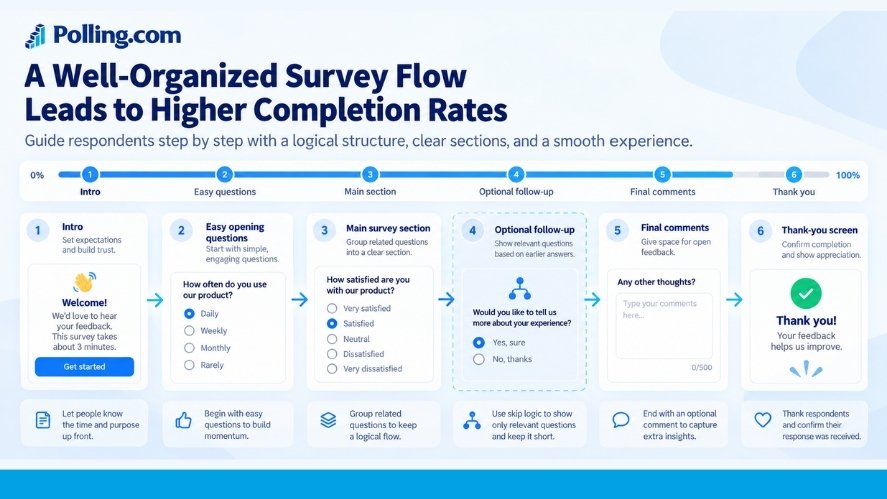
Start with something easy
Begin with a clear, relevant question. For a store survey, you could ask, “Which item did you buy most recently?”
Then move to the person’s experience and overall view. Save more personal questions for later unless you need them first for consent or to check who can take part.
Keep related questions together
A customer survey might follow this order:
- Recent order details
- Product experience
- Delivery experience
- Support experience, if any
- Overall satisfaction
- Ideas for improvement
This order helps people keep track of the topic. However, question order can also shape answers. If you ask about a bad delivery before an overall rating, that event may be on the person’s mind when they rate the whole experience.
If you plan to compare surveys over time, keep key questions and their order the same when you can.
Keep the work reasonable
How many questions should you ask? There isn’t one perfect number. Five easy questions may take less time than two long grids.
Instead of setting a strict limit, test how long the form takes. Then cut repeat questions and any that don’t support your goal. If you use a progress bar, make sure it gives a fair view of what’s left.
For a closer look, read our guide on how many questions a survey should have.
Your Survey Design Checklist should include one simple test: Can someone finish this survey without feeling lost or worn out?
Step 5 check: Do the questions follow a clear path, and is the survey no longer than it needs to be?
Step 6: Check Access, Privacy, and Consent
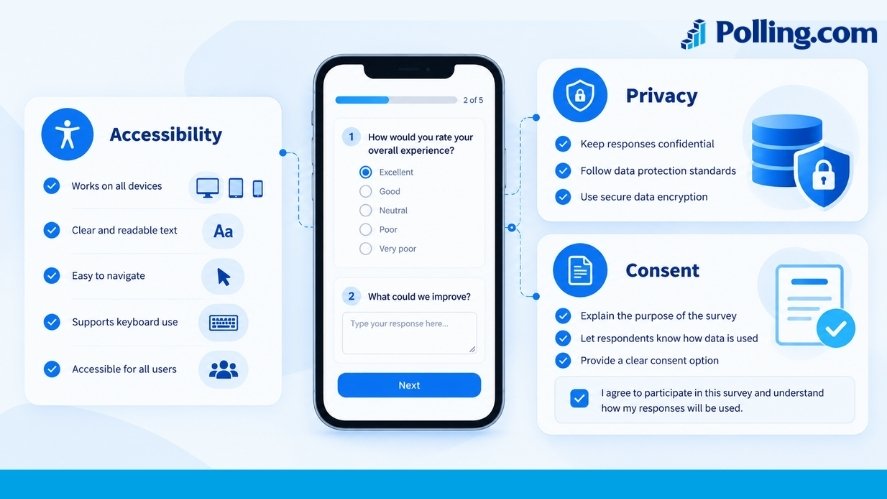
People should be able to use your survey and know what happens to their answers.
Make the form easy to access
Don’t check only how the survey looks on your laptop. Try it on a phone, too.
Make sure that:
- Text is easy to read.
- Every field has a clear label.
- Buttons and choices work with a keyboard.
- Instructions don’t rely on color alone.
- Error messages say what needs to be fixed.
- Screen reader users can follow the form.
For example, a red border alone may not explain a missed answer. Text such as “Please choose one answer before you continue” is clearer.
The W3C guide to accessible forms explains how to build labels, group fields, and show helpful errors.
Tell people how you’ll use their answers
A short introduction should explain who is running the survey, why it exists, and how the answers will be used. Say whether taking part is a choice and give a tested estimate of how long it will take.
You can also point to your privacy notice where needed. Our survey introduction examples offer ways to explain these details in plain words.
Take care with two terms:
- Anonymous means the data does not allow you to identify a person through details you collect or can link to them.
- Confidential means you may know who answered, but you limit who can see or share that information.
A survey that records names or linked email addresses is not anonymous just because you share only totals in the final report.
Collect only what you need
Ask whether each personal detail is needed for the goal. Then review any consent and data rules that apply to your audience and location. For example, the GDPR may apply to some surveys that handle personal data. Other laws may apply elsewhere.
Don’t make a privacy promise that your survey settings can’t support.
Step 6 check: Can people use the form, understand the purpose, and make an informed choice about taking part?
Step 7: Build Your Survey in Polling.com
Once the questions are ready, it’s time to turn the plan into a working survey.
Choose how to start
The Polling.com Survey Creation Guide lists four ways to start: a blank survey, a template, AI-assisted creation, or a copy of an existing survey.
Here’s a simple path you can follow:
- Select Create Survey and choose a starting method.
- Add your questions in the order you planned.
- Enter each question’s answer options and required settings.
- Add branching rules if your survey needs them.
- Check the introduction, sharing method, and end message.
- Preview the full survey before you share it.
A template can save setup time. However, don’t keep every question just because it came with the template.
Polling.com also offers AI-assisted survey creation on eligible plans. If you use it, check every question and answer choice. AI can help you draft a form, but it can’t know if the questions truly fit your research goal.
Check the features you need
Before you build a complex survey, look at your plan’s tools and limits. You may need certain question types, branching rules, ways to share the survey, or options to export results.
Check the current Polling.com plans and features for what your account includes. Don’t assume every feature is part of every plan.
Review the settings
Look at each required question. Does it truly need an answer? If not, consider making it optional.
Also, check that your survey link reaches the people you planned to ask. A public link may be easy to share, but it may not suit a study that needs a defined sample.
At this stage, your Survey Design Checklist moves from ideas on paper to a form people can use.
Step 7 check: Does the live survey match the question plan, and are all settings right for your study?
Step 8: Test Before You Launch
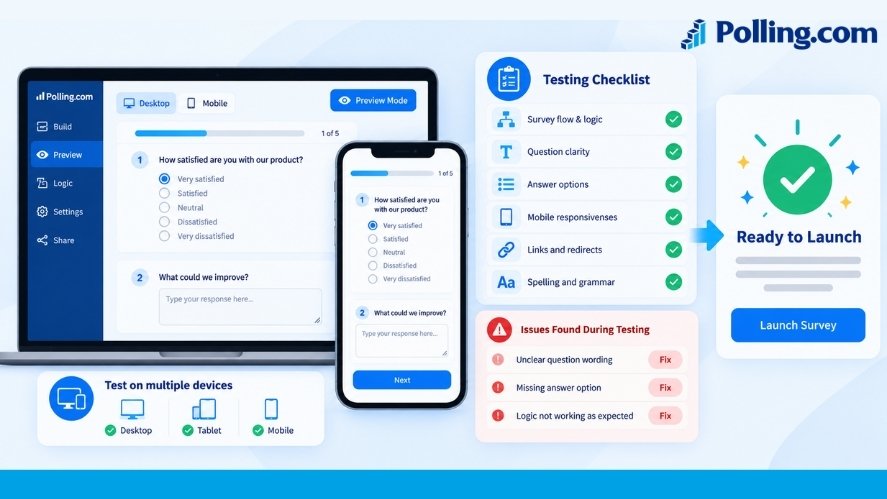
You know what each question means because you wrote it. Other people may see it in a different way. That’s why a test run matters.
Ask people like your real audience to try it
Start with a small group who match the people you want to reach. Ask them to complete the survey and tell you what felt unclear.
You can ask:
- Did any word or question confuse you?
- Was an answer choice missing?
- Did anything feel too personal?
- Was any part hard to finish?
- How long did it take you?
You can also ask people to explain what they thought a question meant. This can reveal a problem that a normal proofread may miss.
Test the whole form, not just the wording
Try each main skip-logic path. Test on a phone and a computer. Use a keyboard to move through the form.
Then send a few test answers. Check that the results are saved under the right questions. Look at any data export you plan to use, too.
For example, a survey may show “Very satisfied” on the screen but store the wrong code in the export. You want to catch that before real answers come in.
Fix problems and test again
Watch for a question that many testers skip or mark “Other.” Maybe the wording is unclear, or maybe the list is missing a common answer.
If you change the survey path or answer options, run another test. Even a small fix can affect what comes next.
A Survey Design Checklist is most useful when it leads to this kind of real test, not just a quick look at the preview screen.
Step 8 check: Have people from your target group tried the form? Do the paths, answers, and saved data work as planned?
Step 9: Plan Your Launch and Follow-Up
A good survey needs the right people to see it. So, plan how you’ll share it before you press Publish.
Choose a way to reach people
Email may work if you have a suitable contact list. A direct link may suit a known group. A QR code may help at an event. Website links and social posts can bring in feedback, but they often attract people who choose to respond on their own.
Pick the method that fits your audience and research goal. Also, keep a record of where you shared the link. That will help you explain who the results may represent.
Write a clear invite
People should know why you’re asking and what to expect. Here’s a short example you can adapt:
Subject: Tell us about your recent order
We’re asking recent customers about their delivery experience. Your feedback will help us find what needs work. The survey takes about five minutes, based on our test run. Thank you for sharing your view.
Only use the five-minute claim if your own testing supports it. Add the correct privacy details and participation link before you send it.
Set dates and watch who responds
Decide when the survey opens and closes. Plan whether to send reminders, and avoid sending them to people who have already opted out.
As answers arrive, check more than the total count. Are the people you need to hear from taking part? If one group is missing, that may affect what you can conclude.
Finally, assign someone to review the results, check data quality, and share the findings. Feedback is most useful when there’s a clear next step.
Step 9 check: Are your invite, sharing plan, dates, reminders, and review tasks ready?
Complete Survey Design Checklist Before Launch
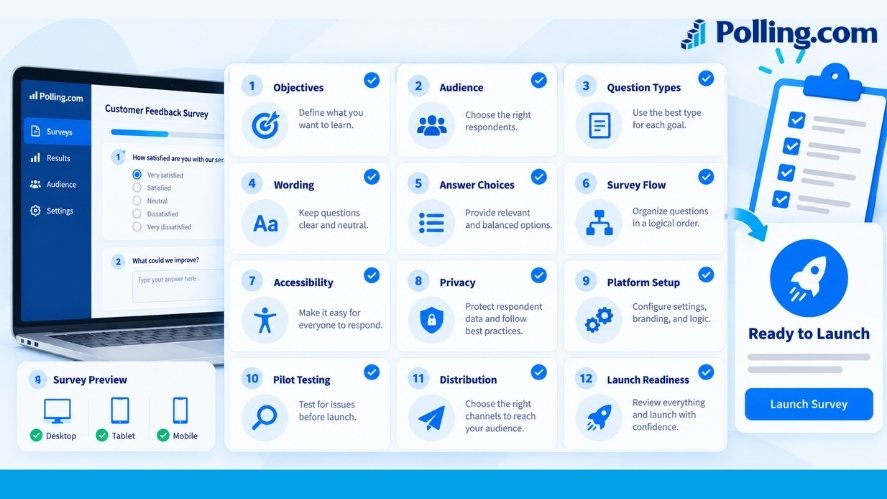
Use this Survey Design Checklist for a final review. You can copy the table into your project plan and mark each task when it’s done.
| Stage | Final check |
|---|---|
| Goal | We know what we want to learn and what we’ll do with the answers. |
| Audience | We know who should answer and how we’ll reach them. |
| Sampling | We understand what our group of respondents can and can’t show. |
| Question types | Each question uses a format that fits its purpose. |
| Wording | Questions are clear, neutral, and ask one thing at a time. |
| Answer choices | Choices are fair, complete, and don’t overlap when only one answer is allowed. |
| Order | Topics follow a clear path, and skip logic works. |
| Length | We’ve removed extra work and tested completion time. |
| Access | The survey works on mobile and with needed access tools. |
| Privacy | We’ve explained data use and checked consent needs. |
| Setup | Required fields, survey access, and data settings are correct. |
| Pilot | People like our audience tested it, and we fixed key issues. |
| Launch | The invite, dates, reminders, and reporting plan are ready. |
For team projects, give each stage an owner. Then note who checked it and what still needs work. This makes the Survey Design Checklist easy to reuse next time.
Common Survey Design Mistakes to Avoid
Even with a plan, a few mistakes can slip through. Here are three worth checking again.
Adding questions with no clear purpose
It’s easy to add “one more question” when several teams want feedback. Soon, the form feels long and unfocused.
For each question, ask, “What will we do with this answer?” If you can’t name a use, consider cutting it.
Writing questions that shape the results
A question like “Why do you prefer our new app?” assumes the person prefers it. Instead, ask which app version they prefer, if either, and follow up with a reason.
Also, watch for missing answer options. People should not have to pick a wrong answer just to move on.
Skipping the test or the audience plan
A form may look fine in the editor and still fail on a phone. And hundreds of replies may tell you little about the wider audience if they all come from the same group.
So, test the form and be clear about who took part. These checks protect the value of the answers you collect.
Survey Design Checklist FAQs
What is a survey design checklist?
A survey design checklist is a set of checks for planning, writing, testing, and sharing a survey. It helps you catch problems before people start answering.
What are the main steps in survey design?
Start with a goal. Choose your audience and sample plan. Pick question types, write fair questions, and set the order. Then check access and privacy, build the survey, test it, and plan the launch.
How many questions should a good survey have?
There is no fixed number. Use enough questions to meet your goal, then remove any that don’t help. Test the time it takes to finish, since a hard question can take longer than several easy ones.
How can I avoid bias in survey questions?
Use neutral words. Ask one thing at a time. Set clear time frames and offer fair answer choices. Also, check question order and who you invite, since bias can come from more than wording.
Why should I test a survey before launch?
Testing helps you find unclear questions, missing answers, broken logic, and mobile issues. It also shows how long the form takes and whether the saved results make sense.
What should I check right before publishing?
Review the goal, target audience, wording, answers, question order, and survey settings. Then send test answers, confirm they were saved, and check your invite and privacy details. The final Survey Design Checklist above covers these steps in one place.
Conclusion: Build a Survey You Can Trust
Good survey results start well before the first person clicks a link. You need a clear goal, the right audience, fair questions, and a form people can finish with ease.
A Survey Design Checklist helps you bring those parts together. It also gives your team a repeatable way to spot problems before they affect the answers.
Use the checklist for your next customer, staff, or product survey. Then review what worked and improve the process for the next round.
Ready to build? Explore Polling.com and turn your survey plan into a form you can test and share.