
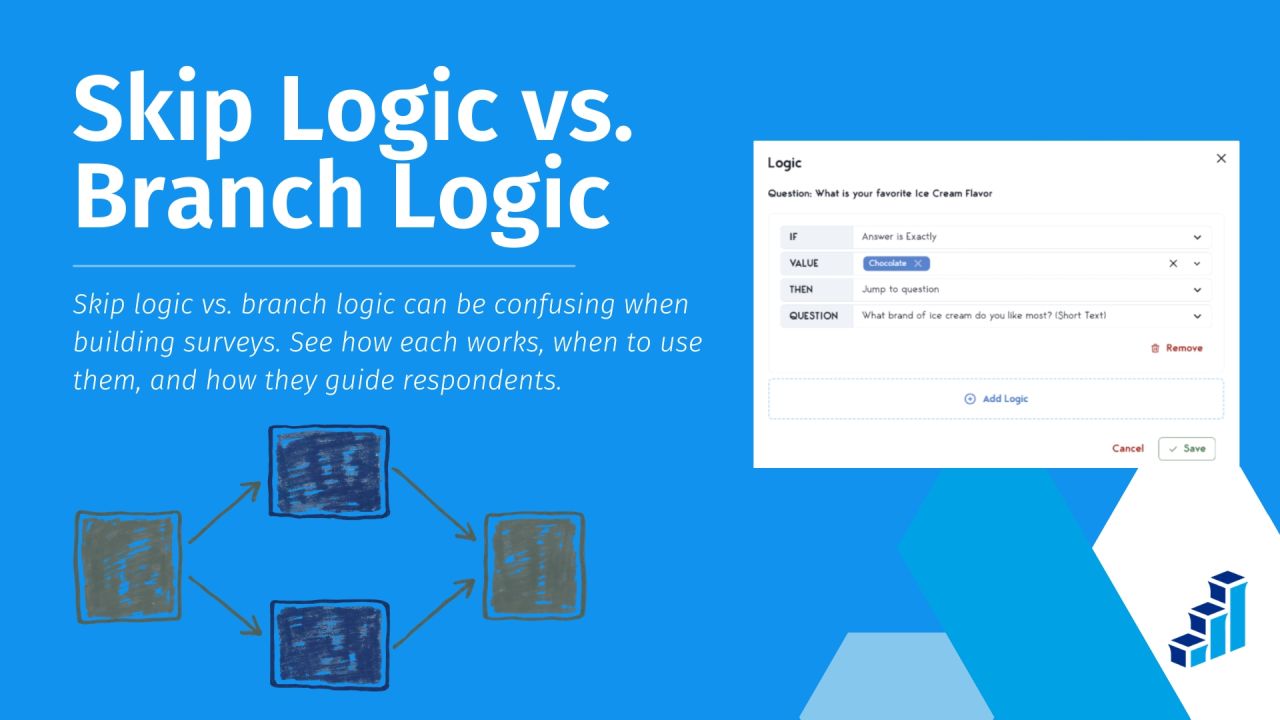
Skip Logic vs. Branch Logic: What Is the Difference?

Survey questions should feel relevant to the people answering them.
When respondents encounter questions that do not apply to their experience, they may become frustrated, lose interest, or abandon the survey.
Conditional survey logic helps prevent this by adapting the questions people see based on their answers.
But what is the difference between skip logic vs. branch logic, and when should survey creators use each?
The terms can overlap, depending on the survey platform.
Rather than relying only on feature names, it helps to understand what each type of rule does and how it changes the respondent’s path.
What Is Survey Logic?
Survey logic is a set of rules that changes what respondents see or do based on their answers or other conditions.
Instead of showing every participant the same questions in the same order, a survey can guide people through a path that fits their responses.
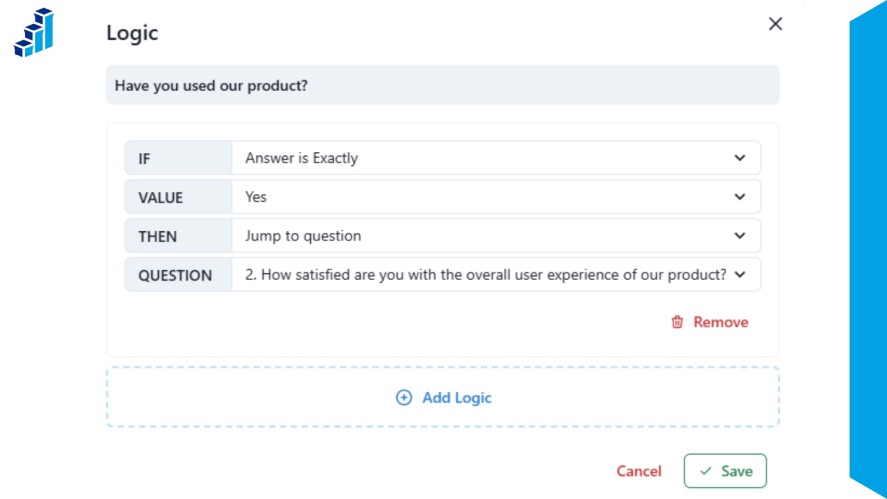
This makes the survey more relevant and can reduce the effort required to complete it.
Respondents can skip questions that do not apply to them or receive follow-up questions based on their situation.
For survey creators, this can also help collect more useful responses by asking people about experiences they actually have.
There are two common approaches in survey logic:
- Skip logic: Moves respondents past questions that are not relevant to them.
- Branch logic: Directs them into different sets of questions based on their answers.
Some platforms use these terms differently, but reviewing survey logic examples shows how both approaches help create a more responsive survey experience.
What Is Skip Logic?
Skip logic is a survey rule that changes where a respondent goes based on their answer to a previous question.
It allows people to bypass questions that do not apply to them and continue with the relevant part of the survey.
How Skip Logic Works
Skip logic starts when a respondent gives an answer that meets a specific condition.
The survey then sends them past one or more questions instead of showing the full sequence.
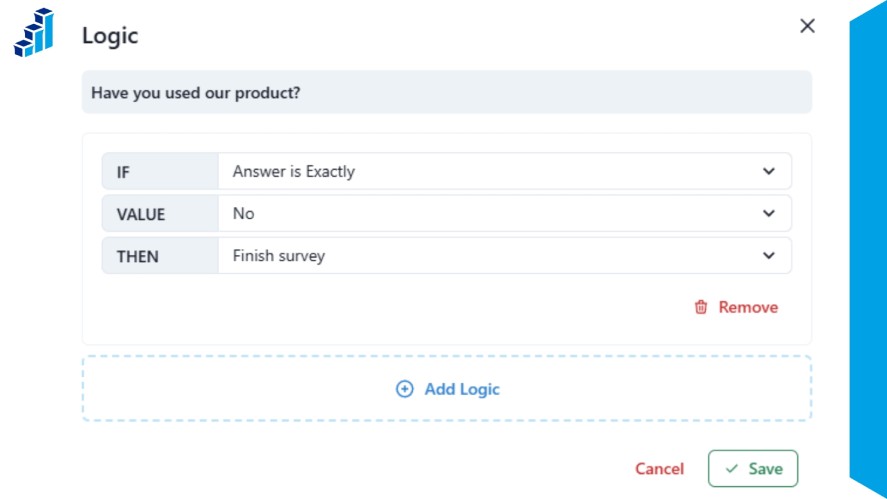
For example, someone who has never used a product does not need to answer detailed questions about using it.
Skip logic can move that respondent to a later relevant question, another section, or an endpoint that ends the survey.
The exact options available can vary by survey platform.
Some tools allow you to skip individual questions, while others can route respondents between sections or end a survey based on their answers.
Skip Logic Example
Imagine you are creating a product survey and want to ask existing users about their experience with your mobile app.
Question: Have you used our mobile app?
- Yes → Continue to questions about the app experience.
- No → Skip the app questions and continue to general brand questions.
This keeps non-users from answering questions they cannot reasonably answer.
It also lets you collect more focused feedback from people who have actually used the app.
When Should You Use Skip Logic?
Skip logic works well when a respondent’s answer determines whether a small part of the survey applies to them.
Common uses include:
- Removing irrelevant follow-up questions: Skip questions about products, services, or experiences a respondent has not used.
- Screening respondents: Send people who meet specific criteria into the relevant part of the survey.
- Skipping sections that do not apply: Move respondents past an entire section when their previous answer makes it irrelevant.
- Ending a survey for respondents who do not qualify: Use a qualifying question to identify participants who should not continue.
- Creating simple Yes/No paths: Send respondents in different directions based on a straightforward answer.
The main goal is simple: show respondents the questions that matter to them and let them move past the ones that do not.
What Is Branch Logic?
Branch logic is a survey rule that sends respondents down different paths based on their answers or other conditions.
Instead of simply skipping a few questions, branching can direct people to different sets or sections that match their role, experience, or other characteristics.
How Branch Logic Works
Branch logic starts with a condition that determines which path a respondent should follow.
Once they meet that condition, the survey routes them to the questions or sections assigned to that path.
This is useful when different groups need substantially different questions.
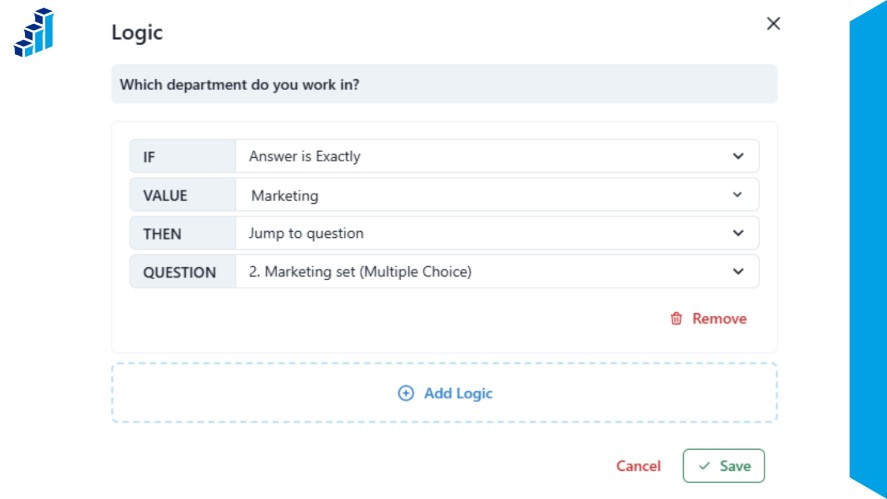
For example, an employee survey can show one set of questions to marketing employees and another to people in engineering.
Each group gets a more relevant survey without having to work through sections that do not apply to them.
The exact way branching works depends on the survey platform.
Some tools may use sections, question groups, or other structures to create separate paths.
Branch Logic Example
Imagine an employee survey that asks respondents about experiences specific to their department.
Question: Which department do you work in?
- Marketing → Marketing question set
- Sales → Sales question set
- Engineering → Engineering question set
- HR → HR question set
A marketing employee would see questions about marketing workflows and goals, while an engineer would receive questions related to engineering work.
This approach keeps each respondent focused on the areas most relevant to their role.
When Should You Use Branch Logic?
Branch logic is useful when different groups need different survey experiences.
Common examples include:
- Employee surveys with role-specific sections: In an anonymous feedback survey, send employees to questions that match their department, role, or responsibilities.
- Customer surveys for different product categories: Show questions based on the product or service a customer uses.
- Market research with different audience segments: Create separate paths for groups with different needs, behaviors, or preferences.
- Different questions based on region or industry: Adapt questions to the market, location, or industry relevant to each respondent.
- Multi-stage qualification surveys: Use responses at one stage to determine which questions or qualification steps come next.
- Surveys with several distinct respondent journeys: Create separate paths when different participants need to answer substantially different sets of questions.
Branch logic becomes especially useful when a survey needs to do more than remove a few irrelevant questions.
It can shape the overall questionnaire around different types of respondents.
Skip Logic vs. Branch Logic
Skip logic and branch logic both power conditional logic forms that dynamically change the questions a respondent sees based on their answers.
The main difference is the scope of the change.
| Factor | Skip Logic | Branch Logic |
|---|---|---|
| Main purpose | Bypass irrelevant questions | Create different respondent paths |
| Typical scope | Questions or sections | Larger question sets or survey paths |
| Complexity | Usually simpler | Can support more complex routing |
| Best suited for | Straightforward conditional jumps | Multiple respondent segments |
| Example | Non-users skip product questions | Different customer types receive different question sets |
The terminology is not standardized across survey platforms.
Some platforms use branching as a broader concept that includes skipping, while others treat skip logic and branch logic as separate features.
This means the same term can describe slightly different functionality depending on the tool you are using.
For that reason, focus on what a logic rule actually does rather than relying only on its name.
Check whether the platform lets you skip individual questions, route respondents between sections, create separate paths, or combine several conditions.
Skip Logic vs. Branch Logic: When Should You Use Each?
The choice between skip logic vs. branch logic depends on how much the survey needs to change from one respondent to another.
Use Skip Logic When You Need a Simple Conditional Jump
Use skip logic when one answer determines whether a specific question or section is relevant.
It works well for simple paths where most respondents follow the same survey, but some need to bypass certain parts.
For example:
- A customer who has not purchased a product skips questions about their purchase experience.
- A respondent who answers “No” to “Have you contacted our support team?” skips the customer service questions.
- A participant who does not meet a research requirement can be sent to the end of the survey.
In each case, the survey structure stays mostly the same. The logic simply removes questions that do not apply.
Use Branch Logic When Different Respondents Need Different Survey Experiences
Branch logic makes more sense when different groups need their own sets of questions.
Instead of making a small jump, the survey can route each group through a different path.
For example, a customer survey might ask what type of product the respondent uses:
- Software customers → Questions about software features and usability
- Hardware customers → Questions about product quality and setup
- Service customers → Questions about support and service experience
A market research survey could use the same approach to give different audience segments different question sets.
This keeps each path focused on the topics that matter to that group.
Use Both When Your Survey Has Complex Respondent Paths
Skip logic vs. branch logic do not have to be competing approaches.
A single survey can use both when respondents need to pass through several conditional stages.
For example, a research survey could:
- Screen respondents with skip logic to remove people who do not meet the basic requirements.
- Route qualified respondents into customer segments based on their answers.
- Give each segment its own question path with questions specific to that group.
- Rejoin respondents for common questions such as demographics or final feedback.
This combination can create a more flexible survey without forcing every respondent through the same sequence.
The key is to use each type of logic where it makes sense rather than adding conditions simply because the survey platform supports them.
How Skip Logic and Branching Work in Polling.com
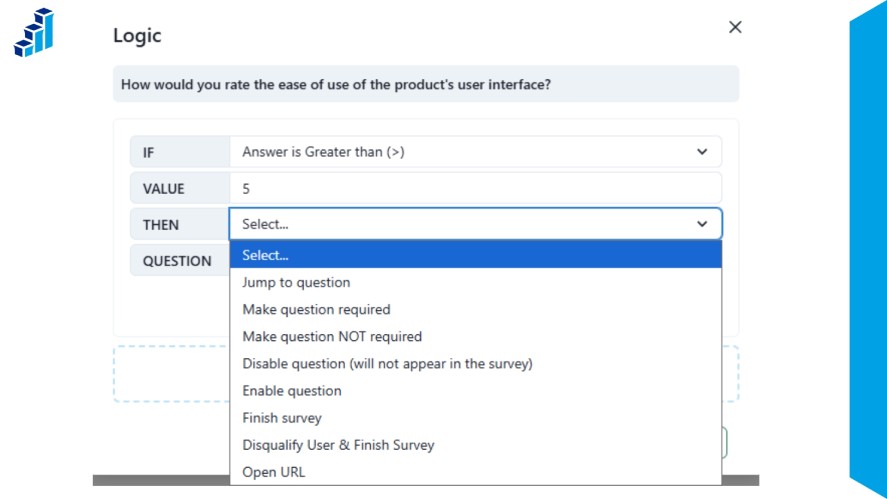
Polling.com supports logic branching that can change a respondent’s path based on previous answers.
Its logic tools include skip logic, section branching, requirement toggling, early survey endings and qualification rules, as well as combinations of multiple conditions.
Branching is available across Polling.com plans, including the Free Plan.
This gives survey creators flexibility to keep simple surveys simple while building more tailored paths when needed.
Creating Survey Logic in Polling.com
Setting up logic in Polling.com is straightforward. Here’s how to do it:
- Select the question that will trigger the logic.
- Open Logic for that question.
- Click Add Logic and choose the appropriate rule.
- Define the resulting path, such as skipping questions or sending respondents to another section.
- Preview and test the survey to make sure each path works as intended.
We recommend testing logic in the preview before applying the survey to respondents.
Read More: Free Survey Tools for Nonprofits: Boost Feedback & Impact
Common Survey Logic Mistakes to Avoid
Survey logic can make a questionnaire more relevant, but poorly planned rules can create confusing paths or prevent respondents from reaching the questions they need.
Watch for these common mistakes when building conditional surveys.
Creating Dead Ends
Every respondent path should lead somewhere intentional.
A logic rule that sends someone to an empty section, an unexpected endpoint, or a path with no way to continue can interrupt the survey.
Review where each condition sends respondents and make sure every path has a clear next step.
Building Overly Complicated Logic
Adding more conditions does not always make a survey better.
Too many rules can make the survey difficult to understand, test, and maintain, especially when several conditions interact.
Use the simplest logic structure that can create the respondent paths you need.
Forgetting to Test Every Survey Path
A survey may work correctly for one answer combination and fail for another.
Test each response that can trigger a logic rule, including different combinations when multiple conditions are involved.
Simulate taking a survey from the respondent’s perspective to check that every path behaves as expected.
Accidentally Showing Irrelevant Questions
Incorrect conditions can send respondents to questions they should have skipped.
This defeats one of the main purposes of conditional logic and can lead to answers based on experiences respondents do not have.
Review each rule to confirm that the questions shown actually match the respondent’s previous answers.
Mixing Survey Logic Terminology
Survey platforms do not always use terms such as skip logic and branch logic in the same way.
One tool may treat branching as a broad form of conditional routing, while another may offer separate skip and branching features.
Focus on what each rule actually does instead of assuming two features with similar names work identically.
Best Practices for Building Conditional Surveys
Whether you are building complex research instruments or interactive fun surveys, a well-planned questionnaire should guide each respondent through a clear path without adding unnecessary rules.
These practices can help you build survey logic that is easier to use, test, and maintain.
- Map respondent paths before building the survey: Decide which groups need different questions and where each path should start and end.
- Keep conditions as simple as possible: Use the fewest rules needed to create the paths you want. Simple logic is easier to test and update.
- Use clear screening questions: Ask questions that quickly identify whether a respondent qualifies or which path they should follow.
- Avoid unnecessary branches: Only create a separate path when respondents genuinely need different questions. Minor differences may not require a new branch.
- Check required questions on every path: Make sure required questions are accessible to everyone who needs to answer them and are not accidentally placed on paths where they do not apply.
- Preview each respondent journey: Follow the survey from the perspective of different respondents to see exactly which questions appear.
- Test survey endpoints and disqualification paths: Confirm that respondents who qualify, do not qualify, or reach the end of a section are sent to the correct destination.
- Review collected data: After launching the survey, check the results for missing responses or unexpected gaps that could indicate a routing problem.
Good conditional survey design is not about creating the most complex logic possible.
It is about creating clear paths that show each respondent the questions that are relevant to them.
Skip Logic vs. Branch Logic FAQs
Not always. Both can change a respondent’s survey path based on their answers, but the terms are used differently across survey platforms.
Yes, combining them can help create more detailed respondent paths. For example, you could use skip logic to remove questions that do not apply, then use branching to send qualified respondents into different question sets based on their answers.
It can reduce the amount of unnecessary work for respondents by removing questions that do not apply to them. However, completion rates depend on many factors, including survey length, question quality, audience, topic, and the channels you use to distribute surveys. Skip logic alone does not guarantee higher completion rates.
Conditional logic is a set of rules that changes a survey based on a respondent’s answers or other conditions. Skip logic and branch logic are two ways to use these rules to create different paths through a survey.
Respondents generally do not see questions that a logic rule tells the survey to skip. The exact behavior can vary by platform, including how skipped questions are recorded or represented in the survey results.
Conclusion
Skip logic vs. branch logic both help create more relevant survey experiences, but they are useful for different types of routing.
- Use skip logic when respondents simply need to bypass questions that do not apply to them.
- Use branching when different respondent groups need substantially different paths or question sets.
The terminology can vary between survey platforms, so focus on what each logic rule actually does rather than relying on the feature name alone.
More complex surveys can also combine both approaches, using simple skips alongside larger respondent paths.
With the right survey logic, you can build questionnaires that adapt to different survey responses without making every respondent answer the same set of questions.
Polling.com lets you create adaptive surveys with logic branching, helping you build paths that fit different respondent experiences.