
User Interface Design Survey Questions: 30 Examples

user interface design survey questions help product teams understand whether an interface actually works for users instead of relying on internal assumptions, stakeholder preferences, or visual taste alone.
A design can look polished and still create friction. A navigation menu can seem logical to the team that built it while confusing first-time visitors. A checkout button can appear obvious to a designer but remain unnoticed by customers. A dashboard can contain every requested feature and still make basic tasks harder than necessary.
The most reliable way to uncover those problems is to gather evidence directly from users.
That is where UI surveys become valuable.
A well-designed survey can help you measure perceived ease of use, navigation clarity, visual consistency, content comprehension, feature discoverability, accessibility barriers, and overall satisfaction. It can also reveal problems your team did not anticipate by giving users space to describe their experience in their own words.
Why UI Feedback Matters in User Interface Design
UI feedback is closely related to ux research, but the two are not exactly the same. UI research focuses heavily on what people see, understand, and interact with inside an interface. Broader UX research may also examine user goals, motivations, workflows, expectations, service experiences, and the complete journey surrounding a product.
For example, a UI study might ask whether users can recognize the primary action on a pricing page. A broader UX study might investigate why users are comparing plans, what information they need before purchasing, and what prevents them from making a decision.
Both types of research can improve a product.
This guide gives you 30 ready-to-use questions, explains which question types work best, shows how to adapt your questions to different stages of the design process, and provides a copy-ready template you can use in your next study.
You will also learn how to turn feedback into design priorities instead of simply collecting opinions.
If you want to build and distribute the survey itself, Polling.com can provide a practical starting point for creating structured questionnaires, collecting responses, and reviewing results. The important part is to begin with a clear research objective.
A good UI survey should always answer one question first:
What design decision will we make differently because of these responses?
What Are user interface design survey questions?
user interface design survey questions are questions used to collect feedback about how people perceive, understand, navigate, and interact with a digital interface.
They can help evaluate websites, mobile apps, SaaS platforms, dashboards, ecommerce stores, internal tools, prototypes, and other digital products.
These questions can capture numerical ratings, written insights, or a combination of both.
Quantitative feedback includes measurable responses such as:
- Ease-of-use ratings
- Satisfaction scores
- Agreement scales
- Task-confidence ratings
- Navigation-clarity ratings
- Readability ratings
Qualitative feedback includes open-ended comments such as:
- What confused you?
- What was hardest to find?
- What would you change first?
- What did you expect to happen?
- Which part of the page was unclear?
Combining both methods can give your team a broader understanding of how users experience the interface.
A simple user interface description outlines the visible elements and components presented on a screen. It may identify a header, navigation menu, search bar, form, button, card layout, or footer.
Research Goes Further
It asks whether users understand those elements and whether the design helps them accomplish what they came to do.
Common areas evaluated through UI surveys include:
- Visual design
- Layout
- Navigation
- Menu organization
- Ease of use
- Content clarity
- Button labels
- Calls to action
- Form usability
- Feature discoverability
- Readability
- Mobile experience
- Accessibility
- Visual consistency
- Overall satisfaction
This information can support user interface design, product optimization, website redesigns, conversion improvement, and broader ui/ux design work.
UI surveys are also related to usability testing, but they should not be treated as the same method.
In usability testing, a researcher typically observes participants as they attempt realistic tasks. This can reveal behavior users may not report accurately themselves.
A survey usually asks participants to describe their perceptions, preferences, satisfaction, confidence, or difficulties.
For example, a participant may say a workflow was easy after completing it. Observation might still show that the participant hesitated, selected the wrong menu twice, and needed several attempts before finishing.
That is why experienced teams often combine surveys with other user research methods.
A ux researcher might use usability testing to identify a problem, analytics to understand how often it occurs, interviews to understand user motivations, and a survey to measure how broadly the issue affects a larger audience.
Why user interface design survey questions Matter
Good interface research helps teams make decisions with evidence.
Without user feedback, design discussions can easily turn into debates based on personal preference.
One stakeholder prefers a sidebar. Another wants tabs. A designer favors a minimal interface. A product manager wants more options visible on the first screen.
None of those opinions automatically tell you what works best for users.
How user interface design survey questions Reveal Real Usability Problems
Users often experience problems that internal teams no longer notice.
People who work on a product every day already know:
- Where features are located
- What internal terminology means
- Which menu contains a specific setting
- What an icon represents
- How a workflow is supposed to function
New users do not have that knowledge.
They may struggle with issues such as:
- Confusing navigation labels
- Hidden controls
- Unclear calls to action
- Overloaded screens
- Unexpected button behavior
- Difficult forms
- Weak visual hierarchy
- Inconsistent layouts
- Hard-to-read text
- Missing feedback after an action
Targeted ui design survey questions can help uncover these problems.
Consider the difference between these two questions:
“Did you like the navigation?”
and
“How easy or difficult was it to find the billing settings?”
The second question is more useful because it connects the response to a specific task.
That makes the result easier to act on.
How user interface design survey questions Measure User Perception
Surveys are especially useful when you need comparable data across multiple respondents.
You can measure:
- Perceived ease of use
- Satisfaction
- Confidence
- Clarity
- Readability
- Visual consistency
- Perceived improvement
- Task difficulty
For example, you might ask:
“How easy or difficult was it to find the pricing information?”
Then use a five-point scale from Very difficult to Very easy.
If you repeat the same question after a redesign using a comparable audience and research setup, you can compare results over time.
This does not prove that the redesign caused every change in the score, but it can provide useful evidence when interpreted alongside other data.
How user interface design survey questions Explain Why Users Struggle
Ratings tell you that a problem may exist.
Open-ended comments can help explain why.
Imagine that users rate a checkout experience 2.6 out of 5 for ease of use.
That number signals friction, but it does not identify the cause.
Comments might reveal that:
- Shipping fees appear too late
- The checkout button is difficult to notice
- Coupon fields are confusing
- Address validation rejects valid entries
- Users cannot find guest checkout
- The mobile form requires too much scrolling
Each issue requires a different solution.
A useful pattern is to pair a rating with a targeted follow-up.
For example:
Closed-ended question: How easy or difficult was it to complete checkout?
Open-ended follow-up: What, if anything, made checkout difficult?
Using both question types helps you see measurable trends while also understanding the reasons behind them.
How user interface design survey questions Help Prioritize Improvements
Not every interface problem should receive the same priority.
A survey can help you identify:
- Frequently reported problems
- Issues affecting important workflows
- Friction that prevents task completion
- Problems concentrated among certain user groups
- Areas with consistently low satisfaction
- Features users struggle to discover
- Changes that users perceive as improvements
Teams collecting broader product insights can also use product feedback surveys to connect interface feedback with customer needs and product priorities.
Teams providing user interface design services can also use structured survey results to support recommendations with user evidence instead of presenting redesign choices as purely subjective.
30 user interface design survey questions to Ask
The following user interface design survey questions examples are designed to be immediately usable.
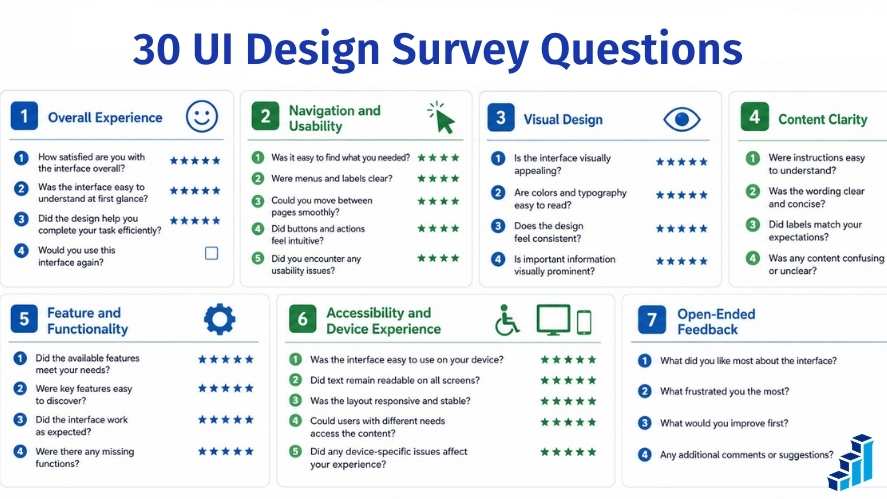
You do not need to ask all 30.
Choose the questions that match your current research objective.
Overall user interface design survey questions
Use these questions to establish a general picture of the interface experience.
1. Overall, how would you rate your experience using this interface?
Suggested format: 1 to 5 rating scale
Use this as a broad benchmark. Follow it with more specific questions if you need to understand what influenced the rating.
2. How satisfied are you with the interface overall?
Suggested format:
- Very dissatisfied
- Dissatisfied
- Neither satisfied nor dissatisfied
- Satisfied
- Very satisfied
3. How easy or difficult was the interface to use?
Suggested format:
- Very difficult
- Difficult
- Neither difficult nor easy
- Easy
- Very easy
4. How closely did the interface match what you expected?
Suggested format: Five-point scale from Not at all closely to Extremely closely
This question can help identify whether the interface follows patterns users recognize.
5. How confident did you feel while using the interface?
Suggested format: Five-point confidence scale
Confidence can reveal uncertainty that does not always appear in task completion data.
Navigation user interface design survey questions
Navigation questions help determine whether users can find information and move through the product efficiently.
6. How easy or difficult was it to find the information you needed?
Suggested format: Five-point ease scale
7. How clear was the main navigation?
Suggested format: Five-point clarity scale
8. How logically organized did the menu options feel?
Suggested format: Five-point scale from Not at all logical to Extremely logical
9. How much effort did it take to accomplish the task you intended to complete?
Suggested format: Five-point ease scale
10. Was there any point where you were unsure what to do next? Please describe what happened.
Suggested format: Open-ended
These questions are especially useful for websites, SaaS products, mobile apps, and information-heavy platforms.
Visual user interface design survey questions
Visual questions should evaluate more than personal taste.
A visually attractive interface is not automatically easy to use.
Focus on whether the design supports comprehension.
11. How clear and organized did the page layout feel?
Suggested format: Five-point clarity scale
12. How appropriate were the colors used throughout the interface?
Suggested format: Five-point appropriateness scale
13. How easy was the text to read?
Suggested format: Five-point ease scale
14. How easy was it to identify the most important information or action on each screen?
Suggested format: Five-point ease scale
15. How visually consistent did the interface feel across different pages or screens?
Suggested format: Five-point consistency scale
These questions can help evaluate layout, typography, hierarchy, consistency, and visual clarity.
Content Clarity user interface design survey questions
Interface wording can create just as much friction as visual design.
Labels, instructions, button text, icons, and error messages all affect usability.
16. How clear were the labels used for menus, buttons, and controls?
Suggested format: Five-point clarity scale
17. How easy were the instructions or explanations to understand?
Suggested format: Five-point ease scale
18. Were any icons or symbols difficult to understand? If yes, which ones?
Suggested format: Yes or No followed by an optional text response
19. How clear were the main calls to action, such as Save, Continue, Submit, or Buy?
Suggested format: Five-point clarity scale
These are useful questions to put on a questionnaire when the goal is to identify wording and comprehension problems.
Feature user interface design survey questions
Feature questions help teams understand discoverability, usefulness, friction, and unmet expectations.
20. How easy or difficult was it to find the feature you needed?
Suggested format: Five-point ease scale
21. Which feature did you find most useful?
Suggested format: Multiple choice or open-ended
22. Which feature, if any, was difficult to understand or use?
Suggested format: Multiple choice with an optional explanation
23. Did you look for any function or action that you were unable to locate?
Suggested format: Open-ended
Question 23 is particularly useful because it can reveal two different issues.
The feature may exist but be hard to discover.
Or the expected functionality may genuinely be missing.
Those situations require different responses from the product team.
Accessibility user interface design survey questions
Surveys cannot replace formal accessibility testing.
The W3C Web Accessibility Initiative recommends evaluating accessibility throughout design and development and notes that automated tools alone cannot determine whether a site is accessible.
However, they can help surface barriers users encounter.
24. How easy was it to read and understand the information displayed on the screen?
Suggested format: Five-point ease scale
25. How would you rate your experience using this interface on your current device?
Suggested format: Five-point rating scale
Consider collecting device type separately when relevant.
26. Did you encounter any accessibility barriers while using the interface? If yes, please describe them.
Suggested format: Yes or No with open-ended follow-up
Responses may identify problems involving:
- Contrast
- Text size
- Keyboard navigation
- Screen-reader compatibility
- Touch targets
- Motion
- Forms
- Focus states
- Zoom behavior
Any reported accessibility issue should be investigated with appropriate technical and user testing methods.
Open-Ended user interface design survey questions
Open-ended questions are most useful when they are specific enough to prompt actionable feedback.
27. What was the most difficult part of using this interface?
28. If you could change one thing about the interface first, what would it be?
29. Was anything confusing, unexpected, or different from what you thought would happen?
30. What would make this interface easier for you to use?
These questions can uncover problems your team did not anticipate.
They are usually more informative than simply asking:
“Do you have any other comments?”
user interface design survey questions by Research Stage
Survey questions should change depending on when you are conducting the research.
A question that works before a redesign may not be the best question during prototype testing.
user interface design survey questions Before a Redesign
Before redesigning an existing product, establish a baseline.
Useful questions include:
- How quickly and comfortably can you locate the information you are looking for?
- Which area of the existing interface creates the most difficulty for you?
- Which tasks take more effort than expected?
- Which parts of the interface work well?
- What would you change first?
- Which features are hardest to find?
- How satisfied are you with the current navigation?
- How readable is the interface on your usual device?
These UI redesign survey questions help prevent unnecessary changes.
Teams sometimes redesign a familiar product based on internal preferences and accidentally remove patterns users already understand.
Baseline research helps identify what should be preserved as well as what should be improved.
user interface design survey questions During Prototype Testing
Prototype survey questions should focus on expectations, clarity, discoverability, and perceived effort.
Try questions such as:
- What did you expect to happen when you selected this option?
- How clear was the navigation?
- How confident were you that you knew what to do next?
- Which part of the screen was hardest to understand?
- Was anything missing?
- Which label was least clear?
- How easy would this workflow be to use regularly?
- What would you change before this design is released?
Survey data is most useful here when paired with observed behavior.
A participant may report that a task felt easy even after hesitating several times.
Observation and self-reported feedback can therefore tell different parts of the same story.
user interface design survey questions After a Redesign or Product Update
After launch, focus on change.
Useful website redesign survey questions include:
- Compared with the previous version, how easy is this interface to use?
- Is it easier or harder to find important information?
- Which change improved your experience most?
- Has anything become harder to use?
- How satisfied are you with the updated interface?
- Which part of the new design is least clear?
- What should we improve next?
Be careful when interpreting responses from long-time users.
People often become efficient with familiar interfaces, even imperfect ones. A redesign can temporarily feel harder simply because established habits no longer work.
That does not mean every negative reaction should be ignored.
It means the results should be interpreted in context.
Which Survey Question Types Work Best for UI Research?
Choosing the right format affects the quality of your results.
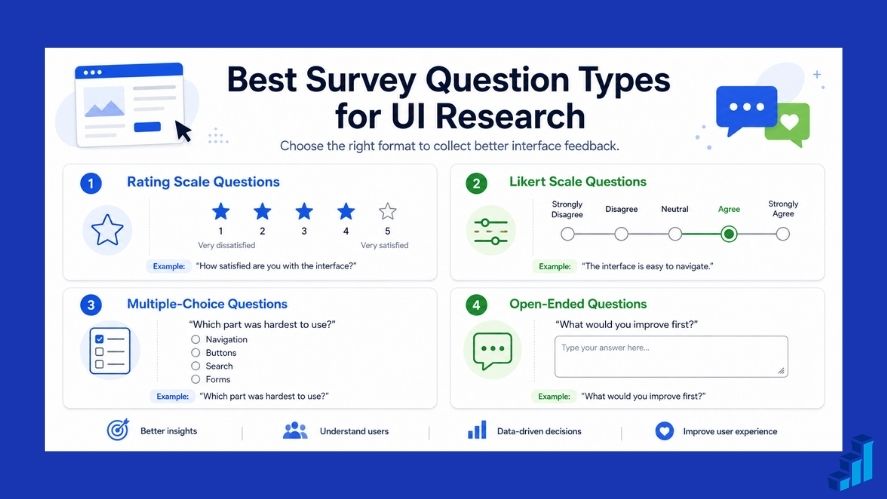
Different question types are suited to different objectives.
Rating Scale user interface design survey questions
Rating scales are useful when you need measurable feedback.
Choosing the right survey scale also makes responses easier to compare and interpret.
Example:
How easy or difficult was it to find the search function?
Possible responses:
- Very difficult
- Difficult
- Neither difficult nor easy
- Easy
- Very easy
This type of question works well for:
- Ease of use
- Clarity
- Readability
- Confidence
- Satisfaction
- Visual consistency
Keep scale direction consistent where possible.
If a higher number means a better experience in one question, avoid reversing that meaning unexpectedly in another.
Likert Scale user interface design survey questions
Likert-style questions ask respondents how strongly they agree or disagree with a statement.
Example:
The navigation labels were easy to understand.
Responses:
- Strongly disagree
- Disagree
- Neither agree nor disagree
- Agree
- Strongly agree
This approach can work well for perceptions such as:
- Clarity
- Consistency
- Confidence
- Ease
- Trust
- Satisfaction
Use balanced response options.
Avoid scales that offer more positive choices than negative choices.
Multiple-Choice user interface design survey questions
Multiple-choice questions make responses easier to categorize.
Example:
Which area was most difficult to use?
- Main navigation
- Search
- Filters
- Account settings
- Checkout
- Other
Use this format when you can define meaningful response categories in advance.
Make sure response options are understandable and do not overlap unnecessarily.
An “Other” option can help when you cannot reasonably list every possible answer.
Open-Ended user interface design survey questions
Open-ended questions are useful when users may identify problems you did not anticipate.
Examples:
- What confused you?
- What would you change?
- What did you expect to happen?
- Why was this task difficult?
- What information was missing?
The disadvantage is that open-ended responses require more effort from participants and more analysis from researchers.
Avoid filling a survey with text boxes.
A stronger approach is usually to combine structured questions with a small number of focused open-ended follow-ups.
The Interaction Design Foundation provides useful background on UX surveys and their role in user research. Pew Research Center also publishes respected guidance on survey-question wording, ordering, response choices, and pretesting.
These principles matter because poorly designed questions can introduce measurement problems even when the interface research objective itself is strong.
How to Write Better user interface design survey questions
Strong survey methodology improves the quality of the feedback you collect.
Ask About One Thing at a Time in user interface design survey questions
Avoid double-barreled questions.
Poor question:
How easy and visually appealing was the checkout page?
This asks the respondent to evaluate two separate things.
The page might be easy to use but visually unattractive.
Or it might look impressive while being frustrating to navigate.
Use two questions instead.
Better:
How much effort did you need to complete the checkout page successfully?
Then ask:
How visually appealing did you find the checkout page?
Polling.com’s guide on how to write good survey questions for free online survey tools can provide additional guidance on wording, scales, and survey flow.
Avoid Leading user interface design survey questions
Do not tell respondents how they should feel.
Poor question:
How much did our improved navigation make the website easier to use?
Avoiding survey bias is especially important when teams already have a preferred design outcome.
The word “improved” assumes the navigation became better.
A more neutral version is:
How would you rate the navigation in the updated website?
You might then ask:
Compared with the previous version, is the navigation easier, harder, or about the same to use?
Neutral wording is especially important when a company has already invested heavily in a redesign.
Research should evaluate the result, not confirm the preferred outcome.
Make user interface design survey questions Specific
Avoid vague questions such as:
What did you think about the website?
A respondent might answer about:
- Pricing
- Branding
- Content
- Customer service
- Product quality
- Navigation
- Page speed
Instead ask:
How easy or difficult was it to locate the pricing page?
Specific questions are easier to interpret and connect directly to design decisions.
Combine Quantitative and Qualitative user interface design survey questions
Closed-ended questions identify patterns.
Open-ended questions can explain those patterns.
For example:
How easy was it to find the export button?
Follow with:
What made the export option easy or difficult to find?
This combination gives you a measurable result and explanatory context.
Many customer feedback tools, feedback tools, and product feedback tools support both formats.
When selecting a platform, do not focus only on the number of available question types.
Look at whether the tool supports the actual workflow you need, including distribution, response review, analysis, and collaboration.
Ask Questions Users Can Realistically Answer
Avoid requiring precise recall of experiences from long ago.
Poor question:
Think about your first session eight months ago. How clear was the second icon in the left navigation?
Most users cannot answer that reliably.
Collect feedback closer to the interaction whenever possible.
This is one reason post-task surveys and contextual feedback can be valuable.
A customer feedback management tool may help centralize feedback, but timing and question design still determine whether the information is useful.
Pretest Before Launching
A survey should be tested before it is distributed widely.
Ask a small number of people to complete it.
Then check:
- Did they interpret each question as intended?
- Were any response options missing?
- Did any terms confuse them?
- Did the survey feel repetitive?
- Was the scale direction clear?
- Did mobile users have trouble responding?
- Was the questionnaire longer than expected?
It is also worth reviewing survey question order because earlier questions can influence how respondents interpret and answer later ones.
A misunderstood question does not become better simply because 1,000 people answered it.
Common UI Survey Question Mistakes to Avoid
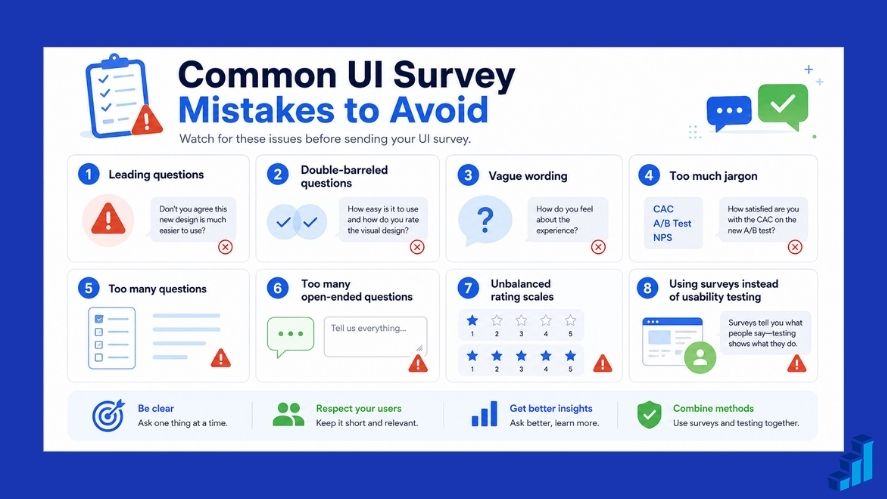
Several mistakes regularly reduce the usefulness of interface research.
1. Leading Questions
Avoid wording that suggests a correct or preferred answer.
2. Double-Barreled Questions
Do not ask respondents to evaluate two different things with one response.
3. Vague Wording
Ask about specific interactions, pages, features, or tasks whenever possible.
4. Too Much UX or UI Jargon
Users should not need to understand terms such as affordance, progressive disclosure, information architecture, or interaction pattern unless those terms genuinely match the audience.
5. Asking Too Many Questions
Long surveys can create survey fatigue.
Choose only the questions connected to your current research goal.
6. Overusing Open-Ended Questions
Writing requires effort.
Use open responses where explanation is valuable, not after every rating.
7. Using Unbalanced Rating Scales
Keep positive and negative options reasonably symmetrical.
8. Asking Questions That Do Not Support a Decision
Before adding a question, ask:
What will we do differently depending on the answer?
If there is no useful answer, reconsider the question.
9. Treating Surveys as a Replacement for Usability Testing
Users cannot always accurately explain what caused difficulty.
Behavioral observation can reveal problems that self-reported feedback misses.
Polling.com’s article on common mistakes in survey design and how to avoid them provides a useful supporting resource.
You can also review survey design best practices to avoid bias and confusion for additional guidance on clarity, neutrality, and response design.
How to Create a UI Design Survey With Polling.com
Once you have defined your research goal, Polling.com can serve as the platform where you turn those questions into a live questionnaire.
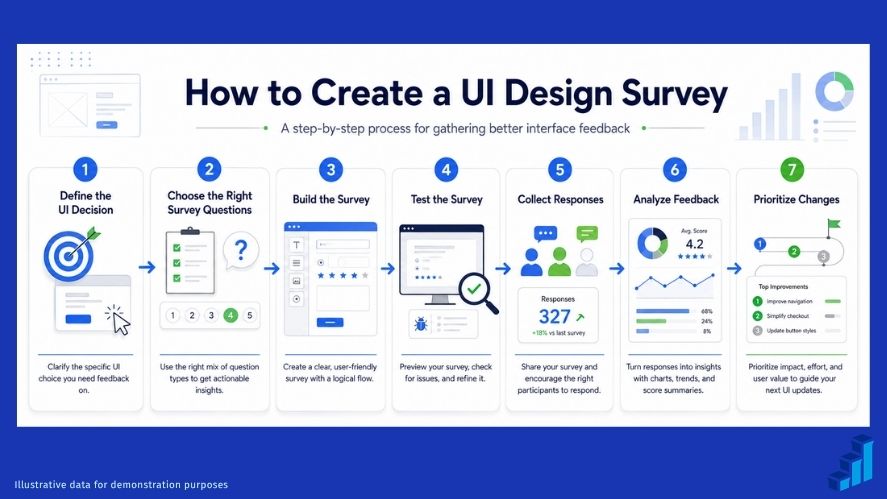
The process should begin with the decision you are trying to make.
Step 1: Define the UI Decision You Need to Make
Do not begin by adding every question you can think of.
Start with a specific objective.
For example:
- Should we reorganize the navigation?
- Is the new checkout easier to understand?
- Can users find the reporting feature?
- Is the dashboard too crowded?
- Do users understand the new account settings?
- Is the mobile layout creating friction?
A clear objective prevents unnecessary questions.
Step 2: Select the Right Questions
Choose only the questions that support your objective.
If you are evaluating navigation, a short questionnaire might include:
- How straightforward was it to locate what you were looking for?
- How clear was the main navigation?
- How logically organized were the menu options?
- Did you encounter any moment when the next step was unclear?
- What would make the navigation easier to use?
That may be enough.
More questions do not automatically produce better research.
Step 3: Build the Survey in Polling.com
The Polling.com survey builder can be used to structure your questionnaire and collect responses.
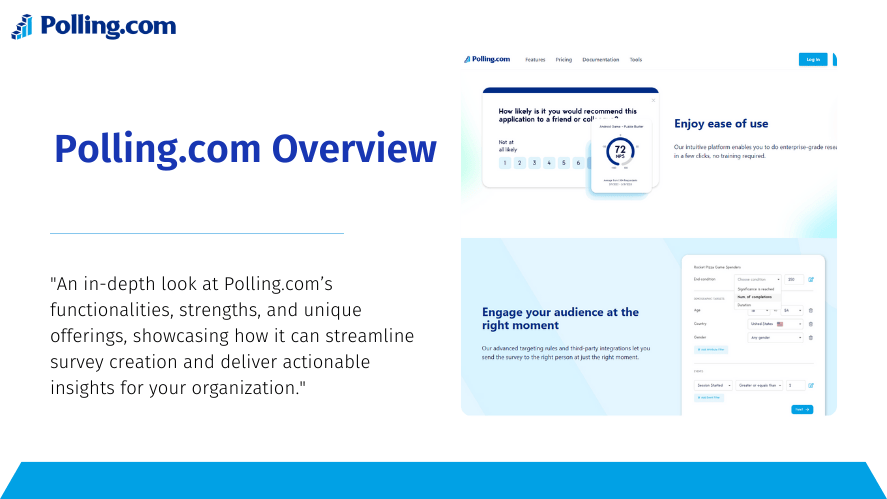
Depending on the features available in your account and the current product offering, you may be able to work with different question formats, templates, presentation options, distribution methods, integrations, and response analysis features.
For current details, consult the official Polling.com Surveys Documentation.
You can also explore Polling.com’s survey question types when choosing between ratings, multiple-choice questions, open text, and other formats.
UI survey can be designed to evaluate how clearly users understand the interface and how comfortably they interact with it.
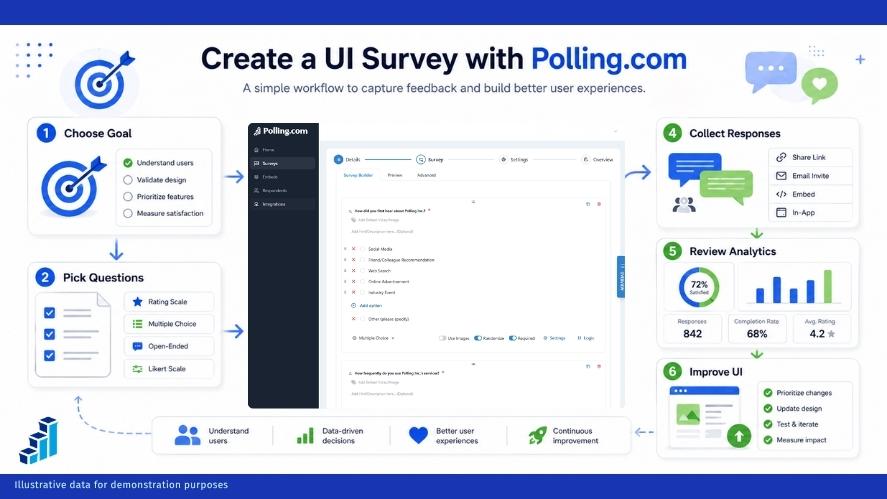
UX survey can expand the scope to include broader workflows and end-to-end experience.
User feedback survey can be useful when your objective includes general product perceptions as well as interface feedback.
When appropriate, Polling.com survey templates can provide an initial framework that you can customize around your product and research goals.
If you are comparing a Polling.com free survey tool option with other platforms, review the current plan details directly before making decisions based on response limits, available integrations, branding, analytics, or advanced functionality.
Product features and plan terms can change over time.
Step 4: Test Your Survey Before Sending It
Complete the questionnaire as if you were a user.
Test it on desktop and mobile when both experiences matter.
Review:
- Question order
- Wording
- Response options
- Scale labels
- Mobile presentation
- Survey length
- Required fields
- Branching or conditional logic
- Submission behavior
Have someone outside the design team test it if possible.
People unfamiliar with the project are more likely to notice assumptions hidden in your wording.
Step 5: Analyze Responses and Prioritize Changes
Do not look only at average scores.
Look for patterns.
Ask:
- Which questions consistently receive low ratings?
- Which problems appear repeatedly in written comments?
- Are certain user groups reporting more difficulty?
- Are critical tasks affected?
- Do complaints align with product analytics?
- Do the same issues appear in usability sessions or support tickets?
- Which improvement would remove the most friction?
This turns feedback into a prioritization system.
It is also where a survey becomes more valuable than a simple satisfaction poll.
Companies comparing market research tools or researching the best market research tools should use the same principle.
The software helps collect information.
The quality of the decision still depends on research design, interpretation, and context.
Likewise, teams evaluating survey tools, best survey tools, or free survey tools should consider more than price or the number of question types.
Think about the complete workflow:
- Can you build the questionnaire you need?
- Can you distribute it to the right users?
- Can participants respond easily?
- Can your team review the results efficiently?
- Can you turn those results into decisions?
Example user interface design survey questions Template
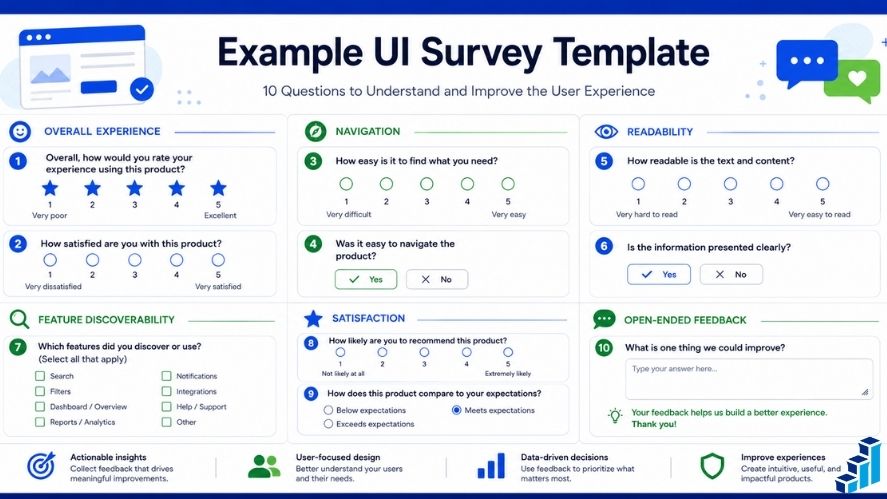
Below is a concise, copy-ready 10-question template.
It works as a starting point for a website, app, SaaS platform, dashboard, or prototype.
1. Overall Experience
Overall, how would you rate your experience using this interface?
Format: 1 to 5 rating scale
2. Navigation
How easy or difficult was it to find the information you needed?
Format: Very difficult to Very easy
3. Navigation Clarity
How clear was the main navigation?
Format: 1 to 5 clarity scale
4. Readability
How easy was the text to read?
Format: Very difficult to Very easy
5. Visual Hierarchy
How easy was it to identify the most important action on the page?
Format: 1 to 5 ease scale
6. Content and Controls
How clear were the labels, instructions, buttons, and controls?
Format: 1 to 5 clarity scale
7. Feature Discoverability
Was there anything you expected to find but could not locate?
Format: Yes or No plus optional explanation
8. Satisfaction
Overall, how satisfied are you with the interface?
Format:
- Very dissatisfied
- Dissatisfied
- Neither satisfied nor dissatisfied
- Satisfied
- Very satisfied
9. Main Difficulty
What was the most difficult part of using the interface?
Format: Open-ended
10. Improvement Priority
If you could change one thing about the interface, what would you change first?
Format: Open-ended
This template intentionally mixes structured data with qualitative feedback.
It is short enough to reduce unnecessary respondent burden while still covering the major areas of interface quality.
Frequently Asked Questions About user interface design survey questions
How many user interface design survey questions should a UI survey have?
There is no single ideal number.
A short post-task questionnaire may need only three to five questions.
A broader study might use eight to fifteen.
The correct length depends on:
- Research objective
- Audience
- Survey context
- Question complexity
- Number of open-ended responses
- How much time respondents are likely to give you
Do not add questions only because you have space.
A focused five-question survey can produce more useful feedback than an unfocused 25-question questionnaire.
What is the difference between a UI survey and a UX survey?
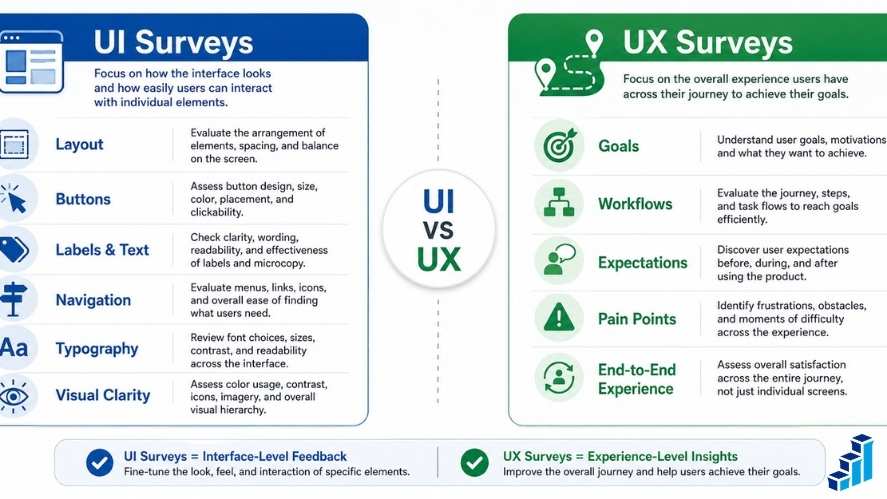
A UI survey focuses primarily on the interface itself.
Topics may include:
- Layout
- Navigation
- Buttons
- Labels
- Visual hierarchy
- Typography
- Controls
- Forms
- Icons
- Readability
- Feature discoverability
A ux survey may include those topics but can also examine:
- User expectations
- Goals
- Motivations
- Workflow
- Satisfaction across the complete journey
- Service interactions
- Pain points outside the interface
This is why ui ux survey questions often overlap.
UI research frequently operates as one part of broader UX research.
When should you conduct a UI design survey?
Useful moments include:
- Before a redesign
- During concept evaluation
- During prototype testing
- Immediately after a usability task
- After launching a major interface update
- After users complete an important workflow
- When investigating a decline in satisfaction
- When evaluating recurring customer complaints
Collect feedback as close to the relevant experience as practical.
That reduces reliance on distant memory.
Should UI surveys use open-ended or closed-ended questions?
Usually both.
Closed-ended questions are efficient for measuring patterns.
Open-ended questions help explain those patterns.
For example:
How easy was it to find the account settings?
Follow with:
What made the account settings easy or difficult to find?
The first question gives you a structured result.
The second provides context.
This combination often produces more useful information than relying on either format alone.
How do you measure user satisfaction with an interface?
Use a clearly defined, balanced satisfaction scale tied to a specific experience.
For example:
How satisfied are you with the account settings interface?
Possible responses:
- Very dissatisfied
- Dissatisfied
- Neither satisfied nor dissatisfied
- Satisfied
- Very satisfied
If you want to track changes over time, keep the wording and scale consistent whenever the research context is comparable.
Do not treat satisfaction as the only measure of interface quality.
A person can report being generally satisfied while still experiencing serious friction in a specific task.
That is why satisfaction ratings should be interpreted alongside task-specific questions and, where possible, behavioral evidence.
Conclusion: Use user interface design survey questions to Make Better Design Decisions
Useful user interface design survey questions help you understand whether people can actually use your interface with confidence.
The goal is not to collect as many opinions as possible.
The purpose is to uncover the insights your team needs to make more informed design choices.
Start with a specific research objective.
Choose only the questions connected to that objective.
Use rating scales when you need measurable patterns.
Use open-ended questions when you need to understand why users struggled.
Keep wording neutral.
Avoid asking about multiple ideas in the same question.
Pretest your survey before sending it widely.
Most importantly, do not treat survey data as a replacement for usability testing, analytics, interviews, or other evidence.
Use it as one part of a broader research process.
If you are ready to collect interface feedback, you can use Polling.com to turn the questions in this guide into a focused survey.
Start with one design decision.
Select the questions that can help you make it.
Build your questionnaire using the Polling.com survey builder.
Test the experience before launch.
Then use the responses to identify recurring friction, prioritize improvements, and give your next design iteration a stronger evidence base.
A better interface does not begin with asking users whether they like the design.
It begins with asking questions that help you understand what they can do, where they struggle, what they expect, and what should improve next.