
Pricing Plans for Top Survey and Polling Tools in 2026

When choosing the right tool for collecting opinions or insights, understanding pricing plans becomes a crucial part of the decision-making process. Whether you’re running a small business, managing a research team, or launching a one-time feedback form, the cost of survey and polling software can significantly affect both your budget and the quality of your results.
In 2026, the landscape of survey and polling tools has become broader and more advanced. Users now have access to a wide range of platforms with flexible models ranging from completely free tiers to highly customizable enterprise-level plans. However, the variety in pricing survey options can make the selection process overwhelming.
So how do you choose the right tool that balances price with the features you actually need? This guide will break down the top survey and polling software platforms, their pricing plans, and what to expect at each level.
What to Consider in Survey & Polling Pricing Plans
Before diving into the comparison of actual platforms, it’s important to understand the key pricing considerations. Not all tools charge the same way, and some might look affordable at first glance but quickly add up due to hidden limits or extra features.
Free vs. Paid Plans
When comparing survey tools, one of the most common distinctions is between free and paid plans. Many platforms offer a free tier to attract new users, especially freelancers, educators, or startup teams. However, these plans are often limited in critical areas like analytics, branding, or number of responses.
For example, Google Forms is a popular free site survey tool that allows unlimited questions and responses. It’s ideal for basic feedback collection or internal use. In contrast, SurveyMonkey pricing includes a free basic plan but limits the number of questions per survey and the number of responses you can view.
Meanwhile, survey monkey plans unlock more advanced features like custom branding, response exports, logic jumps, and team collaboration but only at a cost. The same applies to tools like Typeform and Survicate, which use free tiers primarily as entry points to paid subscriptions.
In short, free tools are great for testing or simple projects, but growing teams often need more than what’s available without a subscription.
Cost Per Response vs. Subscription Model
Pricing models vary between platforms. While some use a subscription-based approach with monthly or annual fees, others charge based on the number of responses collected. To better understand the differences, check the comparison table below.
| Feature | Cost Per Response Model | Subscription Model |
|---|---|---|
| Billing Method | Pay based on the number of responses | Pay monthly or annually regardless of volume |
| Best For | One-time surveys, irregular usage | Ongoing data collection, consistent needs |
| Cost Predictability | Variable costs — can increase with volume | Fixed cost — easier to budget |
| Scalability | Can get expensive as response volume grows | More scalable with flat-rate plans |
| Feature Access | May require add-ons for advanced features | Most features included in tier |
| Common Use Cases | Market research, event feedback | Customer satisfaction, regular tracking |
| Examples | Some enterprise tools, pay-as-you-go APIs | SurveyMonkey, Typeform, Polling.com |
| Downsides | Hard to predict total costs | Paying even when not using full capacity |
Subscription-based plans are common with tools like SurveyMonkey, Typeform, and Zoho Survey. They often provide access to a set of features and a capped or unlimited number of responses per month. These plans are predictable and scalable, making them a good choice for businesses that conduct regular surveys.
On the other hand, some platforms charge based on the number of responses or credits used. This model is helpful for those who only run occasional surveys or need to gather large volumes of data quickly.
However, costs can grow fast. For instance, a survey that receives 5,000 responses could quickly outpace a basic subscription, especially if survey analytics or exports are behind a paywall. This is why evaluating your expected survey process and volume is essential before committing to a plan.
Hidden Limits & Add-Ons
It’s not always clear what’s included in each plan. Some platforms advertise a low starting price, but users often discover that key features require extra payments or upgrades.
Common features often found behind paywalls include:
- Logic branching
- Advanced question types for surveys
- Exporting survey and results
- Custom branding
- Integrations with CRM or email tools
- Team collaboration or admin roles
- Survey methodology tools and analysis
These add-ons are often critical for professional teams or researchers who care about the response rate, survey analysis, or syncing with a customer feedback platform.
Therefore, when evaluating survey and polling software, it’s wise to read the fine print. Consider what your organization really needs, such as analytics or export formats, and make sure they’re included in your pricing tier.
Pricing Plans Compared Across Leading Platforms
Now let’s explore how different tools stack up against each other. The following platforms are among the most popular and effective options in 2026 for various types of users.
Google Forms — Free Survey Tool
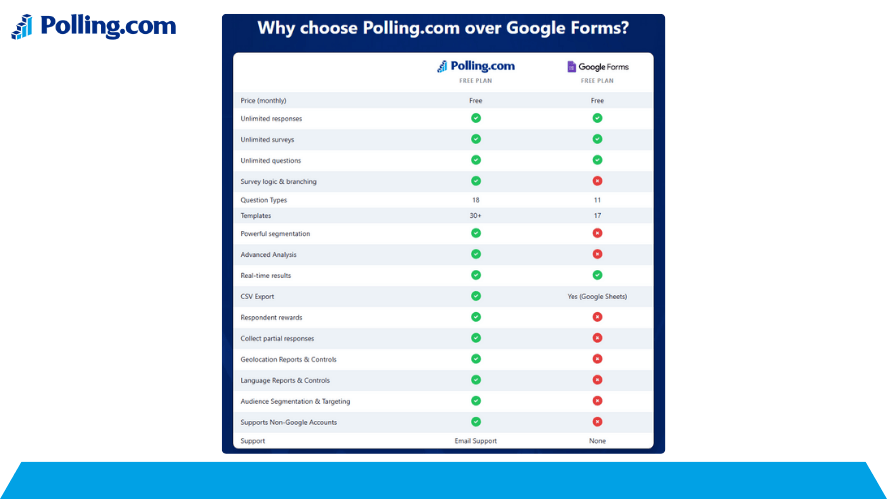
Price: 100% free with a Google account.
Best For: Individuals, educators, startups, and basic data collection.
Key Pros:
- Unlimited surveys and responses
- Integrates with Google Sheets
- Easy sharing and collaboration
Cons:
- Very basic design options
- No advanced logic branching
- Limited to basic analytics unless exported
As a free site survey tool, Google Forms remains a top choice for simple use cases. It supports various types of surveys, from event RSVPs to quick feedback forms. However, it’s not designed for deep survey analytics or professional branding.
SurveyMonkey — Flexible Subscription Tiers
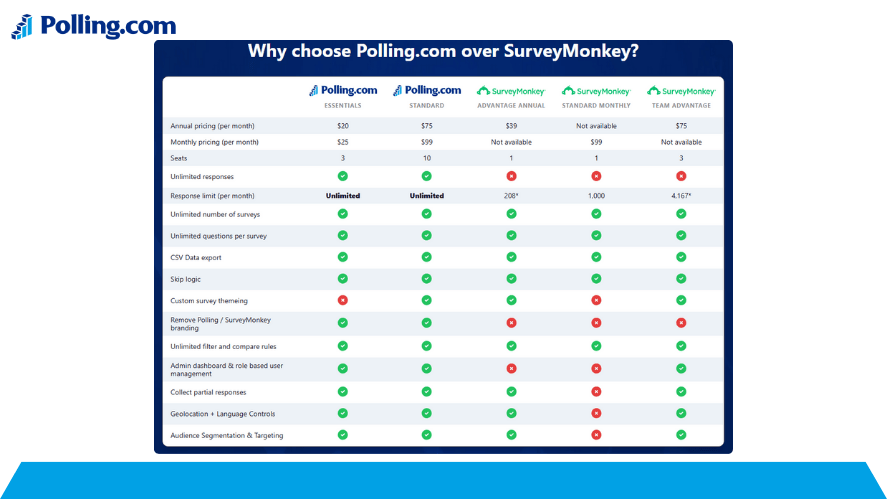
Price: Free basic plan; paid options start from ~$25/month.
Use Cases: Market research, customer feedback tools, academic surveys.
Plans:
- Basic (Free): Limited to 10 questions and 40 responses
- Standard: Unlocks exports and custom themes
- Advantage/Premier: More logic options, analytics, and team features
SurveyMonkey pricing caters to both casual users and business professionals. The platform has evolved to include team collaboration, survey and results dashboards, and advanced filtering. That said, accessing these tools requires moving beyond the free plan.
Their survey monkey plans are designed around growth, allowing you to scale features as needed. It’s one of the most popular platforms for researchers and marketers alike, especially those working with a customer feedback management tool or CRM integration.
Typeform — Engaging Conversational Surveys
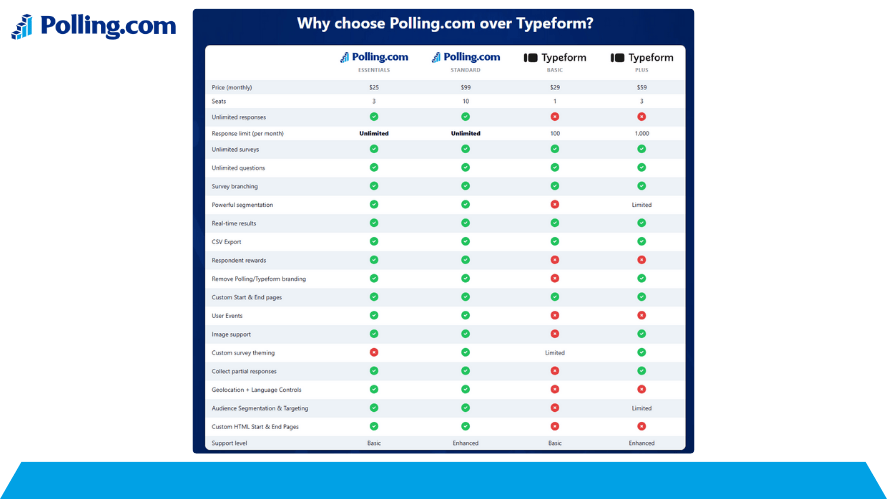
Price: Free tier; paid plans start at around ~$35/month
Best For: Brand-focused teams, designers, UX research
Features:
- Attractive forms with one question at a time
- Strong conditional logic
- Integrates with tools like Slack, HubSpot, and Zapier
Pros:
- Great user experience
- Mobile-friendly layouts
- Works well for fun surveys and interactive content
Cons:
- Expensive compared to others
- Free plan is limited in responses and logic
Typeform is known for its visual and conversational survey format. It’s often used by marketing teams looking to make taking a survey feel more interactive and brand-aligned. However, the paid tiers are necessary to unlock the full power of the tool, especially for logic jumps or integrations.
If your goal is to improve engagement and gather better data quality, investing in one of Typeform’s paid pricing plans may be worth it.
Qualtrics — Enterprise-Level Analytics
Price: Custom pricing (typically expensive)
Best For: Corporations, universities, and research firms
Strengths:
- Deep survey analytics and AI insights
- Custom workflows and security
- Advanced methodology and survey method support
Limitations:
- Steep learning curve
- Pricing is not publicly listed
- Too advanced for casual users
Qualtrics sits at the high end of the spectrum. It’s designed for institutions that require serious research capabilities and integrations. While it supports nearly every type of survey design example, it often demands a dedicated survey researcher or team to fully implement.
Companies that rely on customer feedback platforms, survey methodology, or large datasets will benefit the most. But for smaller users, the cost may outweigh the benefit.
Other Notable Platforms & Their Plans
There are also many other platforms offering competitive features and feedback tools with more flexible pricing survey options.
- Survicate: Offers NPS and feedback forms; free plan available with upgrades starting around ~$49/month
- Jotform: Drag-and-drop form builder with survey capabilities; free plan and affordable paid options
- Zoho Survey: A budget-friendly option with solid analytics and logic; integrates well within the Zoho ecosystem
- SmartSurvey: UK-based tool that offers GDPR-compliant surveys with flexible pricing
These tools are excellent for small to medium-sized businesses looking for alternatives to SurveyMonkey or Typeform. Many of them also double as user feedback platforms, making them suitable for product teams and customer service departments.
How Polling.com’s Pricing Plans Stack Up
When evaluating pricing plans, many users overlook newer or fast-growing platforms like Polling.com. However, in 2026, Polling.com is rapidly gaining attention for its transparent model, rich analytics, and user-friendly interface.
Unlike other platforms that heavily gate features behind enterprise pricing, Polling.com offers a generous free tier and well-structured paid plans that appeal to a wide range of users from startups to large-scale enterprises.
Polling.com Pricing Overview
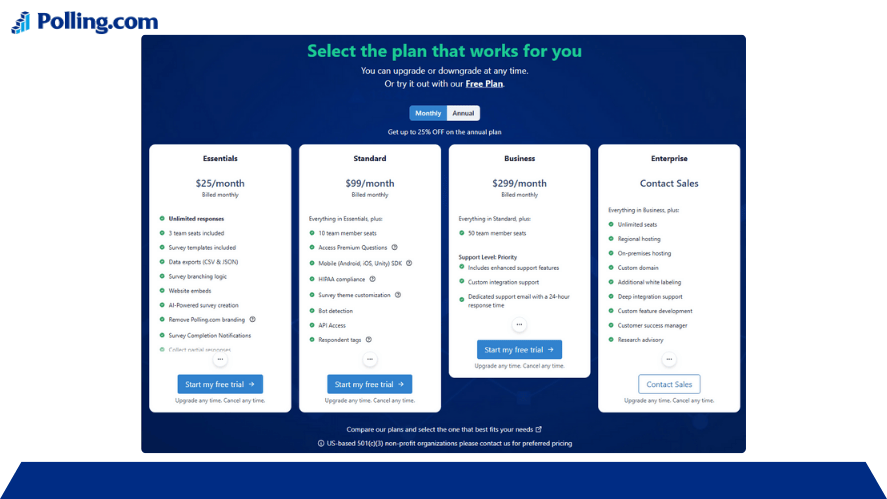
Polling.com offers four pricing tiers:
- Free: Includes unlimited polls with basic analytics and templates
- Starter (~$15/month): Adds export options, branding, and logic branching
- Pro (~$35/month): Includes team collaboration, custom domains, and real-time survey analysis
- Enterprise (Custom): Tailored for companies with large response volumes and integration needs
This model makes polling.com pricing one of the more flexible options available today. Many users compare it directly to SurveyMonkey and Typeform, and for good reason. Not only does it compete on price, but it often surpasses them in areas like real-time reporting and built-in customer feedback tools.
Additionally, Polling.com is especially valuable for those focused on improving their response rate and streamlining the survey process. It integrates with CRM systems, marketing platforms, and user feedback platforms, which adds even more value without requiring complicated add-ons.
Polling.comPlans vs. Others
The polling.com plans offer clarity. There are no hidden charges for exporting results, advanced question types, or multi-language support. This makes it a top choice for budget-conscious teams who still need access to professional features.
For companies seeking an all-in-one customer feedback management tool, Polling.com bundles many advanced features in the Pro tier that are considered add-ons in other platforms.
Pricing Table (Visual Comparison)
To make your decision easier, here’s a breakdown of the pricing survey structures across leading platforms as of 2026.
| Platform | Free Tier | Entry Price | Mid Tier | Enterprise | Best For |
|---|---|---|---|---|---|
| Google Forms | Yes | Free | — | — | Simple internal surveys |
| SurveyMonkey | Yes | ~$25/month | ~$35–$75/mo | Custom | Versatile business use |
| Typeform | Yes | ~$35/month | ~$50/month | Custom | Branded, engaging user experiences |
| Qualtrics | Limited | Custom | Custom | Custom | Enterprise-level research |
| Polling.com | Yes | ~$15/month | ~$35/month | Custom | All-in-one polling and analytics |
| Zoho Survey | Yes | ~$20/month | ~$40/month | Custom | Small to medium business research |
| Jotform | Yes | ~$24/month | ~$34/month | Custom | Drag-and-drop surveys with logic |
| SmartSurvey | Yes | ~$15/month | ~$30/month | Custom | GDPR-compliant surveys |
Pricing data reflects current 2026 estimates and may vary by region or plan structure.
As the table shows, most platforms provide a free tier, but their paid plans can differ widely in what they include. Some focus more on design and user experience, while others lead in analytics and enterprise readiness.
How to Choose Based on Pricing and Needs
With so many options and pricing plans to compare, how do you choose the right one? Your choice should depend on three things:
- Your goals
- Your expected survey volume
- The types of features you require
Freemium for Beginners
If you’re starting out or simply testing the waters, tools like Google Forms or Jotform’s free version are perfect. These platforms let you run unlimited types of surveys and offer basic templates. They’re often used by educators, volunteers, or startups that don’t require complex survey design examples or analytics.
You can also experiment with fun surveys, simple polls, and casual taking a survey experiences without worrying about cost.
SMBs and Growing Teams
For small businesses or marketing teams, SurveyMonkey, Polling.com, or Zoho Survey are good middle-ground options. Their mid-tier plans offer the features needed to collect detailed survey and results data, customize branding, and export responses.
In particular, Polling.com’s Pro plan offers exceptional value for teams that need real-time survey analytics, team collaboration, and customer-focused tools at a predictable monthly price.
Enterprise and Advanced Research
If you’re conducting academic research, market studies, or enterprise-level feedback collection, platforms like Qualtrics and SurveyMonkey Advantage/Premier tiers are more suitable. They support complex survey methodology, large data volumes, advanced segmentation, and deep survey analysis.
For companies that already use free business analytics software or CRM tools, these platforms often integrate directly, improving workflow efficiency.
FAQs
Polling.com offers one of the most competitive plans in terms of price and analytics features. The Pro plan includes real-time analytics and response filtering, which are often extra in tools like Typeform. Zoho Survey also provides analytics at a lower cost than larger enterprise tools.
Yes. While most use subscriptions, some platforms indirectly charge based on the number of responses allowed per plan. For example, SurveyMonkey limits the number of visible responses in its free plan. If your survey and polling software needs to collect high volumes of data, check the limits on each tier.
Sometimes. Google Forms or Jotform free versions are suitable for internal teams or one-time surveys. But businesses that need customer feedback platform features like logic branching, branding, and data exports often need to upgrade.
Yes. Most modern platforms now integrate with free business analytics software such as Google Data Studio, Microsoft Power BI, or internal CRMs. Polling.com, Typeform, and Qualtrics offer strong integrations in their mid-to-high-tier plans.
Look for tools with:
Support for question types for surveys
Logic branching and skip patterns
Export to Excel or CSV
High response rate tracking
Tools to support your methodology and survey method
Conclusion
Choosing the right pricing plans for your survey or polling tool in 2026 means more than just comparing price tags. It requires understanding your use case, future needs, and the features that matter most to your team.
Platforms like Google Forms and Jotform make it easy for beginners to get started for free. Meanwhile, tools like SurveyMonkey, Polling.com, and Typeform offer scalable solutions for growing businesses. For researchers and enterprises, Qualtrics delivers powerful survey analytics and integrations but at a premium cost.
In the end, the best approach is to match features with budget and avoid being tempted by just the lowest cost. Look closely at features like export options, logic branching, and survey analysis tools. Also, be sure to review the fine print for hidden limits and response caps.
Whether you’re gathering product feedback, customer opinions, or conducting a full-scale research project, there is a survey and polling software solution that fits your needs and budget.
Ready to choose the right survey tool for your needs? Compare pricing plans, test free tiers, and find the perfect fit for your goals today.