
Polling.com Slack Integration for Instant Team Polls

Modern teams move fast, and feedback needs to move just as quickly.
Integrating polling tools directly into communication platforms like Slack eliminates delays caused by switching apps, exporting data, or waiting for manual analysis when integrating with Slack.
This shift toward real-time polling improves decision-making. It also strengthens employee engagement and accelerates product feedback loops.
With the Polling.com Slack integration, teams can create polls, collect responses, and view results directly inside Slack.
This turns everyday conversations into actionable insights without disrupting workflow.
In this article, you’ll learn how the Polling.com Slack integration works, what it enables, and how your team can use it to collect faster, more actionable feedback.
What Is the Polling.com Slack Integration?
The Polling.com Slack integration connects your Polling.com workspace directly to your Slack environment as part of modern Slack integrations.
Instead of sending external survey links or relying on separate tools, you can launch polls directly inside Slack channels, group conversations, or direct messages.
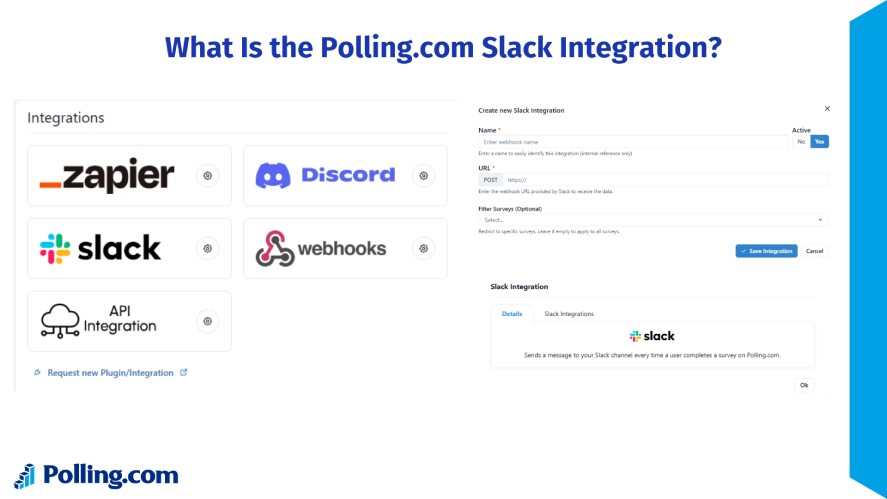
This Slack teams integration enables a range of powerful features, including:
- Instant poll creation within Slack channels
- Automated surveys such as NPS, pulse checks, and product feedback surveys
- Real-time response collection and live result updates
- Automated workflows that trigger surveys based on events or schedules
The integration is designed for a wide range of users across organizations.
For example, product managers can collect product feedback immediately after feature releases. Or HR teams can run employee engagement surveys to monitor team morale.
In addition, marketers can gather campaign feedback. And lastly, leadership teams can run quick polls to support faster decision-making.
By bringing survey tools directly into Slack, Polling.com transforms feedback collection from a separate task into a natural part of daily team communication.
Read More: Survey Integrations: How to Automate Data Collection & Workflows
Why Use Polling.com’s Slack Integration Over Other Polling Tools?
Many teams already use polling tools like SurveyMonkey, Google Forms, or Slack-native apps like Polly.
Even so, these approaches can fall short in scale, flexibility, or depth of features.
When feedback lives outside your core communication environment or requires multiple workarounds to connect back into Slack, it slows down response time and reduces visibility across teams.
The Polling.com Slack integration is built to remove those barriers and make feedback collection seamless.
Everything happens inside Slack without relying on multiple tools or add-ons.
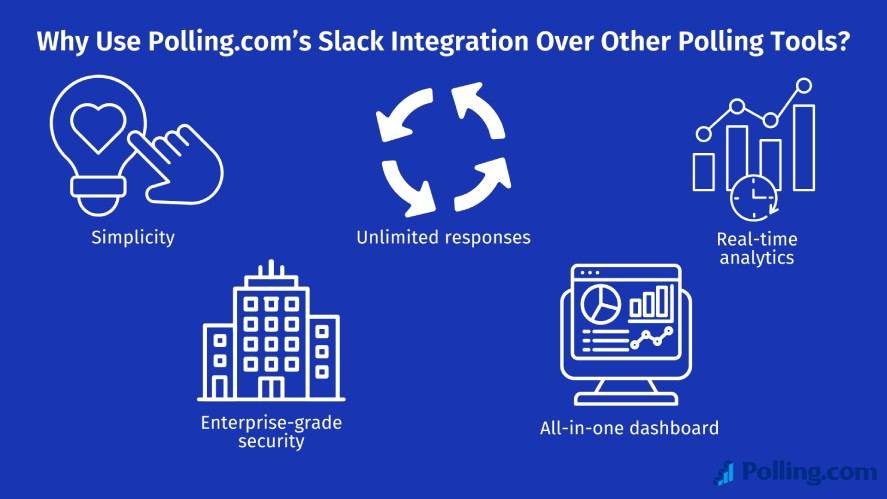
Key advantages include:
- Simplicity: Create and share polls directly inside Slack channels without complex setup.
- Unlimited Responses: Collect as much feedback as needed without worrying about caps.
- Real-time Analytics: View results instantly to respond to feedback while it’s still relevant.
- Enterprise-grade Security: Protect sensitive employee and customer feedback.
- All-in-one Dashboard: Manage surveys, analyze trends, and track results from a single centralized platform.
By combining ease of use with powerful analytics and scalability, Polling.com provides a more efficient and future-ready approach to Slack integration and ranks among the best Slack integrations compared to traditional polling tools.
Benefits for Remote and Hybrid Teams
Remote and hybrid teams depend heavily on Slack to stay connected, which makes built-in polling especially valuable.
This approach delivers several key benefits:
- Instant feedback without switching apps: Team members can respond immediately without leaving Slack. The integration reduces friction and improves participation rates.
- Higher engagement in async environments: Polls allow distributed teams across time zones to contribute feedback on their own schedule.
- Continuous visibility into team health: Managers can regularly check team morale, alignment, and sentiment to identify issues early and maintain productivity.
For modern distributed teams, integrating surveys directly into Slack transforms feedback from a slow, manual task into a fast, natural part of everyday collaboration.
Key Features of Polling.com Slack Integration
Polling.com’s Slack integration is designed to make feedback collection fast, automated, and actionable through AI survey integration.
Below are the four key features of Polling.com Slack integration.
One-Click Poll Creation Inside Slack
Creating a poll with Polling.com inside Slack takes just a few steps. So, most teams can launch their first poll in under a minute.
This frictionless process encourages higher participation because users can respond directly in Slack without opening external survey links or dashboards.
Schedule Recurring Surveys (e.g., NPS, Pulse Checks)
Polling.com makes it easy to automate recurring surveys so you can continuously monitor employee engagement, customer satisfaction, or team alignment.
You can configure recurring surveys such as:
- Weekly employee pulse surveys
- Monthly employee engagement surveys
- Quarterly NPS surveys
- Sprint retrospectives or team health checks
Once scheduled, Polling.com automatically delivers surveys at the defined time and posts them to your selected Slack channels or users.
This ensures feedback is collected consistently without requiring manual effort.
On top of that, automated Slack survey tools can regularly reach out to team members and aggregate responses into charts and summaries for analysis.
This automation helps organizations maintain continuous feedback loops instead of relying on occasional manual surveys.
Collect and Visualize Data in Real Time
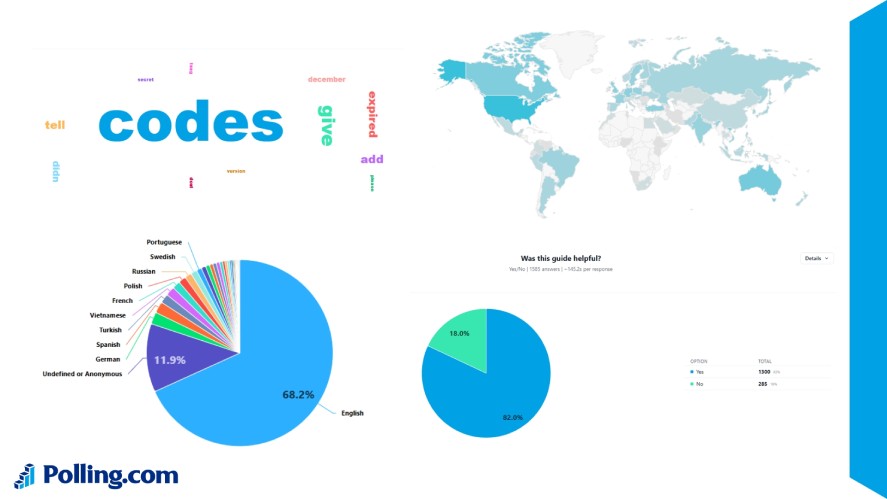
Polling.com ensures every survey response is immediately available for review and analysis.
As soon as someone submits feedback in Slack, the data syncs automatically to your Polling.com dashboard and analytics system.
Webhook integrations enable real-time, automatic data transfer whenever a survey event occurs, supporting datalog Slack integration workflows.
Key analytics capabilities include:
- Live response tracking as votes come in
- Instant alerts for important feedback
- Visual dashboards with charts and trends
- Historical tracking across multiple surveys
This allows teams to detect issues quickly, measure trends over time, and make informed decisions faster.
Anonymous vs. Named Responses
Polling.com supports both anonymous and identified survey responses, giving teams flexibility based on the situation.
Anonymous responses are best for:
- Employee engagement surveys
- Sensitive HR feedback
- Honest team sentiment collection
Polling.com’s anonymous survey feature removes identifying information to protect respondent privacy while still allowing accurate data collection.
Named responses are ideal for:
- Product feedback from specific customers
- Support follow-up workflows
- Assigning actions based on feedback
This flexibility ensures you can balance transparency and privacy depending on your survey goals.
How to Set Up the Polling.com Slack Integration
Setting up the Polling.com Slack integration takes only a few minutes. Here’s how to do it.
Step 1: Set up Your Slack Webhook
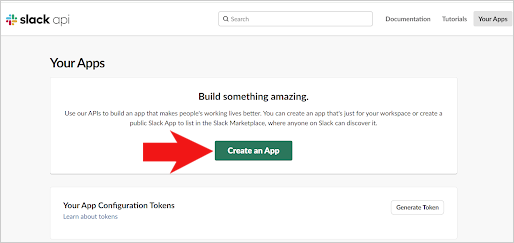
First, go to https://api.slack.com/apps and click “Create an App”.
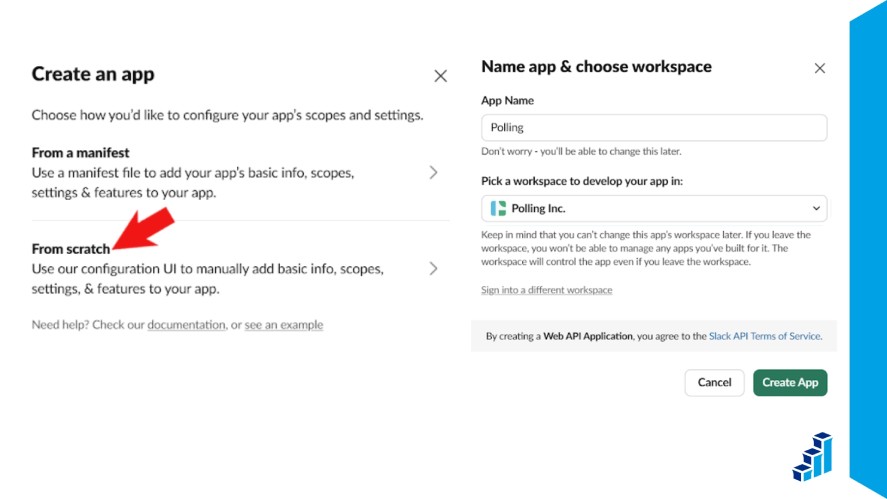
Next, select “From scratch”, enter your App name, and select your company’s workspace.
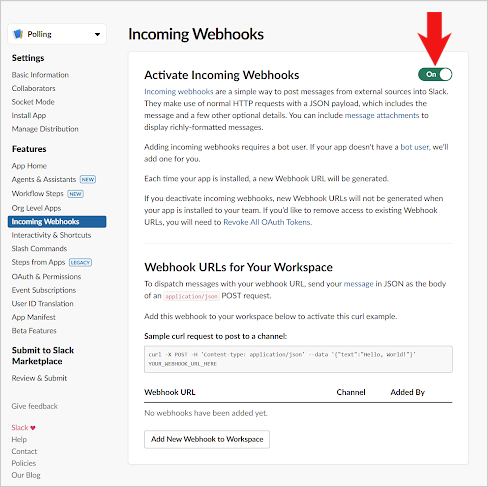
Locate the Incoming Webhooks tab and toggle “Activate Incoming Webhooks”. Then, click “Add New Webhook to Workspace”.
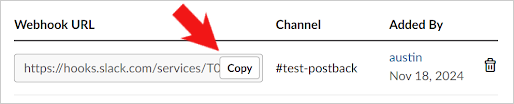
Finally, copy the Webhook URL.
Step 2: Go to Polling.com → Integrations
Log in to your Polling.com account. From your dashboard, navigate to the Integrations section.
This is where you can connect Polling.com with external platforms like Slack, Discord, and automation workflows.
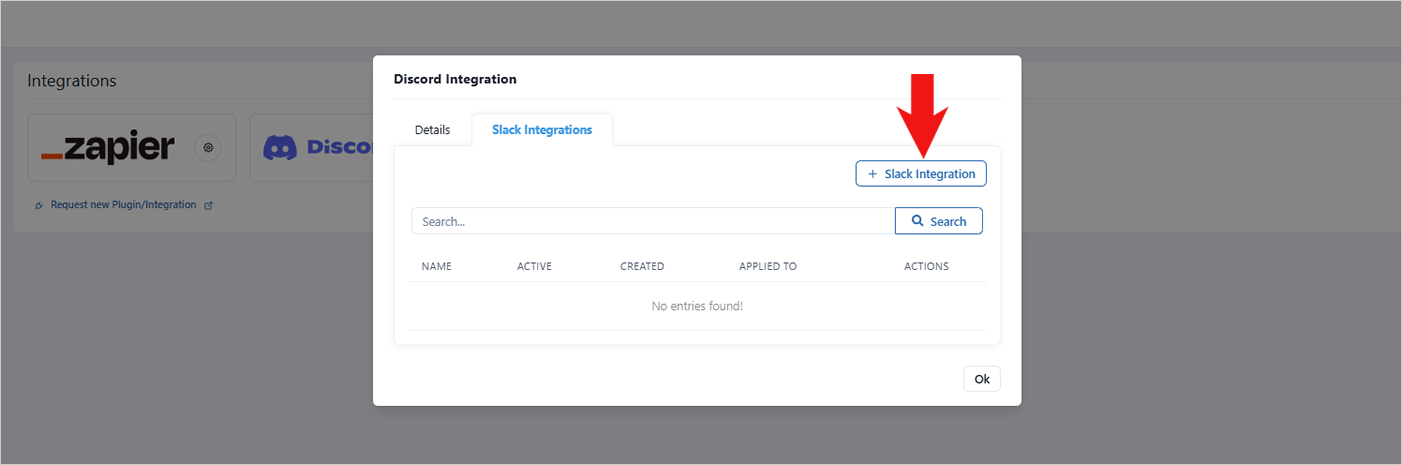
Locate the Slack integration option and go to the Slack Integration tabs.
Step 3: Connect Your Slack Workspace
Click on the button “+ Slack Integration”.
Then, enter the integration name, webhook URL from step 1, and filter surveys (optional).
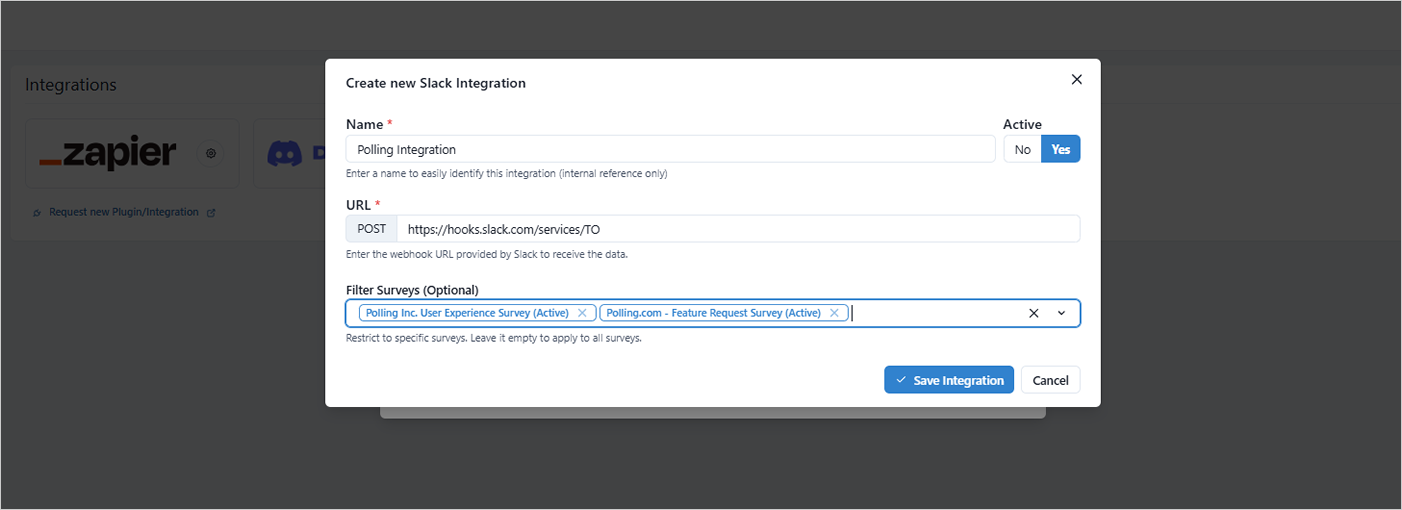
Once done, click “Save Integration” to continue.
Step 4: Start Polling Directly in Slack
Once the integration is active, you can immediately begin creating polls and surveys.
Responses will appear instantly in Slack and sync automatically with your Polling.com analytics dashboard.
This allows your team to collect and act on feedback without leaving Slack.
Troubleshooting Tips
If you run into issues during setup, here are some quick fixes:
- Confirm workspace selection: Verify you connected the correct Slack workspace.
- Reconnect the integration: Disconnect and reconnect Slack from the Polling.com Integrations page if syncing fails.
- Contact your Slack admin: Some organizations restrict third-party integrations, so admin approval may be required.
Once configured correctly, the Polling.com Slack integration runs automatically in the background, making it easy to collect feedback, monitor engagement, and keep your team aligned in real time.
Use Cases: How Teams Are Using the Slack Integration
Teams across departments are using the Polling.com Slack integration to turn everyday conversations into structured, actionable feedback.
From product development to HR to leadership meetings, Slack polls make it easy to gather insights instantly and keep everyone aligned.
Product Feedback Loops
Product teams use Slack polls to collect feedback immediately after feature launches, beta releases, or internal demos. Instead of waiting for formal reports, they can ask:
- “How intuitive is the new dashboard?”
- “Did the latest update improve performance?”
- “What should we prioritize next sprint?”
Responses are collected in real time and synced to the analytics dashboard, helping teams prioritize improvements quickly.
This tight feedback loop shortens the time between insight and action, especially valuable in fast-moving product environments.
Team Culture and Employee Engagement
HR and team leads use Slack-based surveys to run employee engagement surveys, survey employee engagement, weekly pulse checks, and morale assessments.
Because the surveys appear directly in Slack, participation rates are typically higher than traditional email-based surveys.
Common use cases include:
- Weekly “How’s your workload?” check-ins
- Quarterly employee engagement surveys
- Anonymous feedback on leadership or processes
- Team alignment surveys after major changes
By keeping surveys lightweight and integrated into daily communication, organizations can continuously monitor team sentiment and address issues before they escalate.
Quick Decision-Making in Meetings
Slack polls are also powerful for real-time decision-making during meetings or async discussions.
Instead of long back-and-forth debates, teams can quickly vote on:
- Sprint priorities
- Launch dates
- Feature names
- Marketing campaign directions
In hybrid or remote environments, this ensures everyone has a voice, even those who can’t attend live meetings.
Decisions become data-backed rather than dominated by the loudest opinion.
Best Practices for Running Slack Polls with Polling.com
Running effective Slack polls isn’t just about asking types of questions; it’s about asking the right question in the right way.
To maximize participation and get meaningful insights, keep your poll questions concise and easy to understand.
Slack is a fast-moving environment, so shorter questions with clear answer options tend to perform best and reduce confusion.
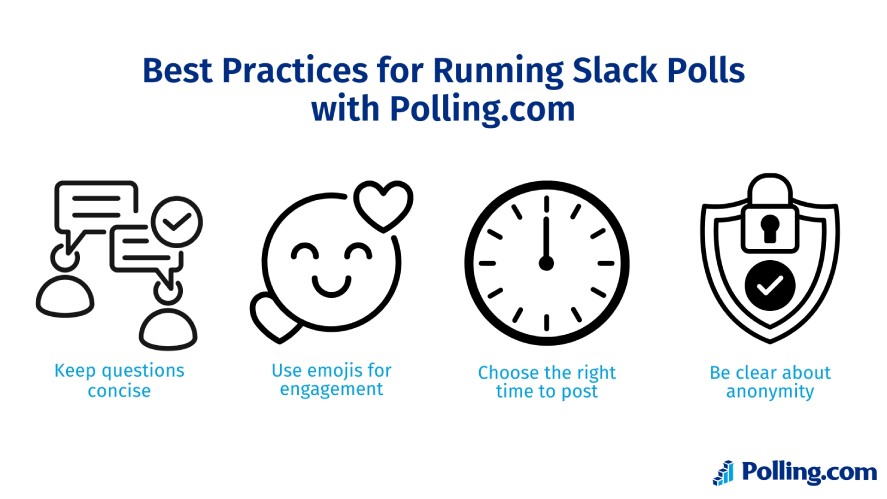
Adding emojis to response options can also increase engagement. Emojis make polls feel more interactive and visually appealing, helping them stand out in busy channels.
At the same time, timing matters. Posting polls during active work hours can significantly improve response rates.
Finally, always be transparent about anonymity.
If responses are anonymous, clearly state that upfront to encourage honest feedback, especially for employee engagement or sensitive topics.
If responses are named, explain how the information will be used so participants feel comfortable contributing.
Conclusion
Integrating Polling.com with Slack transforms how teams collect and act on feedback.
With real-time analytics, recurring survey automation, and flexible response options, the Polling.com Slack integration makes feedback fast, actionable, and effortless.
Start polling your team inside Slack today for free!