
How QR Code Surveys Simplify Feedback Collection

Collecting feedback has always been essential, but now it’s easier than ever thanks to QR code surveys. Whether you’re running a restaurant, managing an event, or improving a product, getting real-time opinions from users is no longer a complicated process. So, how are QR code surveys transforming the way we gather responses, and why are more businesses turning to this mobile-first method?
In this article, we’ll break down how QR code surveys work, their benefits, and how to get started. If you’ve ever wondered whether this tool could boost your response rate or streamline your online surveys, keep reading.
What Are QR Code Surveys?
QR code surveys are feedback forms that users access by scanning a QR code with their smartphones. The code links directly to a digital survey, allowing users to share their input instantly. Unlike traditional online surveys that require email links or embedded forms, these use a contactless and convenient method that fits naturally into today’s mobile world.
Unlike regular qr code survey links shared via email or text, QR codes are visual triggers. They invite quick action. A person sees the code on a receipt, poster, or screen and can scan it within seconds. This makes the feedback process feel more casual and less intrusive.
Where Are QR Code Surveys Commonly Used?
QR code surveys are being adopted across many industries. Here’s where you’re likely to see them:
- Retail Stores: Customers can scan a survey QR code on receipts to rate their experience before they leave the store.
- Restaurants & Cafes: Tabletop displays often invite patrons to “Scan to give quick feedback.”
- Events & Conferences: Attendees scan codes after sessions to share insights.
- Education: Schools and colleges use them for instant classroom feedback.
- Healthcare Clinics: Patients scan codes post-visit to evaluate services.
Each of these use cases benefits from instant access, reduced friction, and real-time feedback.
How QR Code Surveys Work
The process behind qr code surveys is simple but effective. By blending digital survey platforms with QR code technology, businesses can collect responses faster and more conveniently.
Here’s a quick breakdown of how it works:
- Create a survey using a platform like Polling.com, Google Forms, or another free survey maker.
- Generate a QR code linked directly to your survey.
- Place the QR code in high-traffic areas like counters, receipts, email signatures, or displays.
- User scans the code, answers the survey, and submits responses within seconds.
- You collect data instantly and review it through your survey tool’s dashboard.
Let’s dig into the two most important parts of this flow: generating and sharing QR codes.
Generating a QR Code Survey
To start, you’ll need a platform that lets you both make a survey and generate a QR code. Some popular tools include:
- Polling.com: A user-friendly qr code survey generator with customizable templates and real-time analytics.
- Google Forms + QR Code Generator: Create a survey, grab the link, and use any QR code site to make the code.
- Typeform & SurveyMonkey: Combine sleek forms with custom QR codes.
If you’re wondering how to create a QR code for a survey, it’s as simple as pasting your form URL into a QR generator, choosing your design, and downloading the image.
Some platforms go a step further by offering branding tools. For example, Polling.com allows businesses to create codes that include logos, colors, and tracking features. These not only improve trust but also enhance response accuracy by appealing to the user visually.
Sharing & Displaying QR Codes
Where and how you place your QR code affects its effectiveness. The goal is to make it visible, accessible, and easy to scan.
Here are top strategies for placement:
- Receipts or invoices: Great for post-purchase quick survey feedback.
- Table cards in restaurants: Customers scan while waiting or after finishing a meal.
- Event badges or banners: Perfect for real-time session ratings or giveaways.
- Product packaging: Add a survey QR code to boxes or labels for post-use impressions.
- Digital signage: Use screens in-store or at kiosks to invite interaction.
- Email footers or PDF reports: Ideal for professional environments where recipients already engage digitally.
To increase scan activity, use a strong call to action (CTA). Instead of simply showing the code, say things like:
- “Scan to give feedback in 30 seconds”
- “Help us improve – your voice matters”
- “Scan & enter to win a free gift card”
This invites interaction and immediately communicates the benefit to the user.
Top Benefits of QR Code Surveys

The rise in popularity of qr code surveys isn’t just a trend. They solve real challenges businesses face when collecting feedback. Here are some of the top benefits:
1. Contactless Feedback Collection
One of the biggest benefits is the contactless nature. Since 2020, hygiene and low-touch solutions have become vital. QR code for survey forms can be scanned without touching pens, screens, or other shared tools. This is ideal in restaurants, clinics, and retail.
It’s not just about health, either. The ease of scanning removes barriers for people who would otherwise ignore traditional online surveys.
2. Higher Engagement on Mobile
We live on our phones. A mobile-first approach is no longer optional; it’s expected. With QR code surveys, users don’t have to type in a web address or open an email. They scan and get redirected to a mobile-optimized mobile survey interface. This seamless transition keeps users focused.
The result? More surveys completed in less time.
3. Real-Time Responses
Whether you’re running a promotion or collecting feedback after an event, qr code surveys provide real-time insights. You don’t have to wait days for people to check their emails. Instead, feedback is gathered instantly and stored on your survey platform.
This means you can:
- Spot issues as they happen
- Identify trends quickly
- Act before problems escalate
4. Improved Response Rates
Lowering friction leads to more responses. Because QR code surveys eliminate the need to log in, click links, or navigate inboxes, people are more likely to participate.
If you’re wondering how to increase survey response rates, this method is one of the most effective. In fact, many businesses report a 15–30% increase in feedback compared to traditional email or SMS surveys.
That’s because the QR method:
- Feels less intrusive
- Requires less time
- Has a higher novelty factor
5. Custom Branding
Using a qr code survey generator like Polling.com gives you more than just a code. You can fully customize the look:
- Add your logo
- Use brand colors
- Embed short taglines or instructions
This branding helps build trust. When users recognize your brand, they’re more likely to engage.
Best Practices for Designing QR Code Surveys
While QR code surveys are simple to implement, making them effective takes careful planning. To boost your response rate and gather more valuable data, follow these best practices.
Keep Surveys Short and Clear
One of the main reasons people abandon surveys is because they take too long. When users scan a QR code, they expect a quick survey experience. That means:
- Limit the number of questions (5 or fewer is ideal)
- Use simple, direct language
- Avoid unnecessary open-ended questions unless they add clear value
Short surveys show respect for your users’ time. This helps maintain engagement from the first tap to final submission.
Design With Mobile UX in Mind
Since qr code surveys are accessed on smartphones, mobile design is critical. Use survey tools that offer responsive layouts. The goal is to keep everything easy to read and interact with.
Make sure:
- Buttons are large enough to tap easily
- Text fields are spaced properly
- Instructions are concise
- There is minimal scrolling involved
If your platform allows it, preview the survey on different devices before publishing. This ensures a better experience across phones and screen sizes.
Place Codes Strategically
It’s not just about creating a QR code it’s also about putting it where people will actually scan it. To get noticed, your survey QR code should be visible, accessible, and connected to a clear action.
Smart placement ideas include:
- Checkout counters: Ask for feedback right after purchase
- Waiting areas: Engage users while they wait
- Product packaging: Collect feedback post-use
- Website footers or thank-you pages: Follow up with engaged users
- Event exit doors: Let attendees share thoughts before they leave
Add a visible CTA next to the code like “Tell us what you think” or “Share your opinion in 30 seconds.” This small addition can make a big difference.
Use Incentives and a Call to Action
If you’re struggling with how to increase survey response rates, incentives are your friend. People love to receive something in return for their time.
Simple incentives include:
- Discount codes
- Free samples
- Contest entries
- Loyalty points
However, even without a physical reward, strong CTAs can motivate participation. For example:
- “Scan and share your thoughts to improve our service”
- “Give feedback and get 10% off your next visit”
- “Take our 1-minute survey for a chance to win a gift card”
Make sure the CTA is clearly stated next to the QR code and on the survey itself.
Examples of QR Code Survey Use Cases
Seeing how others use qr code surveys can help spark ideas for your own business or project. Below are some real-world examples from different industries.
Event Check-Ins and Post-Session Feedback
At conferences or expos, organizers place QR codes near session exits. Attendees scan the code to rate speakers, share highlights, or suggest improvements. This feedback is often time-sensitive, so QR codes allow fast, frictionless collection.
Example questions:
- How satisfied were you with this session?
- What was the most valuable takeaway?
- Would you attend a similar session in the future?
In-Store Customer Feedback
Retailers add survey QR codes to receipts or shopping bags. This captures the shopper’s experience while it’s still fresh. Some stores also place QR codes on exit doors or near customer service counters.
Example questions:
- How would you rate your shopping experience today?
- Were our staff helpful?
- Would you recommend us to a friend?
Restaurant Guest Surveys
Restaurants often use tabletop QR codes to invite diners to share their thoughts after a meal. These are especially useful for gauging satisfaction with food, service, and ambiance.
Example questions:
- How was your meal?
- Was the service prompt and friendly?
- What could we improve?
Employee Pulse Checks
HR teams can place internal QR codes on posters, email newsletters, or break room walls to collect team feedback. These mini-surveys help keep a finger on the emotional climate of the workplace.
Example questions:
- How are you feeling at work this week?
- What challenges are you facing?
- Do you feel supported by your team?
Each use case shows the flexibility of QR code surveys across different environments and goals.
Comparing QR Code Surveys With Other Survey Methods
Let’s look at how qr code surveys stack up against other common methods like email and SMS surveys.
| Feature | QR Code Surveys | Email Surveys | SMS Surveys |
|---|---|---|---|
| Contactless | ✅ | ❌ | ❌ |
| Instant Access | ✅ | ❌ | ⚠️ |
| Ease of Sharing | ✅ | ⚠️ | ⚠️ |
| Mobile-First Design | ✅ | ⚠️ | ✅ |
| High Response Rate | ✅ | ⚠️ | ⚠️ |
When are QR code surveys ideal?
- You want to collect in-person feedback fast
- You don’t have contact information for users
- You want to avoid email or phone collection
When to consider email or SMS?
- For longer surveys or detailed studies
- When follow-ups or scheduled surveys are required
- When you already have a strong contact database
Still, for short, mobile-friendly surveys in real-time settings, QR codes win on convenience and speed.
How to Create a QR Code Survey With Polling.com
Polling.com doesn’t yet include a native QR code generator, but you can still create a QR code survey in under two minutes using your survey’s share link.
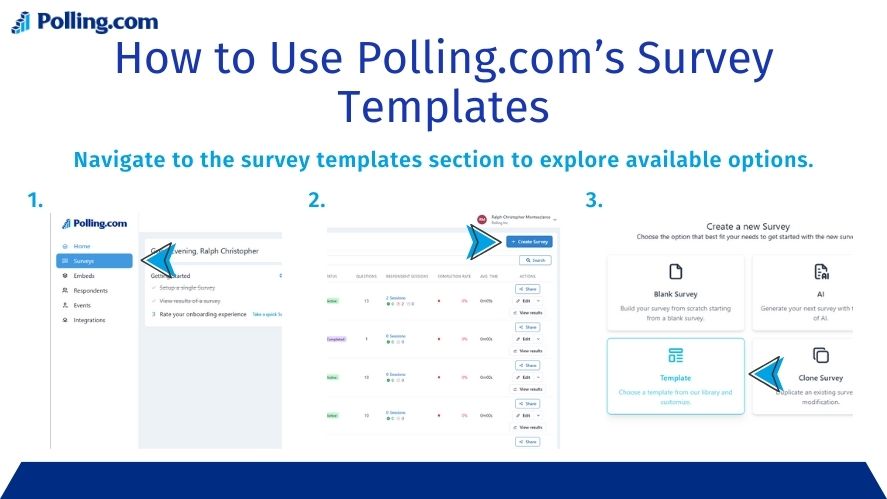
Step 1: Create Your Survey
Log in to Polling.com and either:
- Choose a template (customer feedback, product review, event survey, etc.), or
- Create a survey from scratch.
Keep it short 3 to 5 questions works best for QR-based surveys.
Step 2: Publish and Copy Your Survey Link
Once your survey is ready:
- Click Publish
- Open the Share or Link option
- Copy your unique survey URL
This is the link people will open when they scan your QR code.
Step 3: Turn the Link Into a QR Code
Paste your Polling.com survey link into any QR generator, such as:
- The QR tool built into Canva
- QRCode Monkey
- The free QR feature in Google Chrome (right-click → “Create QR code for this page”)
Download the QR code as a PNG or SVG.
You can now:
- Add your logo
- Change colors
- Resize for print or digital use
Step 4: Place the QR Code Where It Matters
Use your QR code on:
- Posters and flyers
- Store counters
- Receipts and packaging
- Event badges
- Screens or kiosks
Always include a short CTA like:
“Scan to give feedback in 30 seconds.”
Step 5: Track Results in Polling.com
All scans and responses flow directly into Polling.com, where you can view:
- Response counts
- Completion rates
- Answer breakdowns
- Trends over time
You still get real-time analytics only the QR generation happens outside the platform.
Measuring QR Code Survey Success
Collecting data is just the start. To get value from your surveys, you need to track the right metrics.
Here’s what to measure:
Scan Rate
This shows how many people scanned your QR code. A low scan rate may mean:
- Poor placement
- Weak call to action
- Design not eye-catching enough
Completion Rate
This is the number of people who completed the survey after scanning. If it’s low, try:
- Reducing the number of questions
- Improving mobile design
- Offering a better incentive
Time to Complete
Track how long it takes, on average, to finish the survey. If users drop off halfway, it may signal confusion or fatigue.
Source Tracking
If you use QR codes in multiple places, track which location performs best. For example:
- Poster near the checkout counter
- Code on a printed flyer
- Digital QR code on your website
This lets you double down on what works and drop what doesn’t.
Conclusion: Why QR Code Surveys Are the Future of Feedback
QR code surveys are simple to use, mobile-friendly, and perfect for real-time feedback. They meet users where they are in stores, at events, or on the move and turn ordinary moments into opportunities for engagement.
With smart placement, short survey design, and the right tools like Polling.com, businesses can increase their response rate, gain better insights, and make improvements faster.
If you’ve been looking for a better way to collect feedback, now is the time to try it.
Start your free QR code survey today and see how easy feedback collection can be.