
Conversion Optimization for Surveys: Boosting Response & Action

When most people think about conversion optimization, they picture landing pages, checkout funnels, or signup forms, but not surveys.
However, surveys are one of the most underrated tools for boosting site conversion, uncovering friction, and driving action.
When designed well, surveys don’t just collect answers; they convert. And they get people to respond, share insights, and take the next step.
That’s where Polling.com stands out. Unlike a generic free survey site tool, Polling.com is built for teams that care about both data quality and conversion optimization.
The platform helps you create a questionnaire that’s engaging, fast, and optimized for completion, turning simple feedback moments into a meaningful part of your CRO workflow.
Following survey design best practices, surveys become more than a box to tick; they become a strategic engine for improving conversions across your websites that convert, product, or marketing funnel.
What Is Conversion Optimization in Surveys?
In traditional digital marketing, conversion rate optimization (CRO) means improving the percentage of users who take a desired action, such as signing up, purchasing, or clicking through.
And in the world of surveys, the idea is the same: you want more people to complete the survey, provide quality feedback, or take a follow-up action afterward.
In a survey context, a “conversion” can mean:
- Completing the entire survey (not dropping off halfway)
- Answering key questions with meaningful input
- Submitting contact info or opting into an offer
- Taking a next step, like booking a demo or viewing a resource
Optimizing for survey conversions matters because:
- Higher completion rates means more reliable and representative data
- Better quality responses equal clearer insights into user behavior
- More actionable insights can fuel your broader conversion optimisation efforts
When you combine strong survey design with a modern poll survey maker like Polling.com, every response becomes a building block for improving your funnel, identifying blockers, and making smarter CRO decisions.
Why Surveys Are Critical for Conversion Optimization
Improving conversion isn’t just about numbers; it’s about understanding why people behave the way they do. And that’s exactly where surveys become indispensable.
Analytics Tell You “What”, But Surveys Tell You “Why”
Your analytics tools can reveal the facts: bounce rates, abandoned carts, low signup numbers, or weak site conversion. But they can’t explain the motivation behind user behavior.
Surveys fill that gap by capturing the human side: the emotion, intent, confusion, or hesitation behind the metrics.
For example, analytics might show that 42% of users drop off on your checkout page, but only a quick exit-intent poll reveals the real reason: “I wasn’t sure if shipping fees were included.”
That one line of feedback can guide a high-impact change that analytics alone would never surface.
Qualitative Responses Reveal Friction and Blockers
A well-timed anonymous feedback survey or product survey can surface the real issues users face, such as:
- “I couldn’t find the pricing.”
- “The form was too long.”
- “I didn’t trust the payment page.”
These insights are what turn CRO tools from guesswork into precision. Surveys let you pinpoint barriers in your website, funnel, or even your survey form itself.
Survey Insights Power Your Entire CRO Workflow
Survey data becomes the engine behind a smarter, more effective conversion optimization process.
Each insight helps you understand where users struggle, allowing you to pinpoint funnel issues and turn them into clear, testable hypotheses.
From there, you can prioritize the most valuable opportunities, implement targeted changes, and run A/B or multivariate tests based on real user input.
As results come in, survey feedback continues to guide your next iteration, creating a continuous loop of learning, testing, and improving your site’s ability to convert.
Instead of running tests blindly, you base them on direct user input. It’s the fastest way to uncover what actually drives conversion uplift.
Where Polling.com Gives You The Edge
Polling.com is built to make surveys a seamless part of your conversion optimization strategy. With features like:
- Branching Logic: Ask only relevant questions, reducing drop-offs.
- Targeting Options: Show surveys at the right moment. (exit intent, post-purchase, time-on-page)
- Fast, Intuitive Deployment: Embed on websites, apps, emails, or share instantly.
- Clean Analytics: See trends, friction points, and conversion blockers at a glance.
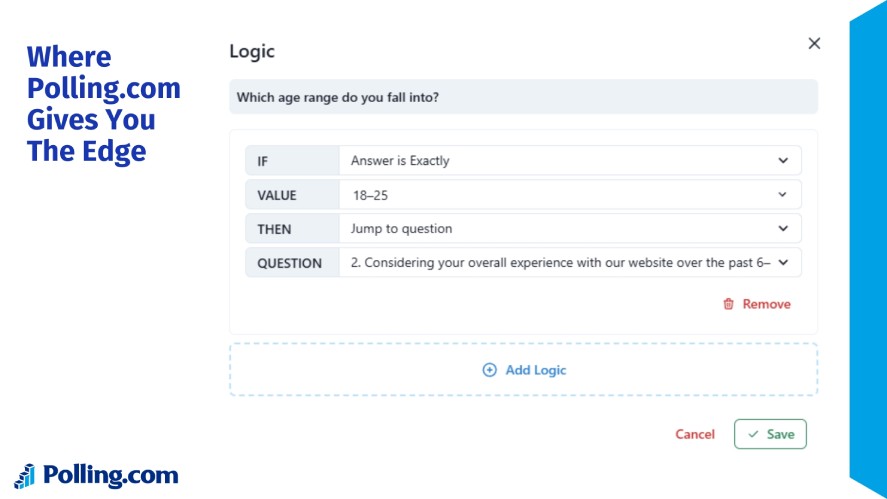
Instead of just collecting feedback, Polling.com helps you turn every good survey question into a CRO engine.
It’s a tool that continuously feeds insights back into your optimization process for higher conversions and better decisions.
Key Survey Strategies for Conversion Optimization
To boost your survey conversion rate, you need a strategy that minimizes friction, maximizes relevance, and captures insights at exactly the right moments.
These proven approaches, along with good survey questions examples, will help your surveys convert better and deliver higher-quality data.
Keep Surveys Short & Relevant to Avoid Drop-offs
Length is the biggest conversion killer in surveys.
Keep questions bite-sized, ask only what you truly need, and remove anything that doesn’t directly support your goal.
Short, tightly focused surveys consistently produce higher completion rates and better data because users stay engaged instead of abandoning halfway through.
Use Targeted Timing and Triggers
The best survey is one delivered at the right moment. Post-purchase, exit-intent, and post-interaction triggers capture users when their intent and memory are fresh.
For example, an exit-intent poll on a pricing page can reveal hesitation you’d never hear about after the user leaves.
Ask The Right Conversion-driven Questions
Effective CRO surveys go beyond generic satisfaction questions. Learn what are good survey question types by digging into behavior with questions like:
- “What prevented you from completing your purchase?”
- “What other options did you consider before choosing us?”
These questions expose hidden friction that hold users back, like unclear pricing, missing features, or trust concerns.
Segment Respondents and Personalize The Flow
Not all users are alike, so your survey shouldn’t treat them that way. Use branching logic to tailor follow-up questions based on behavior, answers, or user type.
This keeps the survey relevant for each respondent and increases the quality of insights.
Turn Feedback Into Hypotheses and Test Them
Survey responses don’t just sit in a report; they fuel the entire CRO cycle.
Use user comments and trends to form strong hypotheses, implement a change, and then test it through A/B testing strategies or multivariate experiments.
Surveys guide the “why”, and testing validates the “what works”.
Integrating Survey Insights into Your Conversion Optimization Workflow
Survey data isn’t just something you collect; it’s a core engine of your CRO process.
When used correctly, surveys reveal exactly where users struggle, why they hesitate, and what needs to change to improve conversions.
Here’s how survey insights plug directly into your optimization workflow.
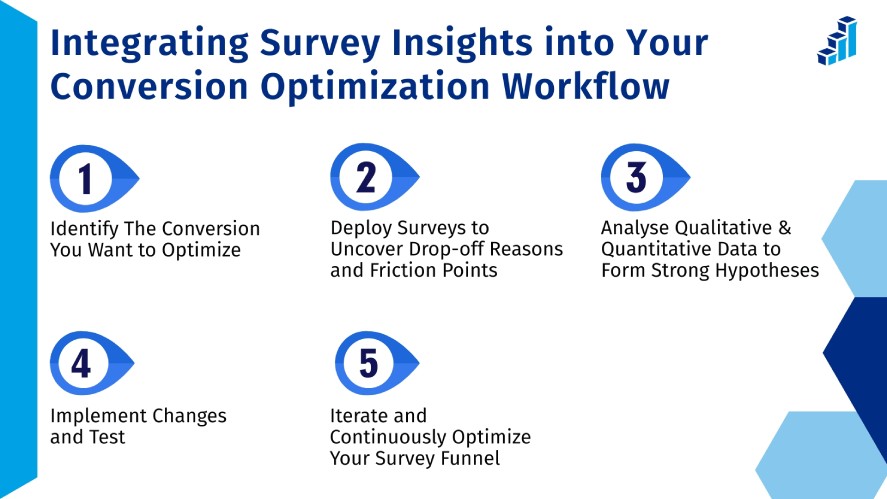
Step 1: Identify The Conversion You Want to Optimize
Before deploying anything, define the specific conversion you want to improve:
- Survey completion rate
- Signup form submission
- Checkout completion
- Demo booking
- Or any downstream action
A clear target ensures your questions are focused and your insights are actionable.
Step 2: Deploy Surveys to Uncover Drop-off Reasons and Friction Points
Launch short, targeted surveys at key moments: after abandonment, post-purchase, at exit intent, or mid-funnel.
These touchpoints reveal the exact obstacles users face, like confusing steps, unclear value, pricing concerns, trust issues, or usability problems.
Step 3: Analyse Qualitative & Quantitative Data to Form Strong Hypotheses
Numbers show the pattern, but open-ended responses show the cause.
So, combine both to create CRO hypotheses like “Users abandon the checkout because shipping fees appear too late” or “Visitors don’t understand the value proposition on the pricing page”.
Step 4: Implement Changes and Test (A/B or Multivariate)
Use the insights to improve copy, layout, CTA clarity, form flow, or overall UX.
Then validate with A/B or multivariate tests to confirm which changes actually lift conversions and contribute to user experience enhancements.
Survey insights remove the guesswork, so you’re testing solutions based on real customer feedback.
Step 5: Iterate and Continuously Optimize Your Survey Funnel
Once changes are live, keep listening.
Run follow-up surveys, monitor drop-off points, compare sentiment shifts, and refine both your surveys and funnel based on new data.
Conversion optimization is an iterative loop, and surveys keep the loop running.
How Polling.com Powers This Entire Workflow
Polling.com makes this cycle seamless, offering tools for writing a survey questionnaire with high-converting micro-surveys. The tool offers:
- Fast, intuitive survey design for creating targeted, high-converting micro-surveys.
- Branching logic and segmentation to tailor questions based on user journey and intent.
- Real-time analytics that combine response patterns, drop-off points, and sentiment insights.
- Easy deployment across pages, emails, apps, and funnels, so no dev work required.
- Integrations with analytics tools so survey insights flow directly into your CRO stack.
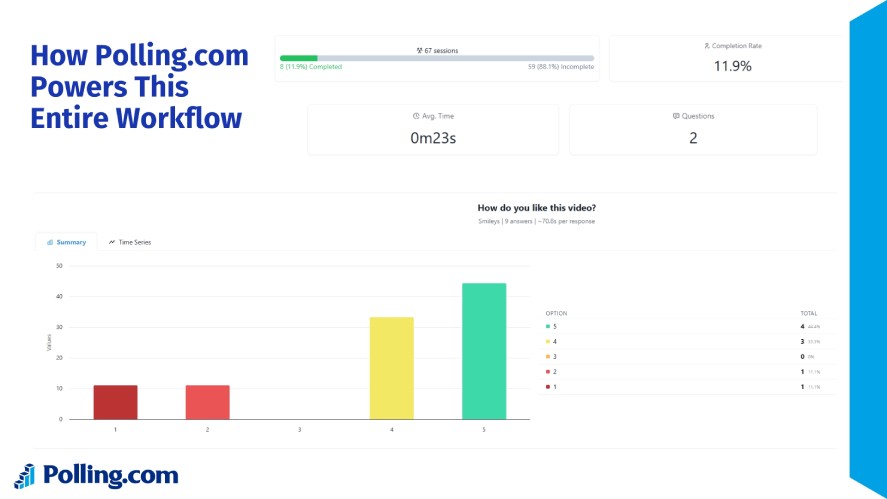
With Polling.com, your surveys don’t just gather data; they become a powerful driver of site conversion and continuous optimization.
Practical Examples & Case Studies of Survey‑Driven Conversion Optimization
Survey-driven CRO works best when you apply it to real situations.
Below are three common scenarios showing how simple, well-timed surveys uncover friction and lead to measurable improvements in conversion rates.
E-commerce: Post-Purchase Survey Reveals Checkout Confusion
A mid-sized online store noticed strong product page engagement but a lower-than-expected checkout completion rate.
After implementing a short post-purchase survey, they included questions like:
- “What almost stopped you from completing your purchase today?”
- “Was anything confusing or unclear during checkout?”
What they learned: Customers struggled with an unexpected shipping fee revealed too late in the process.
The optimization: They moved the shipping calculator to the cart page and added a short “Shipping & returns” reassurance line near the CTA.
The result: Checkout completion increased noticeably because the main point of friction was removed.
SaaS: Trial Abandonment Survey Reveals Missing Value Clarity
A SaaS company saw many users sign up for a free trial but fail to complete onboarding.
They deployed a one-question abandonment survey triggered when users closed the onboarding flow:
- “What stopped you from completing your trial setup?”
- Options included: I didn’t understand the next steps, Setup took too long, I didn’t see the value, I’m just exploring, plus an open-ended field.
What they learned: Most users didn’t understand how the product would help them accomplish a real goal.
The optimization: They added a value-focused onboarding tour and replaced generic copy with outcome-driven messaging. For example, set this up to achieve X in under 5 minutes.
The result: Trial-to-activated-user conversion increased, as clarity directly boosted motivation.
Website Exit Intent: Quick Poll Identifies Messaging Problem
A marketing site added an exit intent survey for users leaving the pricing page without converting with questions like:
- “What’s the main reason you’re not ready to sign up?”
- “What other solutions are you considering?”
What they learned: Visitors felt the pricing page didn’t explain what was included, making the product harder to compare with competitors.
The optimization: They added a simple comparison chart, clarified features, and rewrote the CTA to highlight value instead of generic action language.
The result: Bounce rate decreased and sign-ups improved because visitors finally understood what they were paying for.
Why These Conversion Optimization Examples Work
Each scenario highlights a core truth of survey-driven CRO: Small, well-timed questions uncover high-impact blockers that analytics alone can’t reveal.
By making straightforward changes, these companies turned survey insights directly into measurable conversion lifts.
Polling.com supports these strategies with effortless survey deployment, smart triggers, and structured analytics, making it easier to capture the right insights at the right moment.
Common Mistakes to Avoid in Survey‑Related Conversion Optimization
Even well-intentioned surveys can hurt your conversion rates if they’re not designed with care.
Avoiding a few common pitfalls can dramatically improve both response quality and overall survey performance.
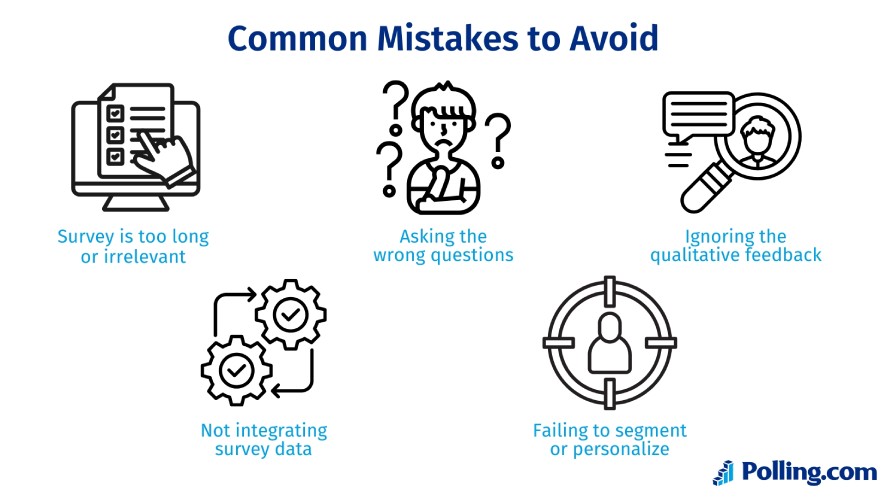
First, overly long or irrelevant surveys almost always lead to drop-offs.
When respondents feel like you’re wasting their time, they bounce, and your conversion rate optimization suffers. Keep every question purposeful, tight, and directly tied to your goal.
Second, asking the wrong questions undermines your insights.
Leading, vague, or overly broad prompts don’t reveal anything actionable. Instead, craft precise, neutral questions that uncover real friction or motivations.
Another common miss is ignoring qualitative feedback.
Analytics may show that users abandon a signup form, but without open-ended responses explaining why, you’re optimizing blind.
Treat qualitative answers as your roadmap for real improvements.
Many teams also fail to integrate survey data into their CRO testing loop.
They collect feedback, nod at the findings, and then continue making decisions based purely on intuition.
Real conversion optimization requires converting insights into A/B tests, messaging updates, UX fixes, or funnel adjustments.
Finally, avoid a one-size-fits-all survey experience. Different users have different motivations and barriers.
Not segmenting respondents leads to generic data and weaker insights. Personalization, routing, and targeting dramatically improve clarity and conversion value.
Metrics & KPIs to Track for Conversion Optimization in Surveys
Tracking the right metrics ensures your surveys actively support your conversion optimization efforts, helping you understand what is a good lead conversion rate. Key indicators include:
- Survey Completion Rate: Measures the percentage of respondents who finish your survey. Low rates highlight potential engagement or question design issues.
- Drop-off Points: Identify where participants abandon the survey to spot confusing or irrelevant questions.
- Conversion After Survey: Track whether respondents take the desired next action, such as signing up, purchasing, or downloading.
- Qualitative Sentiment/Trend Insights: Analyze open-ended responses to uncover common blockers, frustrations, or opportunities.
- A/B Test Uplift: Measure the impact of changes informed by survey feedback to see if your optimizations work.
- ROI of Optimization: Calculate the value of improved conversion rates relative to the cost of survey-driven improvements.
Monitoring these KPIs ensures surveys directly inform actions that boost conversions.
Conclusion
Surveys are a powerful lever in conversion optimization, providing both the quantitative and qualitative insights needed to improve user experience, increase completion rates, and drive business outcomes.
The key isn’t just collecting more data; it’s asking better questions and integrating those insights into a continuous optimization workflow.
Start leveraging surveys strategically with Polling.com: design targeted questionnaires, gather actionable feedback, test improvements, and measure their effect.
With the right approach, your surveys will actively help grow conversions.